
How To Switch Off Ping

Got Ping? Wish you’d not bothered?
You might be over the moon about Apple’s baby social network, but on the off chance that you’re not, here’s a quick’n'simple guide to de-Pingifying your iTunes. It’s not difficult.
- In iTunes, go to the iTunes Store by clicking it in the sidebar.
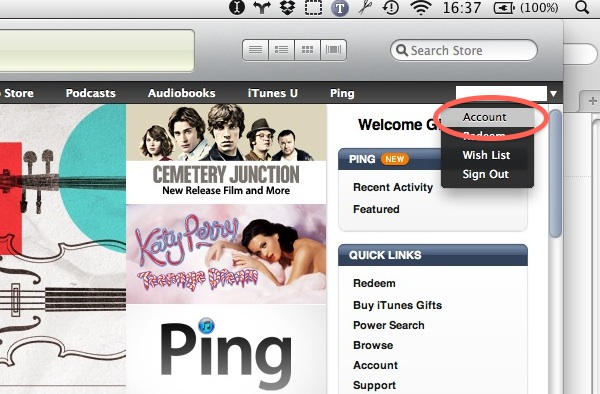
Look at the far right side of the black iTunes Store navigation bar – you’ll see your account ID here. Mouse over it to see a little disclosure triangle on the right – click this to see a little menu. “Account” is the top one; click this.
You may be asked to enter your Account password at this point.

About half way down your Apple Account Information page, you’ll see a panel saying “Ping: On”. To the right of this there’s a button marked “Turn Off”. You know what to do.
iTunes will have a brief “OMG WTF??” moment and ask you:
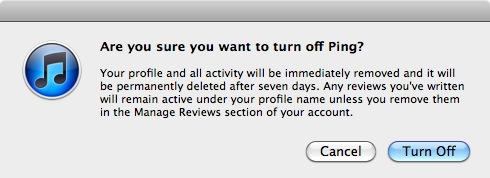
at which point you can make your point by clicking the Turn Off button again, extra forcefully.
Congratulations, you have successfully unPung your computer.

![Read "How The iPad Is Revolutionizing Branding [Exclusive Book Excerpt]" Read "How The iPad Is Revolutionizing Branding [Exclusive Book Excerpt]"](http://cultofmac.cultofmaccom.netdna-cdn.com/wp-content/uploads/2012/02/marcolina-250x150.jpg)


![Read "EA Sports Gearing Up For The Super Bowl, Discounts MADDEN NFL 12 To $0.99 [Deal Alert]" Read "EA Sports Gearing Up For The Super Bowl, Discounts MADDEN NFL 12 To $0.99 [Deal Alert]"](http://cultofmac.cultofmaccom.netdna-cdn.com/wp-content/uploads/2012/02/maddennfl12-640x313-250x150.jpg)

![Read "ZAGGFolio Keyboard Case Is Tough, Stylish And A Delight To Use [Review]" Read "ZAGGFolio Keyboard Case Is Tough, Stylish And A Delight To Use [Review]"](http://cultofmac.cultofmaccom.netdna-cdn.com/wp-content/uploads/2012/02/P1020394-250x150.jpg)
![Read "If iBooks Author Is Overkill For Your Simple eBook Project, Try Book Creator For iOS Instead [Review]" Read "If iBooks Author Is Overkill For Your Simple eBook Project, Try Book Creator For iOS Instead [Review]"](http://cultofmac.cultofmaccom.netdna-cdn.com/wp-content/uploads/2012/02/bookcreator-250x150.jpg)
![Read "Stuck On Earth, Perhaps, But Not Stuck For Lovely Photos To Look At [Review]" Read "Stuck On Earth, Perhaps, But Not Stuck For Lovely Photos To Look At [Review]"](http://cultofmac.cultofmaccom.netdna-cdn.com/wp-content/uploads/2012/02/stuckonearth-250x150.jpg)
![Read "How To Type Like A Hacker On Your iPad [Review]" Read "How To Type Like A Hacker On Your iPad [Review]"](http://cultofmac.cultofmaccom.netdna-cdn.com/wp-content/uploads/2012/02/hackertyper-250x150.jpg)

![Read "Use A Screensaver As Your Desktop Wallpaper [Video How-To]" Read "Use A Screensaver As Your Desktop Wallpaper [Video How-To]"](http://cultofmac.cultofmaccom.netdna-cdn.com/wp-content/uploads/2012/01/033-250x150.jpg)
![Read "I Can’t Reinstall Snow Leopard After Installing Lion [Ask MacRx]" Read "I Can’t Reinstall Snow Leopard After Installing Lion [Ask MacRx]"](http://cultofmac.cultofmaccom.netdna-cdn.com/wp-content/uploads/2012/01/mac_os_x_lion_install-250x150.jpg)
![Read "Customize Notification Center To Fit Your Every Need [Video How-To]" Read "Customize Notification Center To Fit Your Every Need [Video How-To]"](http://cultofmac.cultofmaccom.netdna-cdn.com/wp-content/uploads/2012/01/Notification-250x150.jpg)


