Whether it’s Facebook, AIM, or Yahoo, everyone is signed up to a service that provides them with instant messaging. Besides a phone call, it’s one of the quickest ways to have a conversation with our fellow man, and because it’s completely free, it’s also one of the most popular.
To make the most out of instant messaging on your iOS device, you’ll need a decent application. We’ve put together a list of the best apps currently available; check them out after the break!
Facebook is yet to release an official application for the iPad, and with its founder Mark Zuckerberg claiming the device was “not mobile,” we’re not likely to see one anytime soon. Zuckerberg wants us to use Facebook in our iPad’s web browser, which is fine for some, but others prefer a dedicated application that brings simple photo and video uploading, better chat support, and a user interface better suited to a touchscreen device.
It’s no wonder, then, that iOS developers have attempted to fill this void, and are slowly started to introduce their own third-party Facebook applications to the App Store. We’ve selected the best apps currently available for getting your Facebook fix on your iPad.
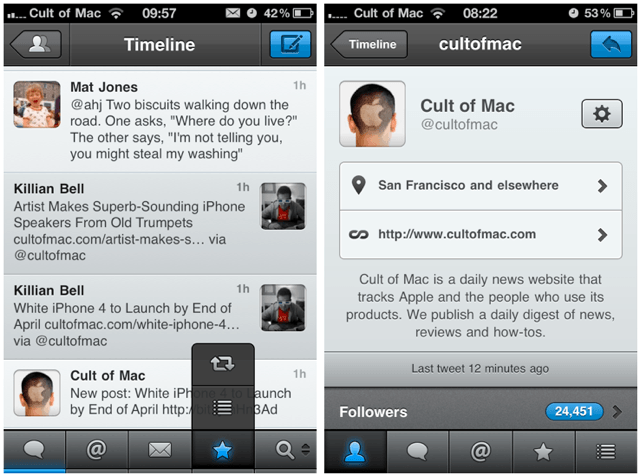
One of the most anticipated Twitter clients for the iPhone finally hit the App Store yesterday, and I was staggered by the attention it received within its first few hours – I can’t remember the last time an iOS application launched with that kind exposure – especially not a Twitter client.
From Tapbots – the creators of Convertbot, Pastebot and Weightbot – Tweetbot promises to be a full-featured Twitter client with a lot of personality; boasting a meticulously crafted user interface, smart gestures, and customizable navigation.
Tweetbot’s launch is big news today – it’s all over Twitter and many publications are dubbing the application a Twitter for iPhone killer. But is it as good as the release day hype would have you believe? Find out in our review after the break!
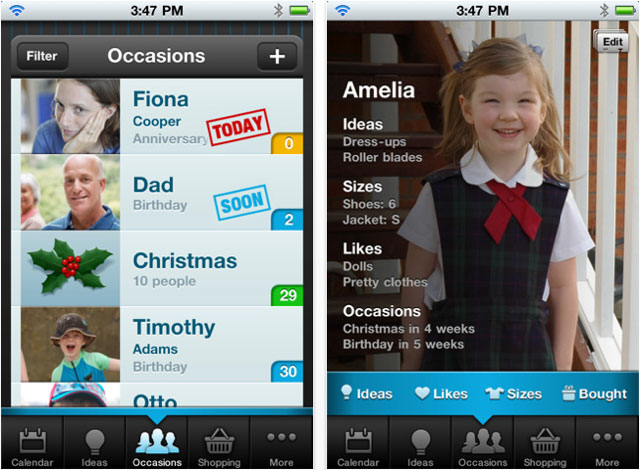
Gift Plan – (Free for today – usually $0.99) iPhone – Productivity
Gift Plan is a fantastic little application for the iPhone that could save you a lot of trouble. Usually $0.99 – but free for 24 hours – it will remind you of special occasions and ensure you never miss a birthday or anniversary again.
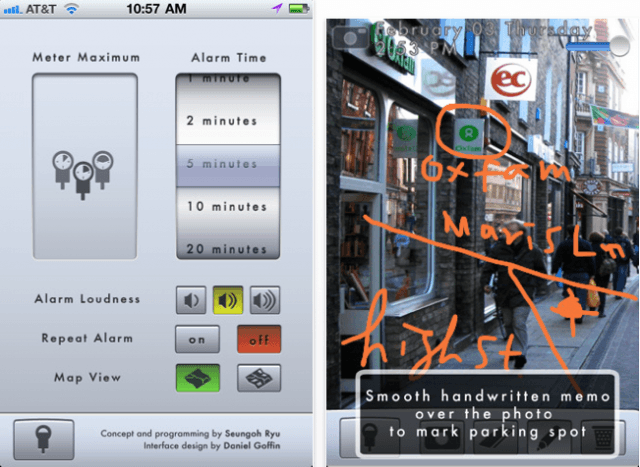
If you’ve ever returned to your car to find that you’ve earned yourself a whopping great fine for running over on the meter, or parking too long in the same spot, Honkis here to help! Simply swipe the virtual parking meter to record how much time you’ve got to park and Honk will ensure you’re reminded when it’s nearly time to move your car. The app icon on your home screen will even display how much time you’ve got left minute-by-minute, so it’s easy to see at a quick glance. You can even use to Honk to remind yourself of where you parked by making handwritten notes, taking photos, and using your GPS location.
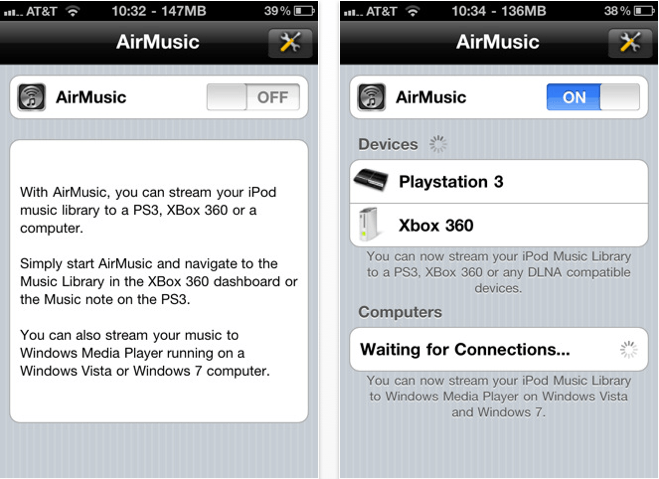
AirMusicis a superb application for streaming your music over Wi-Fi to your PS3, Xbox 360, or PC, and allows you to wirelessly listen to your tunes through your TV without using an AppleTV. Its incredibly easy setup means your music is there the moment you want it – just ensure all of your devices are on the same Wi-Fi network, start AirMusic, then navigate to your music library on your console or PC and your tunes will be there – it couldn’t be easier.
Although I use an AppleTV in our living room, I downloaded this application for use with a PS3 in another room and so far I can’t fault it. The only downside to AirMusic is that it won’t play older iTunes purchases that are protected by DRM, but I’m yet to find a way of playing DRM-protected tunes on my PS3 without putting them onto a CD first. AirMusic setup takes literally a few minutes, streaming is effortless, and the quality is great. If you’re looking for a way to share your iPod library with your Xbox, PS3, or PC, I recommend you give AirMusic a go!
Not many DJ applications for iOS devices quite deliver the experience you get from using this week’s first must-have app – Tap DJ. Its bucket-load of features, together with its brilliantly designed and incredibly intuitive user interface, make it the ultimate pocket DJ application.
Another of our favorites is Wunderlist – a beautifully elegant task manager that’s been around for a short while on the iPhone, and now it’s available in all its HD glory on the iPad
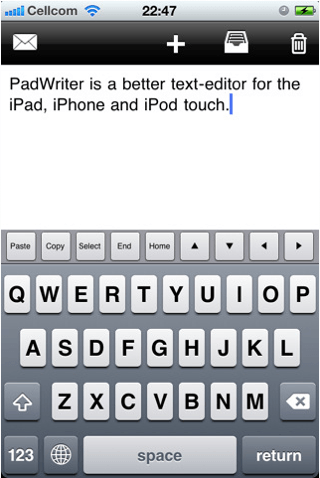
Writing on your iOS device can sometimes be a painful experience, especially if you don’t have a good text editor. Fortunately, our third must-have application is just that. Text Editor is a wonderfully effortless, yet incredibly useful text editor that will go a long way to ensuring that writing on your iOS device isn’t so bad.
Find out more about the applications above and our forth must-have – Oscar Backstage Pass – after the break!
Writing on your iOS device can sometimes be a painful experience, especially if you don’t have a good text editor. Fortunately, Text Editoris just that – a wonderfully effortless, yet incredibly useful text editor that will go a long way to ensuring that writing on your iOS device isn’t so bad. My favorite feature is a very simple one, yet you’ll be surprised how much you use it: there’s an additional line of keys across the top of your keyboard that features the copy, paste, select, home, and end functions, as well as all four arrow keys for when you can’t quite drag your cursor where you want it. It makes performing different tasks that little bit easier, and you’ll soon miss it within other applications.
While you’re writing your document Text Writer will automatically save it, so you don’t need to worry about losing your work if you take a call, jump out of the app to reply to a text, or if your battery dies half way through your document. And once you’ve finished, you can send the finished article via email. This app is universal, so one download will work on all of your iOS devices, and it’s great value for money at just a dollar. I love this application for its pure simplicity and ease of use, and for anyone looking for a basic text editor without all the fancy functions, you won’t go wrong with Text Writer.
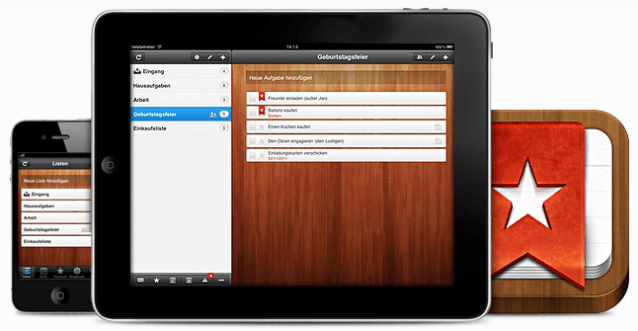
Wunderlistis a beautifully elegant task manager that’s been around for a short while on the iPhone, and now it’s available in all its HD glory on the iPad. Use it to boost your productivity by managing your tasks and to-do lists, while effortlessly syncing them between your Mac and your iOS devices to ensure you’re always on top. Its impressive list of features includes task sharing, push notifications, email reminders, notes, customizable backgrounds, and lots more.
With all its features and its near-perfect user interface, Wunderlist gives many paid task management applications a good run for their money.
Not many DJ applications for iOS devices quite deliver the experience you get from using Tap DJ. Its bucket-load of features, together with its brilliantly designed and incredibly intuitive user interface, make it the ultimate pocket DJ application. Featuring integrated access to your iPod library, a 9 pad sampler, voice recording, FX, a 3-band equalizer for each deck, and lots more – it’s never been easier to mix, scratch, and add FX to your favorite tracks.
Whether you’re a beginner or a pro, Tap DJ makes it unbelievably simple to play around with your music and create mixes you never thought were possible with an iPhone app. Boasting many of the features you’d find in a pricey desktop application, butat a fraction of the cost, there’s never been a better time to try your hand at being a DJ!
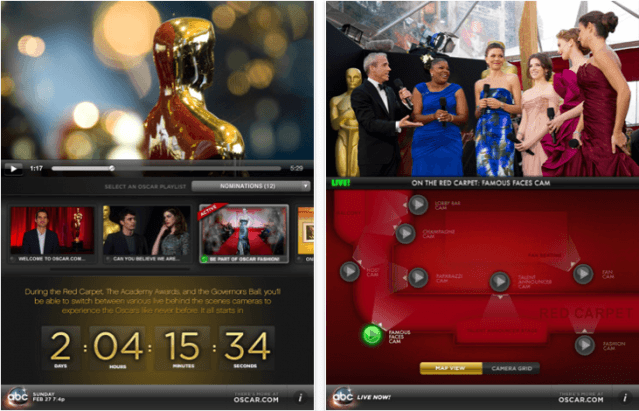
To help you make this year’s Oscars the most enjoyable, the official Oscar Backstage Passapplication for iOS gives you access to live streams from exclusive cameras places throughout the red carpet, the Kodak Theatre, and the Governors Ball, so that you can go beyond the TV broadcast and experience more live action as it happens. Watch the 83rd Academy Awards with this ingenious interactive application on your iPhone or iPad and get access to more stars, more glamour, and more of everything you love about the Oscars.
Its brilliantly designed user interface makes it easy to navigate between each live camera and shows you exactly where each camera is placed at the awards – this marvellous idea ensuresyou won’t miss a single moment of Hollywood’s biggest event.
Watch the Oscars live this Sunday, February 27th, at 8et/5pt on ABC.
Our roundup of must-have iOS apps from this week includes Camera+ – quite possibly the best, and certainly the most popular, photography application for the iPhone. It’s so good that it has replaced Apple’s official Camera app on my iPhone’s home screen, and is now my go-to application for snapping all my photos
Also to feature is Readlines – an application that makes great use of your iOS device while it’s sat in its dock on your desk, and turns an otherwise boring blank screen in to a big, bold stream of random headlines from your Google Reader RSS feeds.
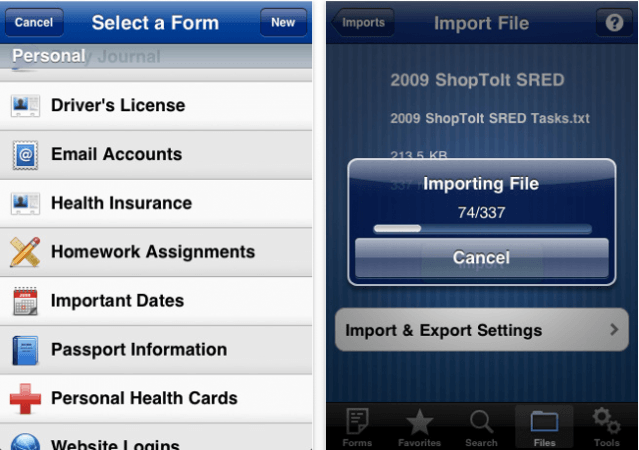
Tap Forms Databaseon your iPhonemeans you can forget sifting through every piece of paper in your home to find your insurance details when you need to make a claim, or panicking because you’ve forgotten your PIN at the ATM when you need some cash – it’s now with you wherever you go.
Find out more about the applications above and check out the rest of this week’s must-haves, including HubbleSiteand Inception: App Edition, after the break!
Camera+ – ($0.99 for a limited time) iPhone – Photography
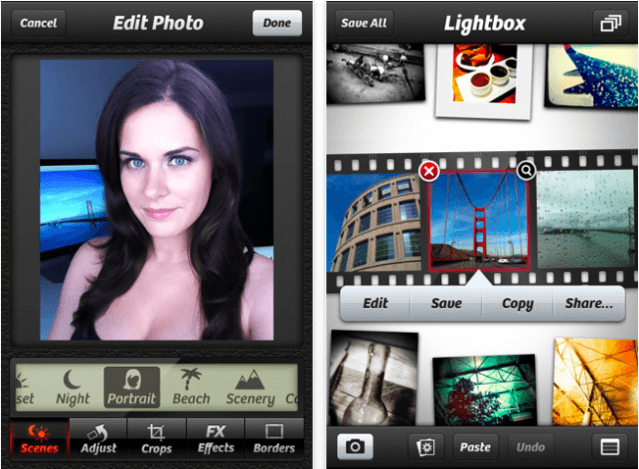
Camera+is quite possibly the best, and certainly the most popular, photography application for the iPhone. It’s so good that it has replaced Apple’s official Camera app on my iPhone’s home screen, and is now my go-to application for snapping all my photos. With dozens of effects, touch exposure and focus, 6x digital zoom, and multiple scene modes, Camera+ is the ultimate way to get the most out of your iPhone’s photos.
In addition to a major updated that includes over 50 awesome new features and improvements, Camera+ has also been reduced for a limited to time to just $0.99. Anyone who’s used Camera+ on their iPhone will agree that you won’t find a better day-to-day photography app, and with the recent performance tweaks and new features, $0.99 for this fantastic application is a steal!
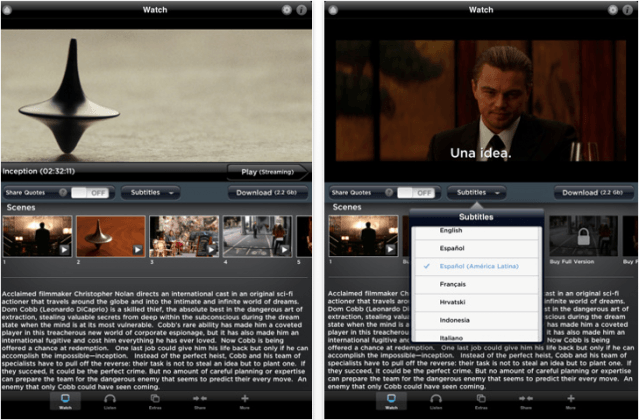
Inception: App Editionis one of the first of Warner Bros.’ App Store releases that not only delivers the full Inceptionmovie, but also offers a stack of movie extras all within an app. You can download the movie on to your device to play at anytime, even when you’re offline, or, if you’re keen to save space, you can stream the movie over Wi-Fi or 3G. The app features five exclusive tracks, bonus features that take you behind the scenes, an array of movie film posters, and multiple languages.
For film fans and movie buffs, Inception: App Edition is the ultimate way to experience this breathtaking film on your iOS device, and it features hours worth of additional content you wouldn’t normally have access to if you’d have purchased the film through the iTunes Store.
The Dark Knightis also available as an ‘App Edition’ from Warner Bros.
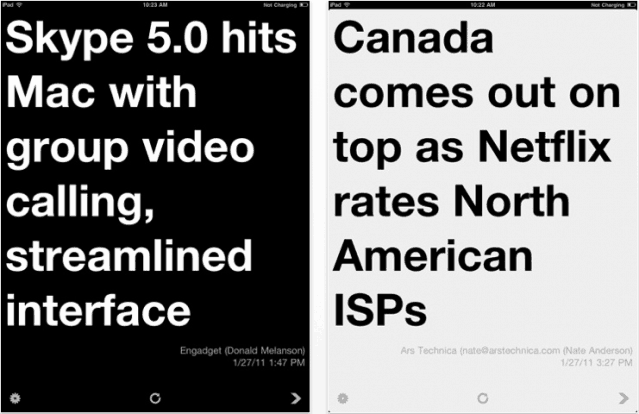
Readlinesmakes great use of your iOS device while it’s sat in its dock on your desk, and turns an otherwise boring blank screen in to a big, bold stream of random headlines from your Google Reader RSS feeds. In the same way that the recent Trickleapplication displays tweets from your Twitter feed, Readlines cycles through your unread stories and displays a constant stream of headlines. Clicking on a headline that interests you will take you straight to Safari where you can read the whole article.
If you use your Google Reader account like I do, you’ll get hundreds of news stories every day that you’ll have to sift through to get to the good stuff that you want to know about. With Readlines you can simply get on with your work while your headlines are streamed to your desk, and it makes picking out only those that interest you incredibly simple.
Forget sifting through every piece of paper in your home to find your insurance details when you need to make a claim, or panicking because you’ve forgotten your PIN at the ATM when you need some cash – it’s now with you wherever you go.
Today’s must-have app is Tap Forms Database, a fantastic way to carry a database of important information with you wherever you go, all stored securely on your iPhone. It’s never been so quick and easy to organize all of your data and have it at your fingertips whenever you need it. Effortlessly create your own database and use the 25 ready-made forms to store passport information, vehicle registration information, credit card numbers, bank account details, software serial numbers, online login information, and so much more.
Download Tap Forms Databasetoday for free and you’ll soon wonder how you ever lived without it!
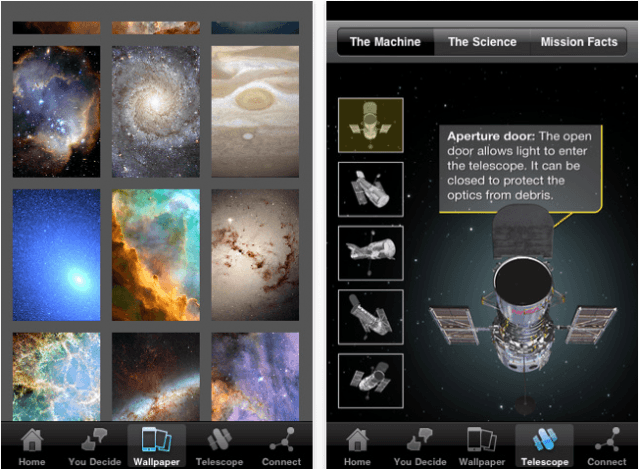
Today’s must-have iOS application is HubbleSite, the online home of NASA’s Hubble space telescope. For over 20 years Hubble has orbited the Earth, beaming home images of celestial splendour; now you have access to the world’s most remarkable Hubble images at your fingertips, to enjoy on your iPhone anytime, anywhere.
Cast your eye over a vast collection of spectacular sights from the Hubble archives and vote for the images that you find the to be the most astounding. Download a selection of wallpapers for your device, all of which have been chosen and edited to deliver beautiful results on the iPhone & iPod touch with a Retina display. Read a compilation of amazing facts about the Hubble telescope’s history and the scientific discoveries it has revealed, from the age of the universe to the mysterious force known as ‘dark energy’ – all within the official Hubble iOS app.
For anyone interested in space and the universe around us, HubbleSiteshould be the next application you download from the App Store.
At the top of our must-have apps list this week is Free-App Hero, a fantastic app tracker maintained by experienced, professional game reviewers with an encyclopaedic knowledge of thousands of iOS apps. Unlike other free app recommendation services, Free-App Hero recommends only the best games, because they’re the best – not just because its developer paid them to recommend it.
Google’s latest application, Google Translate, is also in this week’s choice of applications. One of the best language translation services is now available on your iPhone, with the ability to translate words and phrases between more than 50 languages. It has some great features that make using Google Translate a pleasure on your iPhone.
Pillboxie is an excellent application for those that require regular medication, providing you with an incredibly simple way to create a schedule for your medication and get reminders when your pills are due. Never forget your pills again and discover the easiest method of managing your medication on your iPhone.
Find out more about the applications above and check out the rest of this week’s must-have apps, including Friended and Camera Mic, after the break!
This week’s must-have iOS apps features the impressive new BEP360application from the Black Eyed Peas, which boasts the first jaw-dropping ‘3D360’ mobile music video, as well as access to each band member’s Twitter feed, an addictive little mini-game, and more.
Task Eateris a beautifully simple task management application that helps you to stay organized with the help of your iPhone. It offers all of the great features you need to manage your todo list, including notes; color highlighting; and due dates with alarms, and its minimalistic user interface makes everything very easy.
Essayis a rich text editor that provides only the most essential formatting options to keep you focussed on your document. It uses the HTML file format and offers a wealth of features that make it a fantastic writing application for any writer.
Find out more about the applications above and check out the rest of this week’s must-haves, including 3D Audio Illusionsand CelebrityBooth, after the break!
One of our favorite iOS apps to feature in this week’s must-have list lets you stream your media between your iOS devices, or from iTunes on your computer over your Wi-Fi network. AirViewworks in a similar way to the AirPlay feature already built-in to iOS, however, instead of streaming only to your AppleTV, you can stream straight to your iPhone, iPod touch, or iPad.
Microsoft Office users will be familiar with OneNote, the powerful note taking application for all of your ideas that syncs your notes with free Windows Live online storage account, and allows you to access them from virtually anywhere using your phone, computer, or web browser. Now the OneNote application is available for your iPhone, allowing you to make notes while you’re on the go so that you don’t forget another good idea. It’s also free for a limited time!
Cloud Connect Profor your iPad allows you to leave your laptop at home while you’re on the go, but still gain access to the files you have stored on your Mac and PC, or online storage services like Dropbox, iDisk, or Box.net. You can also access your home computer through the built-in screen sharing feature, and view and control your applications just like you’re sitting in front of them.
Find out more about the applications above and check out the rest of this week’s must-have iOS apps, including TapnScrap HDand TalkBox Voice Messenger, after the break!
This week’s must-have iOS apps features Bills – On Your Table HD – a fantastic finance application that helps you manage your money on your iOS device. Bills makes it simple to store and track various types of outgoing payments with specific due dates. The application has been available on the iPhone for some time, but now it’s available in HD for the iPad.
iDarkroomis the latest top photography application for personalizing your snaps. With a wide variety of effects and frames to choose from, it’s easy to make your photos that little bit more priceless.
“The internet, rethought, reinvented, and handcrafted for the iPad,” with Browser+ HD – a feature-packed web browser that claims to be the slickest way to browse the internet on the planet.
Find out more about the applications above and check out the rest of this week’s must-have iOS apps, including Timeliand OMGuitar, after the break!
Now that the festive period is out of the way and we begin to settle in to the new year, Apple has returned to reviewing App Store submissions and games and apps are starting to trickle in again. Here’s our pick of the best iOS apps to enter the App Store over the past week.
8mm Vintage Camerais a great new video application that shoots old-fashioned 8mm movies in real-time. It was recently reviewed by the Cult’s own David Martin, who was very impressed with the app’s effects and awarded it 4 out of 5 stars.
Trimensionalis a ground-breaking photography app and the world’s first 3D scanner for the iPhone. It cleverly uses both the screen and the front-facing camera on your device, detecting patterns of light reflected off your face to create a true 3D model. The results are extraordinary and you can check out some screenshots after the break.
If you’ve made any New Year’s resolutions for 2011, Zendrefor your iPhone is the app you need to keep track of your goals and achievements. Reward yourself progress points every time you do something towards meeting your resolution, and get the motivation you need to keep your resolutions going.
Find out more about the applications above and check out the rest of this week’s must-have iOS apps, including Awesome Files HDand Symphony Pro, after the break!
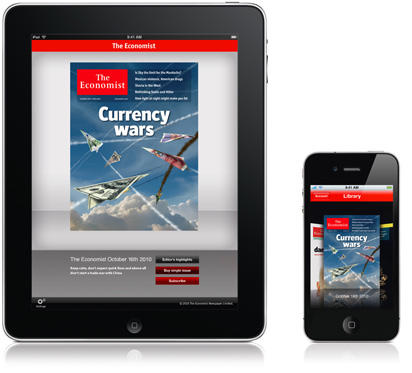
I knew I was old the moment I realized that the foundation of my every Sunday’s pleasure was wandering down to the newsstand and picking up the latest issue of the Economist, so I’m both a little sad and a little delighted to note that I’ll no longer have to make that journey: the Economist is coming to the iPhone and iPad.
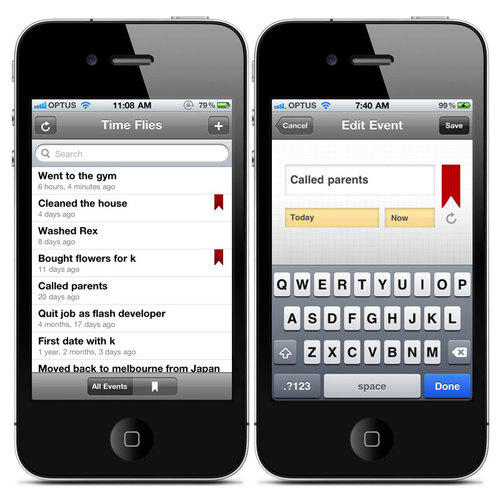
At the top of our favorite iOS apps list this week is Time Flies – a simple but useful application that helps you keep track of how long it’s been since you last completed a chore or task. It’s now even easier to remember when you last called your parents, bought flowers for your wife, or cleaned the house.
Our second must-have app is a quick and powerful to-do app called SpeedTask. It features a simplistic, easy to use user interface, with free ‘cloud’ syncing that allows you to access your tasks from any device, or sync them with iCal on your Mac.
Also featured this week is the redesigned ReBirth, which is now available on the iPad, emulating the classic Roland TB-303 Bass synth and the Roland TR-808 & 909 drum machines. Making music on your iOS device has never been so powerful!
On the one hand, I love the idea behind Time Flies, a to-do app from Absent Design which allows you to record the things you do, then tells you how long it’s been since you last did them.
It’s a great idea, right? Time Flies keeps you honest. “No, you didn’t go to the gym ‘the other day’… it was three weeks ago. No, you didn’t buy your girlfriend flowers last month… it was three months ago. No, you didn’t move the stash a week ago… it’s been a month.” And so on.
My only problem here is that while I’d love to use this app myself, I definitely don’t want my girlfriend getting wind of it and using it against me. Claiming that it’s her turn to do the dishes or grout the tiles is going to be a lot harder if she’s got an app specifically devoted to catch me in my lies.