Mobile menu toggle

‘AirMusic’ Streams Your Tunes to PS3, Xbox, PC [Must-Have App]

By

AirMusic for iPhone

AirMusic($0.99) iPhone – Utilities

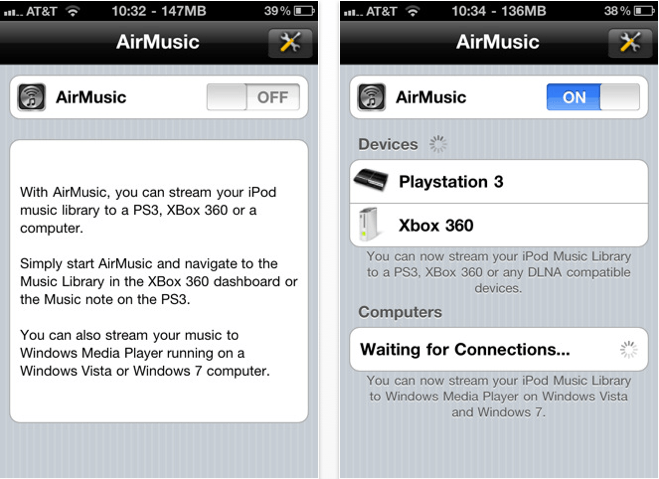
AirMusic is a superb application for streaming your music over Wi-Fi to your PS3, Xbox 360, or PC, and allows you to wirelessly listen to your tunes through your TV without using an AppleTV. Its incredibly easy setup means your music is there the moment you want it – just ensure all of your devices are on the same Wi-Fi network, start AirMusic, then navigate to your music library on your console or PC and your tunes will be there – it couldn’t be easier.

Although I use an AppleTV in our living room, I downloaded this application for use with a PS3 in another room and so far I can’t fault it. The only downside to AirMusic is that it won’t play older iTunes purchases that are protected by DRM, but I’m yet to find a way of playing DRM-protected tunes on my PS3 without putting them onto a CD first. AirMusic setup takes literally a few minutes, streaming is effortless, and the quality is great. If you’re looking for a way to share your iPod library with your Xbox, PS3, or PC, I recommend you give AirMusic a go!

[xrr rating = 80%]

  • Subscribe to the Newsletter

    Our daily roundup of Apple news, reviews and how-tos. Plus the best Apple tweets, fun polls and inspiring Steve Jobs bons mots. Our readers say: "Love what you do" -- Christi Cardenas. "Absolutely love the content!" -- Harshita Arora. "Genuinely one of the highlights of my inbox" -- Lee Barnett.

12 responses to “‘AirMusic’ Streams Your Tunes to PS3, Xbox, PC [Must-Have App]”

  1. bondr006 says:

    Why would I want to stream to my computer? That’s where my iTunes library is already. Wouldn’t that be a slight bit redundant?

  2. Guest says:

    Does this stream to a Mac or only Windows PC’s?

  3. jdog25 says:

    Double Twist’s Air Sync is better because it does the same thing as this app but it also syncs wirelessly with your Double Twist music library, which is like iTunes. Also you don’t have to jailbrake (root) your Android device. BTW I use a Nexus S as my phone, the iPhone 4 just doesn’t cut it IMO.

  4. Download says:

    Interesting and informative post
    For more great posts:
    Cheap Hosting
    Cash Back
    Blog
    Blogging
    Spyware

  5. Cowley says:

    Cool looking app but beware that is does not actually support all types of DLNA devices at this point.
    I have confirmed with the developer that Sony Bravia’s are not yet currently supported despite its claim to stream to DLNA compatible devices.

  6. Tips says:

    Yes, anybody else can solve this problem!

  7. Amir Mark says:

    Download Streamer4 instead. Does the trick, also cheaper and displays
    song name as well. ?http://itunes.apple.com/app/id

Leave a Reply

