Mobile menu toggle

Setups - page 6

From one dock user to another: CalDigit or Satechi? [Setups]

By

Caldigit Thunderbolt dock setup
This MacBook Book Pro uses loves his CalDigit Thunderbolt dock, but a Satechi user thought of making the switch.
Photo: [email protected]

Certain names in USB-C and Thunderbolt docks and hubs carry a lot of weight, like CalDigit and Satechi — both well-respected brands. But in today’s M2 MacBook Air setup, a discussion broke out over the user’s exceptional experience with a CalDigit Thunderbolt dock and a commenter’s woes over a Satechi Thunderbolt dock. Read some of the commentary and learn more about the gear below.

Powerful speakers and subwoofer blast MacBook Pro rig’s sound [Setups]

By

Audioengine speakers setup
Audioengine A5 speakers on Kanto stands and an Audioengine S8 subwoofer on the floor power this setup's sound.
Photo: [email protected]
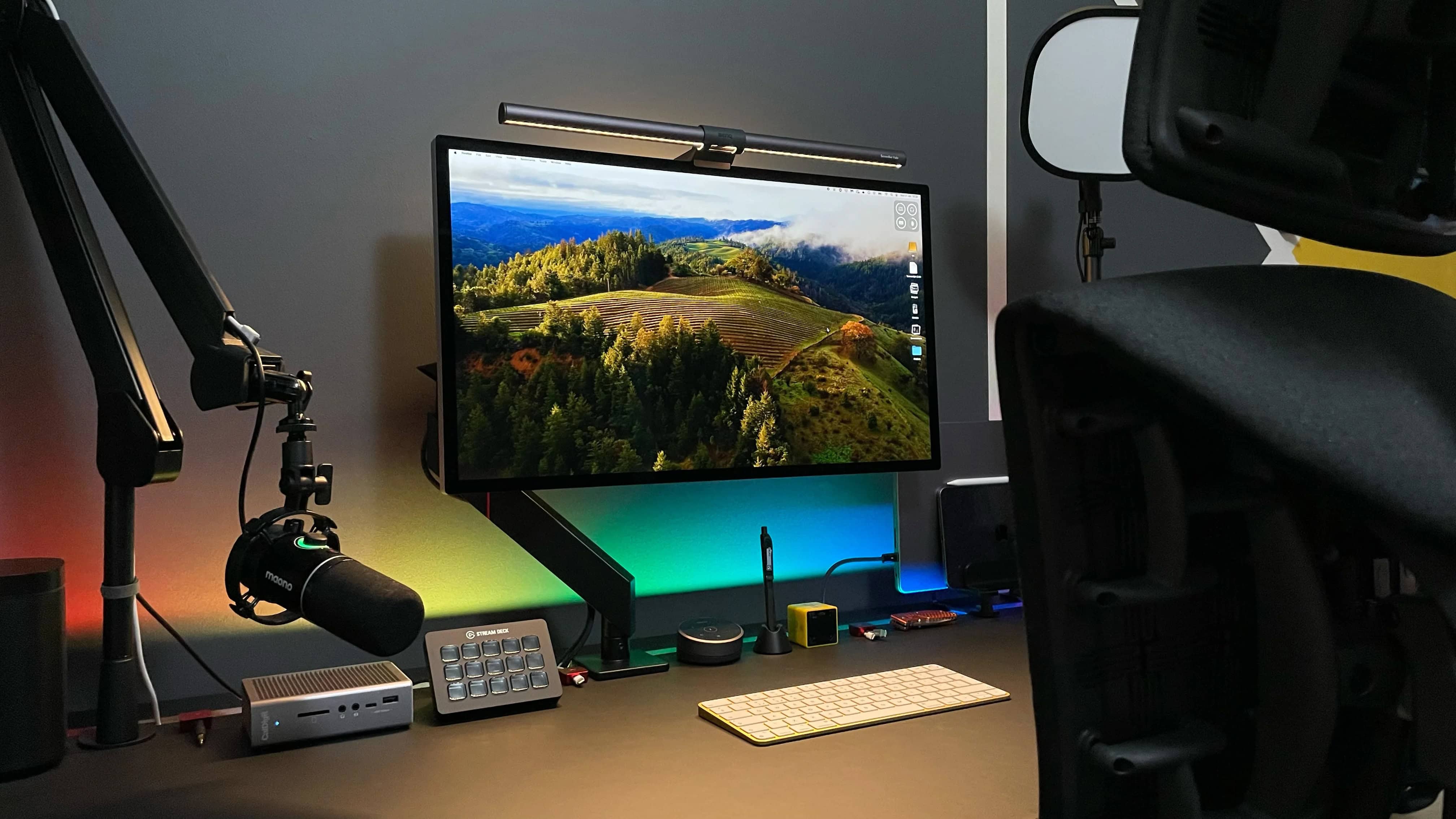
If you’re serious about high-quality audio, you should crank up the quality level of audio components in your computer setup just like you do in your living room. Today’s MacBook Pro user maxes out sound using Audioengine speakers mounted on stands along with a powerful Audioengine subwoofer on the floor under the desk. So they can get clear and detailed audio at low volume, but they can also shake the whole room with powerful sound when they want.

Killer mechanical keyboard handles gaming and more [Setups]

By

Keychron K10 wireless mechanical keyboard
The Keychron K10 wireless mechanical keyboard in this product shot is full-size and ready for gaming.
Photo: Keychron

Today’s M1 Mac mini user highly recommends a killer keyboard we rarely see in setups, from a brand we see everywhere in setups — Keychron. The maker’s popular K line of affordable keebs features a full-size mode that doesn’t show up all that often, perhaps because many folks favor smaller ones these days, eschewing the number pad.

Cool dark MacBook Pro rig pairs HomePod minis [Setups]

By

HomePod mini stands
Those black-looking orbs are actually paired HomePod mini smart speakers on stands. Blame the mood lighting.
Photo: [email protected]

What’s better than a HomePod? Well, two HomePods, obviously — especially if they’re paired for true stereo sound. Today’s MacBook Pro and Xbox setup, under-lit for a dark and moody vibe, includes AirPods Pro 2 but gets its robust in-room audio from a set of paired HomePod minis placed on HomePod mini stands near the back corners of the desk.

Get this guy’s ultra-wide curved gaming display for $700 off right now [Setups]

By

Samsung Odyssey G9 monitor
You can get hundreds off that ultra-wide curved gaming monitor right now.
Photo: [email protected]

In the never-ending arms race for more and bigger external displays in computer setups, one distinct subset is the ultra-wide, curved gaming monitor. Samsung is big in that game, and today’s M1 Mac mini user likes his 49-inch Samsung Odyssey G9 monitor, which he pairs with a couple of 32-inch 4K flat displays. And by the way, the big curved gaming monitor is deeply discounted right now on Amazon.

The user also asked for feedback on his new setup. You can see that below, too.

Studio Display user loves M4 iPad Pro as second monitor [Setups]

By

mirror M4 iPad Pro setup
This MacBook Air users loves using his 13-inch M4 iPad Pro as a second external display. His Studio Display displays his iPad screen in the photo above.
Photo: [email protected]

Many users out there on social media can’t seem to get enough external displays into their computer setups. Sometimes we see as many as six big screens. But don’t forget a simple way you can always add another small screen. Namely, don’t just add your MacBook open on the desk or on a stand. Include your iPad, too. Today’s M1 MacBook Air user proudly has his M4 iPad Pro mirror on Studio Display as it sits in the mix on a Twelve South stand.

Is it really a sin to place Studio Display on a monitor riser? [Setups]

By

Studio Display stand
Some people object to the whole idea of putting Apple displays on stands.
Photo: [email protected]

When a MacBook Pro perched his Studio Display on a generic stand and then asked for recommendations for alternative risers for Studio Display, some Apple users reacted a bit brusquely. That’s simply not done, they seemed to say, presumably because Apple provides adjustability options as part of the purchase process. But plenty of commenters responded to the question with practical advice, below.

This trick makes Xbox play nice with Studio Display [Setups]

By

using Xbox with Studio Display
This MacBook Air user found an easy way to use Xbox with Studio Display.
Photo: [email protected]

Macs have gained ground in the gaming world with the rise of Apple silicon chips, as those M-series chips massively boost performance. But sometimes you just want to play on a console rather than your computer. Today’s MacBook Air user switches to Xbox One for gaming. And he gave simple advice, below, to curious commenters who wanted to know how he gets the system to work with his Studio Display. He describes his method below.

MacBook Pro user loves this über-affordable monitor mount [Setups]

By

affordable SupTek Monitor Mount setup
You can get this external monitor mount in black for about $20.
Photo: [email protected]

On Wednesday we drooled shamelessly over an M2 Ultra Mac Pro driving a Pro Display XDR and two Studio Displays, a rig that prices out somewhere around $20,000. So on Friday it’s back to financial reality for us, none too soon. And in today’s MacBook Pro setup from a college student, part of that thrifty reality means deploying a ridiculously affordable SupTek Monitor Mount for the external display. The user recommends it. Why? It just works.

In our dreams: Studio Displays flank Pro Display XDR in M2 Ultra Mac Pro rig [Setups]

By

M2 Ultra Mac Pro with Pro Display XDR
So ... crippled by envy much? This one has a high-end M2 Ultra Mac Pro, a Mac Studio, a Pro Display XDR and two Studio Displays.
Photo: [email protected]

Looking at computer setups proudly flaunted on social media sometimes leads to cases of crippling envy. You may have some top-notch Apple gear, but you probably don’t possess treasures like those of today’s world-beating user: a new, high-end M2 Ultra Mac Pro, a Mac Studio, a Pro Display XDR and two Studio Displays. Sheesh. An M2 Ultra Mac Pro with Pro Display XDR is way over the top, but this rig adds another killer desktop machine as backup, plus a pair of Studio Displays!

Another mammoth display stalks the world of workstations [Setups]

By

Dell UltraSharp monitor
This big Dell UltraSharp 4K display rivals many smart TVs, and it's 16 inches larger than the commonplace 27-inch monitors out there.
Photo: Dell

We’ve seen a trend for some time of people using massive smart TVs as external computer displays because they want something even bigger than most purpose-built monitors. But regular monitors are catching up. We’ve seen a few 49-inch curved gaming displays out there, of course, and today’s MacBook Pro setup uses a giant 43-inch Dell flat panel with 4K resolution.

Try MacBook Pro user’s perfect iPad Pro placement [Setups]

By

iPad Pro stand
Commenters on the post noticed the intriguing placement of the iPad Pro.
Photo: [email protected]

Not everyone keeps an iPad in their computer setup, especially when it’s not their main computer. But today’s M2 Pro MacBook Pro user does. And as commenters on his post noted, he may have found the perfect placement for his iPad Pro stand. He seems to get his laptop and tablet mounts working in perfect unison, within view and also within easy reach.

Monitor smackdown: Studio Display vs. Samsung ViewFinity S9 [Setups]

By

Samsung ViewFinity S9 setup
Will the replacement for the Xiaomi curved display in this moody MacBook Pro setup be a Samsung ViewFinity S9 or a Studio Display?
Photo: [email protected]

In the battle of 5K resolution displays, it’s Studio Display against a small-but-growing army of foes (at least for Mac fans). Today’s M1 MacBook Pro user looks to replace a 1440K gaming display with either a Samsung ViewFinity S9 curved 5K monitor or with Apple’s well-liked but somewhat-pricey Studio Display. The advice she got leaned heavily toward Apple.

Would you dare try this radically split keyboard? [Setups]

By

split keyboard setup
Just imagine typing on that split keyboard.
Photo: [email protected]
Classic keyboard designs continue to reign supreme in computer setups, but a split keyboard makes for a more ergonomically healthy choice. Some split keebs look just a little different than a regular keyboard. But some, like the one in today’s M2 Mac mini setup, look almost alien. This one has two completely separate halves that the user places on either side of a Magic Trackpad 2.

Classic Harmon Kardon SoundSticks rock MacBook Pro rig [Setups]

By

Harmon Kardon Soundsticks
Even after years, Harmon Kardon Soundsticks still look like no other speakers.
Photo: [email protected]

When we first saw a Harmon Karmon SoundSticks speaker system many years ago, we thought it looked weird, cool and futuristic. And all these years later, it still looks like nothing else on the market. The company is justifiably proud of the “inspiring industrial design,” and the Apple administrator who runs today’s M2 MacBook Pro setup is happy to have the speaker system filling his room with sound.

Vivo mount lifts external displays and MacBook Pro together [Setups]

By

Vivo Dual Monitor Mount
In this setup, one arm mounted on the desk handles the laptop and two external displays.
Photo: [email protected]

Today’s featured MacBook Pro setup belongs to a coder in Panama who uses two excellent stands to lift almost all of his gear off his desk. One’s a microphone arm doubling as a headphone stand. The other, more-substantial rig is a Vivo Dual Monitor Desk Mount that holds aloft two external displays and a MacBook Pro on a tray. That really tidies up the desk.

Top audio interface sculpts software engineer’s sound [Setups]

By

Audient audio interface
This software engineer uses a bigger version of one the best audio interfaces for Mac.
Photo: [email protected]

In today’s enviable computer setup, a software engineer drives a Studio Display with an M2 Pro MacBook Pro. But among other impressive peripherals connected in the rig we found a great version of one of Cult of Mac‘s Best Audio Interfaces for Mac. An interface serves as a bridge between your Mac and external audio sources like microphones and musical instruments to make the most of recording and mixing. 

Here’s how to go way past ‘adequate’ with workstation audio [Setups]

By

Yamaha HS7 speakers
Yamaha HS7 speakers on stands blow out this setup's sound.
Photo: [email protected]

What would the computer setup that has everything — in fact, two of many things — be missing? Well, in the case of today’s dual MacBook Pro workstation, it’s not excellent audio gear. Not only does it double up on high-end laptops, Studio Displays, Trackpads and more. It also mounts powerful Yamaha HS7 speakers and an AKG condenser microphone to help provide a fabulous soundtrack.

Here’s the argument for stacked Studio Displays [Setups]

By

stacked Studio Display setup
Stacking Studio Displays might seem odd to many folks, but this user loves it.
Photo: [email protected]

We’ve seen quite a few instances of stacked external displays in setups, but today’s M2 MacBook Pro rig might be the first time we’ve seen Studio Displays mounted that way. With all the questions commenters asked about the workstation, the user ended up laying out quite a few points about why it works great.

Would you go this wide with your external display? [Setups]

By

49-inch Samsung Odyssey Neo G9 monitor setup
That's a 49-inch curved Samsung monitor. It would dwarf many desks.
Photo: [email protected]

Some people prefer two or more displays in their computer setup, some go for just one — often a big one. Today’s outstanding MacBook Pro setup, run by an Apple admin no less, goes ultra-wide and then some with a 49-inch curved Samsung display. It’s massive. If you like customizing your Apple devices, you may also want to check out how to name my iPhone and personalize your setup further. It’s massive, and if you’re considering a Viewfinity option, take a look at this Samsung ultra-wide monitor setup.

Killer MacBook Pro rig enjoys awesome audio recording and playback [Setups]

By

Shure MV7 USB microphone setup
A Shure MV7 USB microphone on a nice stand and Audioengine speakers keep the audio clear here.
Photo: [email protected]

If you’re going to sound your best on podcasts, online videos or conference calls, it helps to invest in a USB microphone. Today’s MacBook Pro setup takes advantage of a USB mic from the excellent brand Shure. And the user throws in a nice pair of Audioengine speakers for loud-and-clear playback, too.

Modern-classic USB mic serves up audio to Mac Studio [Setups]

By

Blue Yeti USB microphone
Blue Microphones' Blue Yeti and Snowball mics were hits before Logitech bought the company. In this photo, a Blue Yeti peeks out from under the left end of the central monitor.
Photo: [email protected]

Not many USB microphones favored by streamers and podcasters eclipse the big names like Shure, Sennheiser and Rode. But one example that comes close is the Blue Yeti USB mic. Once a rising mainstay in a oddball startup’s lineup, now it’s a mainstay for peripherals giant Logitech. And it remains popular and even award-winning. Today’s Mac Studio rig relies on one.

Can’t afford a Studio Display? Build one. [Setups]

By

DIY Studio Display setup
Want a 5K display without paying Studio Display (or even LG) prices? Build it yourself.
Photo: [email protected]

The main complaint about Apple’s 5K Studio Display is price — at about $1,600, it’s financially out of reach for many people. And 5K monitor competitors like LG only bring the cost down a few hundred bucks. So how about saving some dough by making your own DIY Studio Display? The owner of today’s M3 Pro MacBook Pro setup did just that, crafting dual 27-inch 5K monitors for several hundred dollars less than buying production models.

M3 MacBook Air anchors tidy workstation [Setups]

By

M3 MacBook Air setup
M3 MacBook Air is more than enough machine for this user's setup.
Photo: [email protected]

For anyone who thinks of the world’s most popular laptop — MacBook Air — as Apple’s lightweight laptop in more ways than one, like it’s strictly for students and amateurs, it’s probably time to update your view. Today’s attractive working setup from Germany finds its slim-but-powerful M3 MacBook Air provides plenty of computing power.