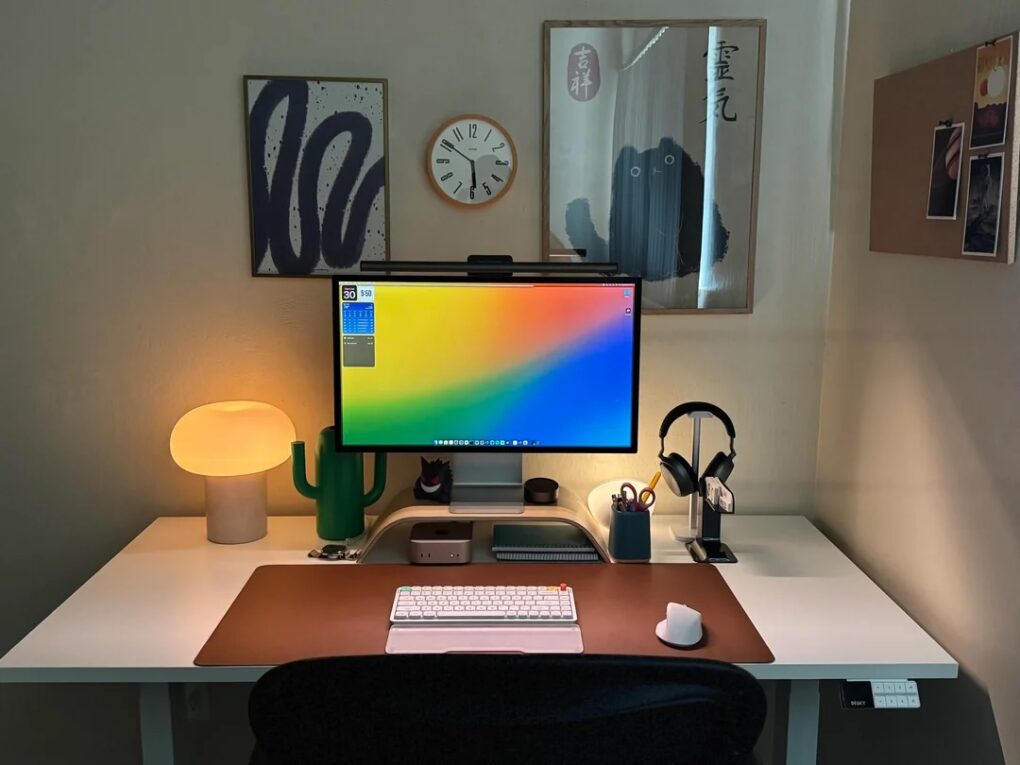
Who doesn’t love new gear in their computer setup — either brand new or just new to them? Today’s Mac mini and Studio Display setup comes complete with two shiny new items recently added to the market — the NuPhy Air75 v3 low-profile wireless mechanical keyboard and the updated BenQ ScreenBar Halo 2 monitor light. And he’s got some over-ear headphones I find enviable, too.
This post contains affiliate links. Cult of Mac may earn a commission when you use our links to buy items.
Mac mini user loves his new NuPhy Air75 v3 low-profile mechanical keyboard and BenQ ScreenBar Halo 2 monitor light
This mini desktop computer's M4 chip packs a 10-core CPU and 10-core GPU for plenty of processing power. Multiple ports for connectivity include Gigabit Ethernet. Works with iPhone/iPad.
- Powerful M4 chip
- Starts at 16GB unified memory
- Several SSD storage size options
- Headphone jack on front
- BYODKM (bring your own display, keyboard and mouse)

In a post titled “Finished my Mac mini set up” — yeah, right, like setups can be “finished” — Redditor Edivan_ef showed off a beautifully composed and well-lit workstation. You can see the M4 Pro Mac mini (64GB RAM/1TB SSD) peeking out from under a curved bamboo monitor stand that holds up a Studio Display. But it’s really the new-new gear in the setup that caught my attention. NuPhy just put out its Air75 v3, the third iteration of its low-profile mechanical keyboard, which it calls “perfect for Apple devices.” And Ed also sports the latest BenQ ScreenBar Halo 2 monitor light, the newer version of what has been a swanky standard for a while.
NuPhy Air75 v3 low-profile mechanical keyboard
The v3 Air75 is the latest low-profile keeb from NuPhy. It’s a 75% layout keeb with 84 keys with double-shot PBT keycaps. It’s hot-swappable, so you can change out keycaps and switches as you like without needing a soldering iron. Reviews tend to rave about how good it is. And what’s good about “low profile?” The keys, being a bit lower than most mechanical keebs with less travel space, tend to increase typing speed and accuracy while reducing fatigue — while still keeping the look and feel of switch-driven keys. Kind of a best-of -both worlds situation for many folks.
“How are you liking the keyboard?” a commenter asked. “I’ve been looking at those Nuphys, they look pretty nice.”
“I love it so far!” Ed replied. “After using a heavy duty Keychron keyboard for a while I realized I prefer lightweight and low-profile keyboards, so I gave Nuphy’s new release a try and im glad I did.”
I pointed out that NuPhy says the keeb is perfect for Apple devices and asked if Ed agreed.
“I would say yes, I agree,” he replied. “The key layout is almost identical to the Magic Keyboard, plus it’s thin and lightweight to mimic the Magic Keyboard. Overall I’m super happy with it.”
NuPhy’s new keeb doesn’t even show up on Amazon yet, so you have to buy it through NuPhy. You can find the link to it and all the other gear in the setup below, in addition to some items in display boxes.
Other keyboard features:
- Gasket mount and plate-mounted stabilizer
- N-key rollover support
- North-facing RGB-LED with 20 back-lighting modes
- Compatible with macOS/iOS/Windows/Linux/Android.
- 2.4GHz, Wired (USB-C) or Bluetooth 5.0 connectivity
- 2.4GHz or wired polling rate: 1,000Hz; Bluetooth 5.0 polling rate: 125Hz
- 4000mAh battery
BenQ Screenbar Halo 2 Monitor Light
Complete with a wireless controller, this glare-reducing monitor light bar lets you adjust brightness and color temperature.
- Glare-free front lighting
- Ambient back lighting
- Wireless controller
- Somewhat expensive

Another cool element in the setup is the above-average monitor light bar. It’s the second version of the swanky Halo system from BenQ. For those who don’t mind spending a few bucks, it’s a good get. And in Ed’s setup, the Halo 2 gets some help from a Ikea desktop lamp shaped like a mushroom and a Philips Hue Go Portable Light.
Halo 2 features:
- Wide and adjustable ambient backlight reduces contrast between your screen and dark surroundings, helping your eyes stay relaxed and focused for longer.
- Precision front lighting at an 18-degree anti-glare angle illuminates your desk without reflecting on your screen or shining into your eyes.
- Intuitive wireless dial controls brightness, color temperature and modes, with a built-in display showing precise values for easy fine-tuning.
- Choose from stepless brightness levels and a wide color temperature range (2700K–6500K) to suit different times of day and tasks.
- Securely mounts on monitors 0.43–6 cm thick and 1000R–1800R curved, without damaging the screen.
- Automatically turns on/off with your monitor, adjusts brightness with ambient light, and remembers your last used settings with “My Favorite” mode.
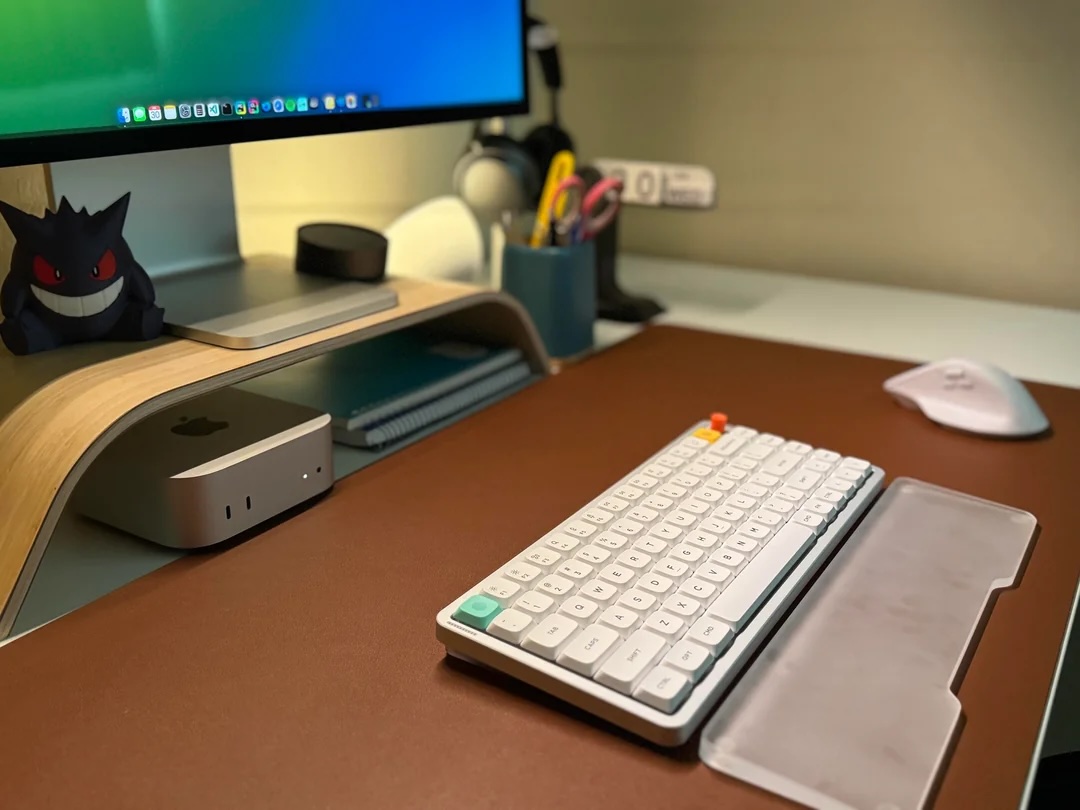
Photo: [email protected]
Sennheiser headphones
And one more item in the setup caught my attention. I’m not sure I’ve come across Sennheiser Momentum 4 over-ear wireless headphones in a setup before. I had the third edition and loved their old-school look and spacious soundstage. Then, a while back, I gifted them to my brother after he helped me move to a new place. Still second-guessing that decision.
“I like them for the most part,” Ed said about the well-regarded cans. “After short periods of time wearing them, I start feeling ear fatigue, which doesn’t happen with my Beyerdynamic headphones.”
Shop these items now:
Computers:
Display, stand and light bar:
Nuphy Air75 keyboard, wrist rest and mouse:
- NuPhy Air 75 v3 low-profile mechanical keyboard
- Clear acrylic keyboard wrist rest
- Logitech MX Master 3S wireless mouse
Audio:
You can use the lightweight, foldable Sennheiser Momentum 4 Bluetooth over-ear headphones for dynamic music and clear calls. The cans feature Adaptive Active Noise Cancellation, 60-hour battery life and a choice of five colors.
- Great sound
- Adaptive ANC
- 60-hour battery life
- Somewhat expensive at full price

Furniture and lighting:
If you would like to see your setup featured on Cult of Mac, send some high-res pictures to [email protected] (iPhone pics usually work fine). Please provide a detailed list of your equipment. Tell us what you like or dislike about your setup, and fill us in on any special touches, challenges and plans for new additions.

David Snow, an expert on Apple hardware and software, writes on a variety of technological and cultural topics for Cult of Mac. They include Apple news, technology buying guides, and features about computer setups and Apple TV shows and movies.
With 30 years of experience covering technology and other subjects, he has written and edited for numerous print and online publications, including CMP Media, TechTV.com, CNET, Wired News, Red Herring magazine, Law.com, The National Law Journal and Law Technology News magazine. Among other roles, he served as executive editor of the Law.com network of websites and editorial director, technology, for ALM Media.
Snow graduated with a B.A. from Syracuse University with majors in magazine journalism and psychology. While there, he worked as a reporter for The Daily Orange newspaper and associate editor of Equal Time magazine.
Founder of the blog At the Waterline, he can be reached on X (formerly Twitter) via @atthewaterline and on Mastodon via @dsnow.

