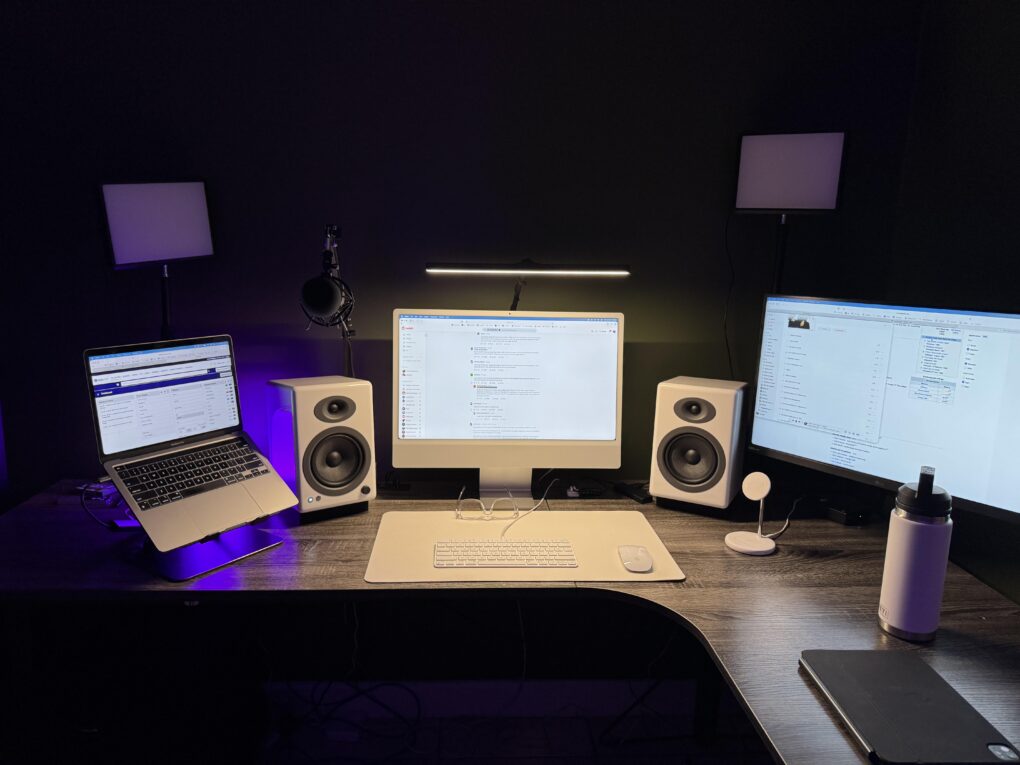
Today’s featured setup user seeks out and gets good advice on his upgrade questions. He runs an aging MacBook Pro and a more recent iMac, but wonders about replacing them both with a newer MacBook Pro, perhaps an M4 Pro model. Commenters on his post offered useful thoughts, below, on future-proofing choices of Mac models as well as external display options.
This post contains affiliate links. Cult of Mac may earn a commission when you use our links to buy items.
User’s dilemma: M3 iMac vs MacBook Pro (M4 Pro)
Apple's all-in-one desktop machine features a 24-inch built-in display and color-matched keyboard and mouse -- plus all the basic specs needed for casual uses.
- Simple all-in-one design
- Beautiful 24-inch display
- Color matched keyboard and mouse
- Not the most powerful Mac

In a post entitled, “Replace M3 iMac with M4 MacBook Pro?” WFH real estate agent and Redditor Icy_Astronaut_7534 posed the question about which of his Mac machines to replace when, and with what. He runs an M1 MacBook Pro with 8GB of RAM. It drives a 27-inch LG display, though he also leaves the laptop open for use with Universal Control. But he also runs an M3 iMac (16GB RAM, 512GB SSD) as his main machine that he thought he might ditch as well, possibly in favor of an M4 Pro MacBook Pro. He said he loves the newer laptops’ two-external-display capability, and maybe it could replace both his Macs.
“I always have plenty of tabs open. I also am starting to do more video editing and more demanding tasks. It’s been great thus far, but my M1 MacBook Pro with 8GB RAM is starting to be insufficient. Instead of replacing only my laptop, I’m considering replacing/selling/trading my iMac as well, while it’s still worth something, since I plan on upgrading my MacBook at some point anyway, and eventually this 16GB M3 iMac won’t cut it.”
“I’m looking for recommendations for MBP Chip, RAM, SSD (leaning M4 Pro, 24GB, 512GB), and a main monitor since I would no longer have the iMac’s beautiful 24 inch display,” he added. “Or whether I should just wait for the M5 MacBook Pro this fall since I don’t necessarily need to upgrade at this moment. Open to all suggestions.”
And the suggestions came from helpful commenters. Coincidentally, Icy’s top pick for MacBook Pro is exactly the model I have as my main daily driver.
What helpful commenters suggested on iMac vs. MacBook Pro and display questions
This Apple laptop features an M4 Pro chip with a 12-core CPU, a 16-core GPU and the same lightweight design we all know and love. Available in space black or silver.
- 14.2-inch Liquid Retina XDR display
- 24GB unified memory (configurable from 16GB to 36GB)
- 512GB SSD storage (configurable to 1TB)
- Same design as previous models

Just replace the MacBook Pro with MacBook Air
- The iMac you have is great. You ain’t getting a screen like that for any reasonable amount of money, and the price of the Studio display is just stupid. If I were you I would just buy a new [MacBook] Air when the M1 craps out. But you say this iMac is not gonna cut it. I don’t know what could you be doing in real estate that a base chip (even an M1 tbh) cannot handle. Keep in mind Pro and Max chips are equally as fast as the base chips, they just have more cores. If you wanna add a third display, while not breaking the bank, I would highly suggest the LG 4K Ultrafine 27-inch. Also, having two devices is actually better than having one device. People sometimes don’t realize how beneficial it can be to be working with multiple Macs in parallel.
- Icy’s reply to above: I think you’re right, my workflow isn’t chip demanding, just RAM demanding. And having two separate computers kinda spaces out that workload. I think I’ll just wait and upgrade, like you said, once this MacBook has its last breath. Maybe I’ll look to explore a Mac mini or something in the future to replace my iMac when my work flow demands it.
Add an external SSD or go with M4 MacBook Pro
- What your leaning into should be good for your editing needs 16-24GB since you already know the 16GB feel with ur iMac. Just get an external SSD when you need it later. But if you just do light editing on videos, nothing major, then you can also go M4 only and 24GB 1TB [SSD] if it’s a hassle to carry around an external SSD. Should be priced around the same.
Switch to used MacStudio and external 4K display
- If you just use the laptop for basic stuff, keep it. However … I’d get a second hand Mac Studio and get a decent but inexpensive 27-inch 1440p (or 4K) monitor. You won’t get the same level of sharpness but you’ll be saving money in the long run. That way, if you decide to get a Studio Display later, you can save money overtime to get that instead of trying to get all of it in one go.
Watch out for laptop swelling with MacBook-as-desktop
- I’m not a fan of using MacBooks as a desktop after having a few get wrecked from battery swelling. But if you need your desktop and laptop fully in sync, it’s not a bad option, but may cost you long term. In theory they improved battery chemistry and the OS battery health improvements, but they may still run hot and be susceptible depending on what you’re doing. I try to minimize that risk that comes with having it plugged in all the time.
Shop these items now:
This crisp and clear 4K display features an Ergo stand, UHD 4K resolution, IPS technology, HDR 10 compatibility and USB-C connectivity.

Computers and stands:
Display and overhead desk lamp:
Input devices:
- Magic Keyboard (mini)
- Magic Mouse 2
Audio:
Other lighting:
If you would like to see your setup featured on Cult of Mac, send some high-res pictures to [email protected] (iPhone pics usually work fine). Please provide a detailed list of your equipment. Tell us what you like or dislike about your setup, and fill us in on any special touches, challenges and plans for new additions.

David Snow, an expert on Apple hardware and software, writes on a variety of technological and cultural topics for Cult of Mac. They include Apple news, technology buying guides, and features about computer setups and Apple TV shows and movies.
With 30 years of experience covering technology and other subjects, he has written and edited for numerous print and online publications, including CMP Media, TechTV.com, CNET, Wired News, Red Herring magazine, Law.com, The National Law Journal and Law Technology News magazine. Among other roles, he served as executive editor of the Law.com network of websites and editorial director, technology, for ALM Media.
Snow graduated with a B.A. from Syracuse University with majors in magazine journalism and psychology. While there, he worked as a reporter for The Daily Orange newspaper and associate editor of Equal Time magazine.
Founder of the blog At the Waterline, he can be reached on X (formerly Twitter) via @atthewaterline and on Mastodon via @dsnow.

