Mobile menu toggle

Search results for: apple tv

iMovie Officially Announced For iOS

By

20110302-10482827--img4660

Now that the iPad has a video camera, you’ll need something to edit videos together. Enter iMovie for iOS, which Apple is announcing today.

Features of iMovie for iOS include a precision editor, multitrack audio recording, new themes, AirPlay to Apple TV, and the ability to share your videos in HD.

A universal app, iMovie for iOS will also run on the iPhone. When you start up the app, there’s a new home screen which shows thumbnails of your movies in poster format.

Click through, and the iMovie interface is up top with the timeline below. A camera button on the right lets you use your device’s camera to record in realtime, or pull in from your video bin.
Tap on a clip and you get two handles to choose the segment you want to include: a reverse pinch triggers the precision editor for a more precise edit.

In iMovie for iOS you have full control over transitions: press and hold on top dot to choose the point within the video that you want to end. You can also add and subtract frames from both sides of a clip simultaneously, and view the audiowave forms of all your clips. There’s also a new voiceover recording system.

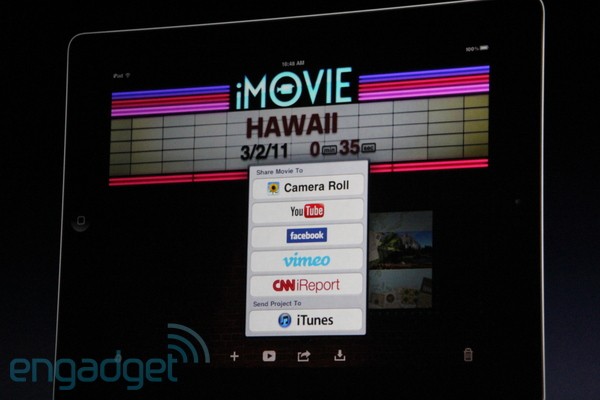
For music, you can choose songs from your iPod library, or choose another theme’s music. A Share button lets you send to YouTube, Facebook, Vimeo, CNN iReport, and to iTunes.

iMovie will be available on the App Store on March 11th for $5.

‘AirMusic’ Streams Your Tunes to PS3, Xbox, PC [Must-Have App]

By

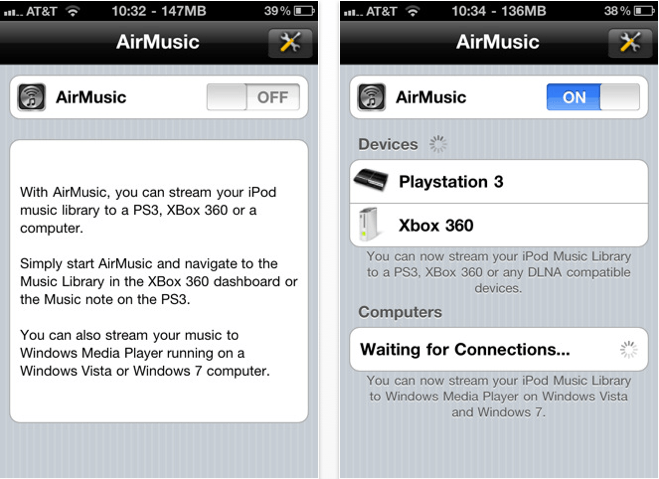
AirMusic for iPhone

AirMusic($0.99) iPhone – Utilities

AirMusic is a superb application for streaming your music over Wi-Fi to your PS3, Xbox 360, or PC, and allows you to wirelessly listen to your tunes through your TV without using an AppleTV. Its incredibly easy setup means your music is there the moment you want it – just ensure all of your devices are on the same Wi-Fi network, start AirMusic, then navigate to your music library on your console or PC and your tunes will be there – it couldn’t be easier.

Although I use an AppleTV in our living room, I downloaded this application for use with a PS3 in another room and so far I can’t fault it. The only downside to AirMusic is that it won’t play older iTunes purchases that are protected by DRM, but I’m yet to find a way of playing DRM-protected tunes on my PS3 without putting them onto a CD first. AirMusic setup takes literally a few minutes, streaming is effortless, and the quality is great. If you’re looking for a way to share your iPod library with your Xbox, PS3, or PC, I recommend you give AirMusic a go!

[xrr rating = 80%]

This Week’s Must-Have iOS Apps: Tap DJ, Wunderlist HD & Text Writer

By

Screen shot 2011-02-27 at 20.39.00

Not many DJ applications for iOS devices quite deliver the experience you get from using this week’s first must-have app – Tap DJ. Its bucket-load of features, together with its brilliantly designed and incredibly intuitive user interface, make it the ultimate pocket DJ application.

Another of our favorites is Wunderlist a beautifully elegant task manager that’s been around for a short while on the iPhone, and now it’s available in all its HD glory on the iPad

Writing on your iOS device can sometimes be a painful experience, especially if you don’t have a good text editor. Fortunately, our third must-have application is just that. Text Editor is a wonderfully effortless, yet incredibly useful text editor that will go a long way to ensuring that writing on your iOS device isn’t so bad.

Find out more about the applications above and our forth must-have – Oscar Backstage Pass after the break!

Get Your ‘Oscar Backstage Pass’ Ready to Make This Year’s Awards the Best Yet! [Must-Have App]

By

Oscar Backstage Pass for iOS

Oscar Backstage Pass($0.99) Universal – Entertainment

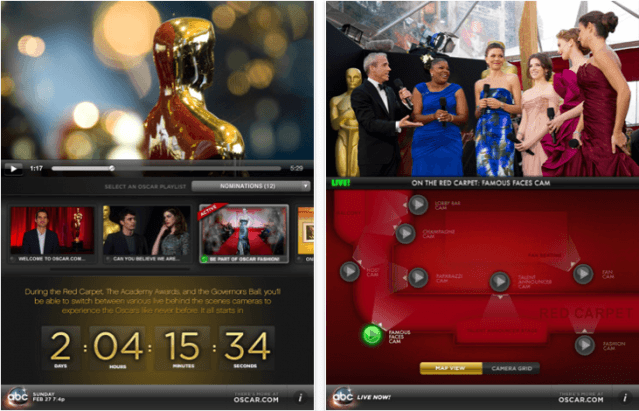
To help you make this year’s Oscars the most enjoyable, the official Oscar Backstage Pass application for iOS gives you access to live streams from exclusive cameras places throughout the red carpet, the Kodak Theatre, and the Governors Ball, so that you can go beyond the TV broadcast and experience more live action as it happens. Watch the 83rd Academy Awards with this ingenious interactive application on your iPhone or iPad and get access to more stars, more glamour, and more of everything you love about the Oscars.

Its brilliantly designed user interface makes it easy to navigate between each live camera and shows you exactly where each camera is placed at the awards – this marvellous idea ensures you won’t miss a single moment of Hollywood’s biggest event.

Watch the Oscars live this Sunday, February 27th, at 8et/5pt on ABC.

[xrr rating=80%]

Daily Deals: iPhone App Price Drops, iPhone App Freebies, $149 8GB iPod touch

By

cult_logo_featured_image_missing_default1920x1080

758559-large758559-large758559-large

We wrap up another week with more iPhone applications. A number of apps are available with lower prices, including “Paperboy,” a port of a 1980s arcade game. From the absolutely free bin comes several other apps, such as the value comparison application “Comp and Save.” We also take a look at some iPod touch deals, including one 8GB unit for just $149.

Along the way, we also check out some discounts on iPhone 4 cases, some travel charges and software for the Mac. As always, details on these and many other items can be found at CoM’s “Daily Deals” page right after the jump.

iPad Helps Capture Robbery Suspect In West University, Texas

By

HoustonSkyLine

Earlier this week, ABC 13 Action News in Houston, Texas reported that an unnamed West University woman was robbed in front of her house. An iPad owned by the woman was used to locate the robbery suspect.

The woman was robbed at gunpoint while placing her child into her car. The robbery suspect took her jewelry and iPhone.

How Streaming iPhone and Mobile Computing Rumors Tie Together

By

Apple Pay's ease of use may lead to increased impulse buying -- and that's exactly what Apple's hoping for.

On Monday, we reported how Apple is working on a streaming-only iPhone. The smaller, lighter device will have limited storage. Media and data will be streamed to the device over the network, like the second-generation Apple TV.

In November, we reported that the iPhone 5 will use a Near Field Communications chip (NFC) to enable an ambitious remote computing system. Wave the NFC-equipped iPhone near any compatible Mac, and the user’s entire Home directory will be loaded onto the guest machine — files, photos, music and even the same desktop background. It will be as though the user is sitting in front of their home computer. Apple has even patented the system.

How are the two related?

PwnageTool 4.2 Fixes iBooks Issue, Untethered Jailbreak, Available Now

By

PwnageTool 4.2 tweet

The latest update to PwnageTool from the iPhone Dev-Team is now available to download, and version 4.2 brings with it untethered jailbreaking for devices running iOS 4.2.1 and fixes the recently discovered iBooks issue that prevents a user opening an iBookstore purchase on their jailbroken device.

PwnageTool uses the “feedface” untether developed by the Chronic Dev Team to allow for untethered jailbreaking in the latest release, and supports all 4.2.1 devices other than the iPod touch 2G. Another issue fixed in this version is the Wi-Fi problem that some users had with the second-generation AppleTV.

If you’ve already jailbroken your device and you’re desperate to gain access to your iBookstore purchases, don’t think you need to restore and jailbreak again with the latest version of PwnageTool. On their blog, the iPhone Dev-Team have stated that fixes for both the iBooks issue, and the Wi-Fi issue for AppleTV, will be available in an upcoming Cydia package that you’ll simply be able to download and install on your device.

Once again that’s iOS jailbreakers 1, Apple nil.

How the Mac Got Started, in its Birth-Father’s Words

By

511px-Macintosh_128k_transparency

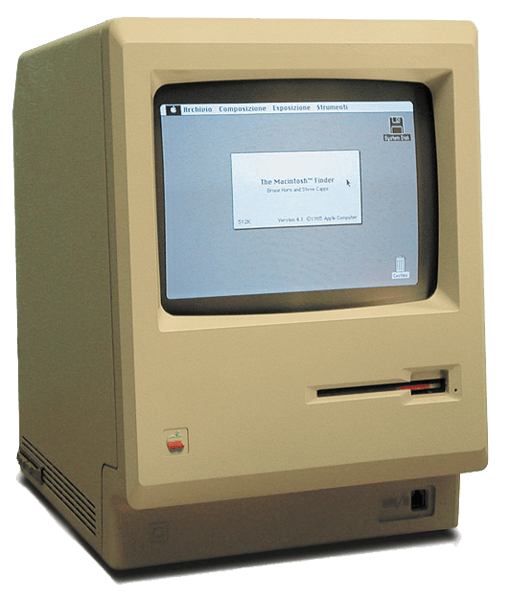
Image via Wikipedia

Fast Co.Design has a very interesting Apple history artifact posted up today: the birth of the Mac, as told by Jef Raskin, the late founder of the Mac project. Jef’s son Aza wrote the piece and provides scans of the original document if you’re into authenticity instead of legibility.

It’s worth noting before you dive in, which I highly recommend, that Raskin’s vision for the Mac was very different from what Apple actually produced once Steve Jobs took over the development team. Raskin wanted the most unified hardware and software imaginable. One screen, one keyboard, one processor, one memory configuration, no expansion slots, one box. Oh, and he wanted a printer built into the box.

He also wanted to get rid of all modality in a computer. So, for example, if you started typing, the word processor would open and capture what you were typing (rather than having Clippy note that you’re writing a letter). A lot of that stayed in, but Jobs made it much more powerful and, ultimately, diverse and fragmented a platform than Raskin ever envisioned (see the Canon Cat for that).

As Aza Raskin notes, his father’s philosophy is much closer to what’s going one with the iPhone and the iPad. After all, you can have any iPad you want, so long as it comes in brushed aluminum.

This item of controlling appearance is quite significant: for example it is impossible to write a program on the Apple II or III that will draw a high-resolution circle since the aspect ratio and linearity of the customer’s TV or monitor is unknown. You can probably promise a closed curve, but not much more. You cannot promise readable characters, either. Therefore, a predictable, documentable system must be entirely under Apple’s control. LISA is Apple’s first system to allow us to design in context, without depending on chance for the all-important visual aspects of the computer’s output.

Well said. And one of the few places Jef and Steve really saw eye-to-eye, in the long run.

Sexytime Soundtrack App Puts the Laughs Back in Sex

By

Picture 6

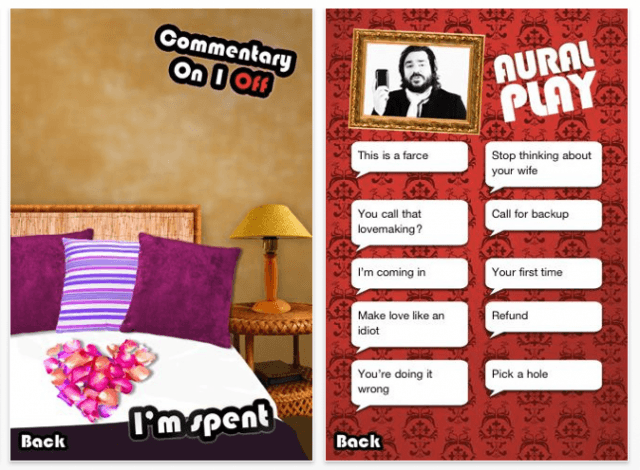
If you need a good laugh as much as you need a roll in the hay, a new app that promises to synch music to the intensity of your lovemaking may be just the thing.

The Matt Berry Sexytime Soundtrack App works using the iPhone’s accelerometer – put your phone on your bed and it should regulate the music to your amorous ministrations. So the harder you go at it, the raunchier the music gets.

Just don’t expect to keep a straight face: you’ll be goaded and chided by the voice of Matt Berry, who interjects things like: “You’ll probably get breakfast for this.”