Mobile menu toggle

Search results for: Apple One

Macs’ Virus Immunity is Reaching Its Expiration Date

By

cult_logo_featured_image_missing_default1920x1080

I got an email today from some friends who run a Bay Area IT consultancy. They deal almost exclusively in the PC trade but are Mac savvy themselves, so I was startled a bit by the subject line for their monthly Good News / Bad News newsletter: Two Very Bad Mac OSX Viruses.

Of course, I knew from chatter over the summer and from more recent conversation that the days of Macs being impervious to viruses and malware are probably numbered and sure enough, even Apple Support now officially recommends users install antivirus protection on Mac systems:

Apple encourages the widespread use of multiple antivirus utilities so that virus programmers have more than one application to circumvent, thus making the whole virus writing process more difficult.

The Apple knowledge base article goes on to recommend programs from Intego, Symantec/Norton and McAfee, all of which are commercially licensed products.

My consulting friends recommended iAntivirus, which is a free program, and said, “We have never used it but reviewers say it is good for being a free program. Download and use all free software with caution!”

Another free Mac virus checker (though the developer gratefully accepts all donations) is ClamXav, an updated version of which was released on Monday; the program gets 4.25 stars at Mac Update.

So, is that it? Are we all going to opt for the flu shot from now on? If you’ve installed antivirus software on your Mac, tell us how it’s going and what you like. If you haven’t, or don’t plan to, tell us why in comments.

iProduct Placement: Disney’s “Bolt” a Turn Off

By

post-5313-image-9af68057574c6850c319674ac9638ded-jpg

Disney animation movie “Bolt,” where John Travolta lends his voice to the dog-hero in the title, has a brief, fleeting moment of Apple product placement.

Pixar blogger and CoM reader Guido Rogall explains: in Bolt “there’s a chase scene on a train. For a few seconds you see a young woman with a laptop, either a MacBook or iBook, but what is funny about it is that the Apple logo is not lit.”

As another one of our sharp-eyed readers pointed out, this Apple turn-off  scenario happens every so often in movies.

Wonder if it’s a mistake or makes it product placement more memorable to clued-in viewers…

AppStore Bucks Economic Downturn Trends

By

cult_logo_featured_image_missing_default1920x1080

Blogger Charles Teague has done some comprehensive analysis of emerging trends based on the AppStore’s first 5 months of business and there’s no denying Apple’s online distribution model has exploded out of the gate.

I wrote a couple of weeks ago about the proposition that the AppStore could be Apple’s most revolutionary development of all, which Teague’s research would appear to confirm in many respects.

The chart below shows the number of applications being released per day, with momentum clearly trending upward and sitting currently at more than 140 new apps per day. There are more than 9000 apps available on the AppStore, with the ratio of paid to free apps at about 7:2.

Foof Shop Holiday Gift Ideas

By

cult_logo_featured_image_missing_default1920x1080

We came across some very groovy Mac and iGear sleeves and covers from a shop in Australia that could have just the thing for the Apple nut on your holiday gift list.

Foofshop offers ‘foofbag’ Apple laptop sleeves for the MacBook line of notebook computers and soft ‘foofpod’ iPod covers for use with iPod, Touch & iPhone.

Sampled in the gallery below are some of the colors and case designs, all of which are snug fitting and soft padded in sherpa fleece, protecting your stuff from scratches and things that go bump.

Both the bags and pods are slot loading, with an opening at one end; designed for easy removal with no silcone, neoprene, straps, velcro, buttons or clips.

All their products are handmade locally in Australia and the company is certified “carbon managed” by Carbon Planet; 100% of their greenhouse gas emissions have been offset since 2006.

Kiku Mahura foofbag Kiku Makura foofpod Nami Aka foofbag
Nami foofbag Purple Acrylic Tuft foofbag Sea Urchin Acrylic Tuft foofbag

Airport iStore Cleared for Takeoff

By

post-5256-image-0493f8834840777ba8fffcf6e955d63d-jpg

The first Apple reseller is as good a reason as any to fly through Montreal’s Pierre Elliot Trudeau airport.

The recently-launched Boutique iStore, a petite 225 square feet, offers free Wi-Fi, an iPod bar as well as a few useful accessories, like the power cord you left in the office in a hurry to dash.

It’s the sister store to an Apple retailer in central Montreal, which gives some assurance that the operation isn’t fly-by-night — and that if you need to service on something you bought at the airport, you don’t have to trek back out there.

ifoAppleStore, a site dedicated to keeping an eye on Apple stores, said that Apple retail execs once mentioned the mini-store prototype might move into airports, but the concept was never expanded beyond the original nine stores.

With long layovers the norm, this is an idea whose time has come.

Via Softpedia

24″ Cinema Displays Have Shipped

By

post-5242-image-1f1bcbc126086f887062aec819628a80-jpg

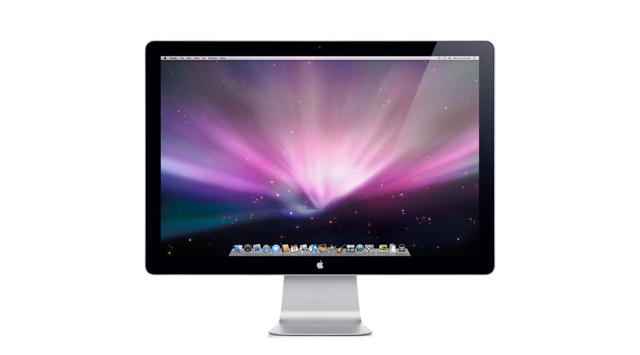
Apple’s latest lstandalone Cinema Displays, the 24″ widescreen with LED backlight technology announced in August, have shipped and began arriving Wednesday for customers also fortunate enough to own Apple machines with mini-Display port connectors.

The new 21lb bright, shiny things work only with the new MacBook and MacBook Pro notebooks and the Macbook Air, a limitation puzzled over by many in the wake of the August announcement, but now that they are here, object lust would seem to be kicking in predictably for many.

Ars Technica blogger Clint Ecker did an unboxing first impressions post on Wednesday, a few shots from which can be seen in the gallery below. Of note is the high-gloss reflectivity of the display glass and the fact that Mac OS X elegantly defers to the display’s iSight instead of the notebook’s. It also uses the USB audio on the display, disabling the output on the notebook until you plug into the notebook’s headphone jack. Ecker says the Cinema Display appears “slightly brighter” than the display on a similarly sized iMac.

24-inch-led-screen-1-2 24-inch-led-screen-6-20081126-135523
24-inch-led-screen-1-3 24-inch-led-screen-9

Via Ars Technica

Job Compass – An App for These Times

By

post-4854-image-68b57081f535338942f5424f8703b89e-jpg

I wrote last week about the impending release of Job Compass, an iPhone app that utilizes the phone’s location-aware capability and Google Maps to deliver location-specific results to users’ job search queries. The app had its debut on the iTunes AppStore over the weekend and I’ve spent the past few days playing around with it.

I am happy to report Job Compass is a useful, intuitive and well-designed application that takes out of the equation some of the more tedious aspects of searching for new employment. In the current economic climate, where the unemployment rate in the US has risen in each of the past six months and now stands at a level higher than its most recent peak in 2003, Job Compass is a handy app indeed.

On launch the program asks permission to use your location as a base from which to perform a job search. After a few moments, a Google map pinned to your location appears and you’re invited to search for a job. Users can put in anything they want (now’s the time to think – what’s your dream job?) and choose to search for listings within a 5, 10, 25, 50 or 100 mile radius of their current location.

A recent search for writer/editor positions within 10 miles of my house returned five open positions, all of which I could then call up and read about, either in short digest or full description form. Users can choose to send themselves an email with a link to the job description, or open it in Safari and apply for the job right from the iPhone. Though, given the limitations of the iPhone’s virtual keyboard and the raft of text entries usually required in an online job application, sending an email link is almost always going to be your best option. (Note to Ed.: I’m not looking, that was just an example!)

Titus Blair, spokesman for Securicy Ventures, the app’s developer, told Cult of Mac, “we have partnered with most of the large jobs boards with the goal of being the #1 source for location based jobs searches,” and noted that Jobs Compass’s patent pending search protocol currently scans a database of over 2+ million listings, with more added daily.

Blair acknowledges “on Edge it can run pretty slow,” but says “we are working directly with Google on dramatically speeding this up for release 2.0.” Other enhancements in the works for coming updates include displaying maps and search results in landscape mode, the ability to input zip codes to search in other locations, as well as support for listings in the UK and Canada, and possibly other countries down the road.

Job Compass sells for $3.99 on the iTunes AppStore, which, if you’ve just lost your job or are interested in finding a new one, could prove to be a worthy investment.


Beat Holiday Stress With Koi Pond

By

post-5146-image-ca018d4889aad07224f2a01617b51413-jpg

You don’t need to be in holiday stress mode to realize the zen benefits of playing with Koi Pond on your iPhone or iPod Touch. Tis the Season, however, and the dev team at The Blimp Pilots studio have added a holiday theme for your added enjoyment of one of the best apps I’ve seen to leverage the awesomeness that is Apple’s touch interface and accelerometer.

Koi Pond is an application with a graphically realistic pond filled with Koi fish. You can move your finger around the screen to create ripples in the water that send the fish scurrying for safety off the screen. You can rearrange the lily pads, feed the fish, even get them to come and nibble your finger by leaving it in the water. The app has beautiful 3D sound, too and rates, for my money, among the best bucks I’ve ever spent.

33GB iPod Touch?

By

post-5140-image-9dc54ef46cb73dabbaafe039ae3f0dc9-jpg

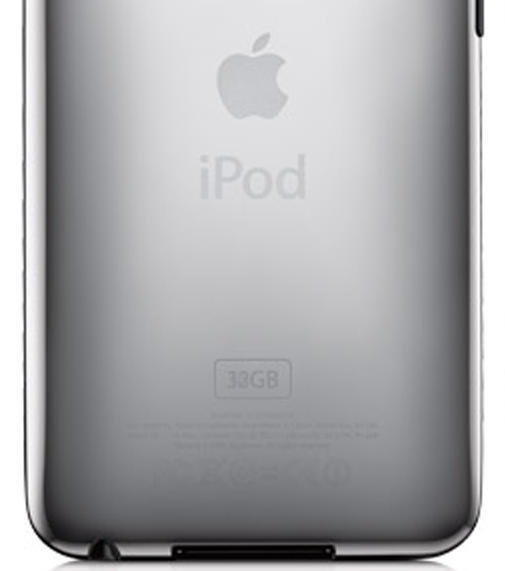
On the Apple Store website, it seems clear your choices among the iPod Touch offerings are 8GB, 16GB and 32GB models. Alerted by a photo posted by Flickr user iTomath, however, I was drawn to the What’s New with iTouch info page on the Apple site and, sure enough, the photo on the page as of this writing appears to indicate a 33GB device. Not that 1GB makes any difference in this day and age, but it does seem odd, doesn’t it?