Mobile menu toggle

Search results for: Apple One

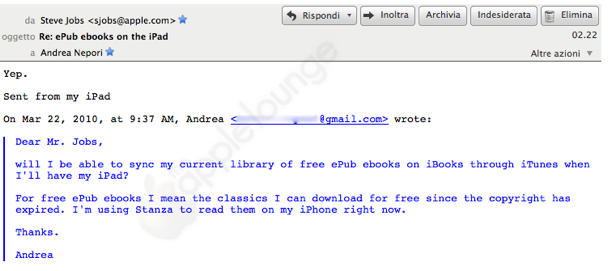
Steve Jobs Answers Email Via iPad

By

post-34568-image-48429602d1ce3521876a4b471913c6c1-jpg

It’s not easy being Steve Jobs: one minute, you’re the guy behind the world’s most admired company, the next you’re about to become a pin cushion turning a profit for a journalist as a sitcom.

Still, no matter what you think of Jobs, it’s cool that every now and then he takes a few seconds to answer email from everyday users.

He seems to have been busy with a lot of his famous, less-than-a sentence replies lately, but his answer to an Italian blogger at The Apple Lounge may be the first one he’s sent using an iPad. (Up until March 20, he was still using 3.1.2 iPhone OS.)

Opera Mini Browser Submitted to the App Store

By

post-34566-image-340b78c96778d6667cede5afe9e97b5c-jpg

httpvhd://www.youtube.com/watch?v=OpTCS3g-cBY

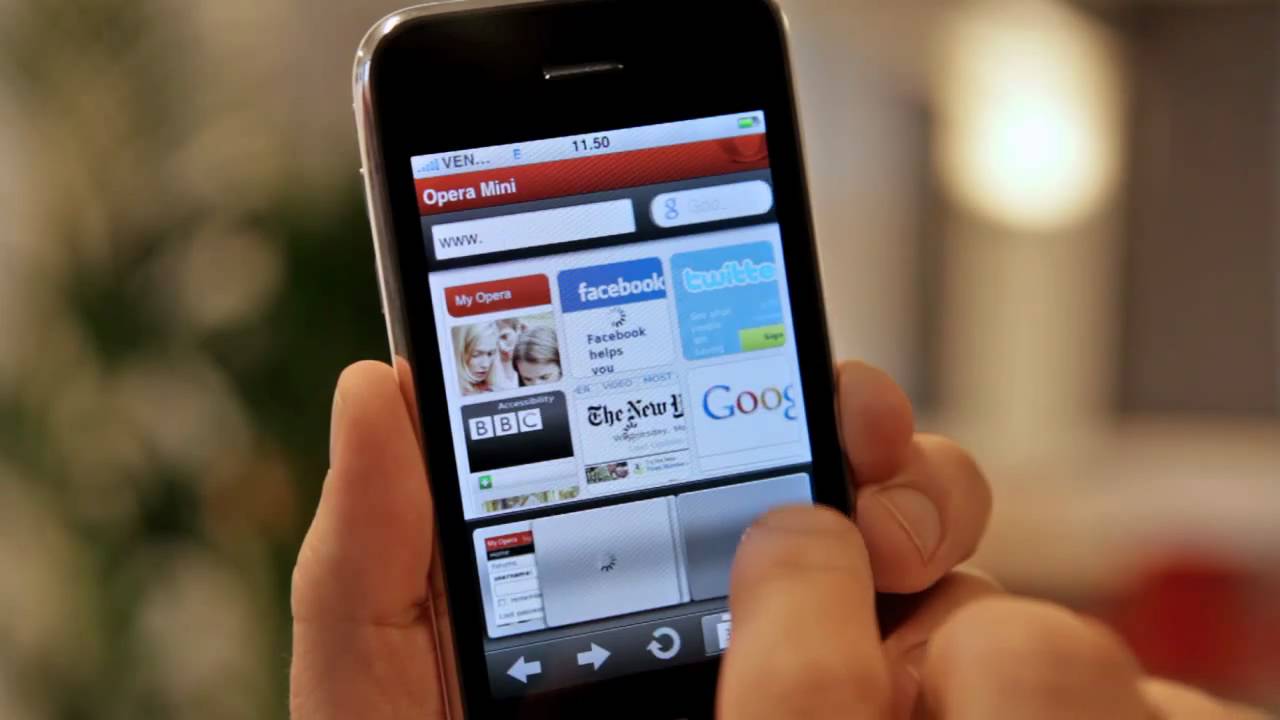
According to a long and enthusiastic press release (doubtlessly designed to bring as much attention to the approval process as possible), Opera has announced that they have submitted their Opera Mini browser to the App Store.

Although Apple often takes an unfavorable view upon applications which duplicate functionality of built-in iPhone apps, Opera thinks their Mini browser gets around the issue by refusing to execute code natively on the handset. Instead, it asks Opera’s servers to translate, optimize and render the data into a format that only the Opera Mini browser can understand.

The result? A browser that is supposedly up to five times faster than Mobile Safari, especially on EDGE.

Steve Jobs Hints at Hardware Refresh as MacBook Pro Supplies Become Constrained

By

post-34538-image-a3e9aa52bd061fb39a5c0cc228f0096f-jpg

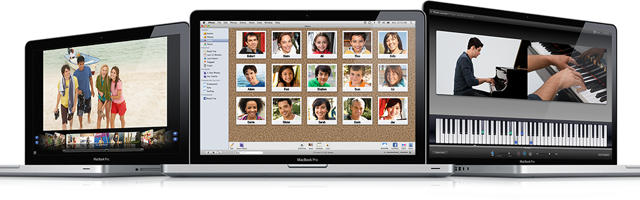
Don’t fret, my little poppies. I know you want a new MacBook Pro, with one of Intel’s sexy new Core iX mobile processors fused to its circuit board cerebellum. Uncle Steve says not to worry. Literally. But reading between (or below, or above) Steve Jobs’ sole line of text commenting on the matter, it’s easy to guess that a hardware fresh of the MacBook line is coming soon.

According to MacRumors, MacBook Pro shipments have “abruptly” become constrained, which generally points to an imminent refresh.

Even better, one of their readers wrote to Mr. Jobs directly, expressing concerns about Apple’s recent focus on the iPad and the lack of news about MacBook Pro refreshes.

I recognise the need for secrecy etc but I am really losing heart in the lack of vision for the MBP and Mac Pros. Not expecting a response but as someone who has personally switched dozens of people onto the mac way this is a sad email for me to compose.

To this maudlin complaint, Jobs played the world’s smallest violin on one hand while typing this reply into his iPhone with the other.

Not to worry.

If you’re in the market for a new laptop, you might want to start saving up your lunch money.

Report: Early iPad Apps Heavy on Games, Light on Books

By

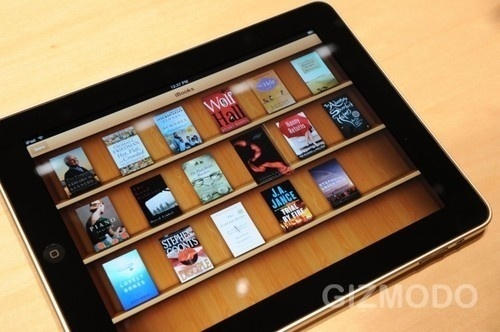
Books were just 3 percent of the apps tested for the upcoming iPad.

Could the iPad become another gaming platform for Apple, like the iPod touch or iPhone? While much attention has been focused on getting books onto the new tablet device, new research indicates games comprise almost half of the iPad applications tested so far.

Games accounted for 44 percent of early applications tested on the iPad, followed by entertainment, according to analytics firm Flurry. Only 3 percent of those initial apps are books, the company announced Monday. The iPad is set to begin shipping April 3.

Individual Apps Now Giftable At The App Store

By

gift

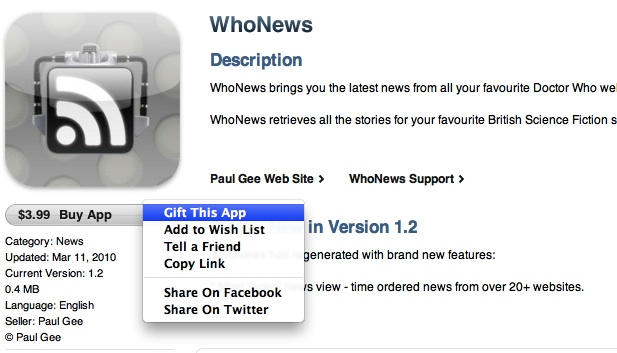
From time to time I come across an iPhone app I think would make a great gift for a friend or family member (in this case, my mom, since she has an iPod Touch and everyone else in my family is either Apple-phobic or a Luddite). Problem is, it just seems too authoritarian to send them a $5 iTunes Store gift card with stipulations on how to spend it.

Well, problem solved: Apple is apparently now allowing individual apps to be given as gifts. Although no official word has come from Apple — the heads-up comes from the folks at TUAW — I clicked on the  “Gift This App” menu item and, sure enough, was taken to a screen to handle the details.

Presumably, the gift is actually a code similar to the redeem codes app reviewers typically receive from developers when reviewing apps. The gift can be emailed or printed out and mailed, but can only be redeemed by residents of the same country as the purchaser, and can’t be bought with iTunes store credit.

[via TUAW]

Daily Deals: Mac mini $556, Nikon D90 $699, App Store Freebies

By

cult_logo_featured_image_missing_default1920x1080

772888-large772888-large772888-large

We start the week with a deal on Apple’s mac mini. This bargain covers the 2.26GHz Core 2 Duo model for $556. Next up is a refurbished Nikon D90 body. This digital SLR is rated at 12.3MP and is priced at $699. Finally, our top trio includes new App Store freebies, including 80s Galaxy, a classic retro game.

As always, details on these and many more bargains are available on CoM’s “Daily Deals” page right after the jump.

Chart: the App Store has over 130,000 more apps than Android Marketplace

By

post-34353-image-adcd9b68e8030feee800e9262daa5da2-jpg

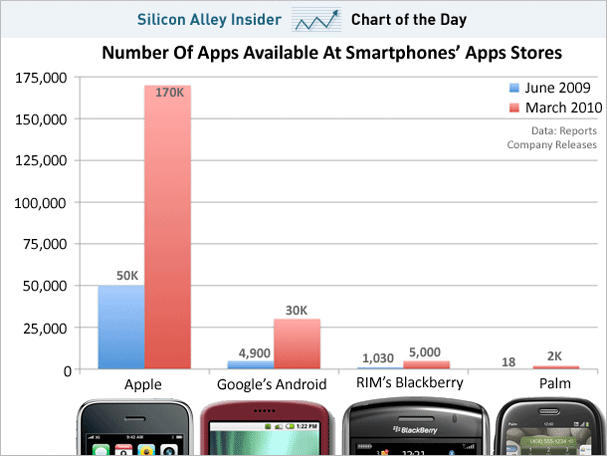
Not that there was any doubt which app marketplace had the most apps out there, but sometimes, seeing it all laid out there as empiric data points on a chart can really put things in fresh perspective.

Take this chart just posted by Silicon Valley Insider, which ranks all four major smartphone providers according to how many apps they have available on their marketplaces.

Of course, we knew Apple was destroying pretty much everyone out there in volume of apps available. Of the competition, Android’s doing best: they’ve multiplied their app catalog sixfold in the last nine months (to Apple’s own 3.5x) but unless they keep that up for the next 18 months, they’re not likely to catch up… especially with the iPad imminent.

As for RIM and Palm? The fresh perspective here isn’t that Apple’s beating the competition… it’s that they’ve managed ripped the heads off of both RIM and Palm’s steaming App Marketplace trunks.

Amazon announces Kindle for iPad

By

navarro-sect01-popover._V215370788_

Amazon’s Kindle used to be the best e-reader out there, but now that the iPad’s been announced, the e-reader’s slowly-updating, monochrome display looks like something the ghost of Johannes Gutenberg is ectoplasmically sliming digital type upon from beyond the grave.

No surprise, then, that they’ve already announced the Kindle for iPad app… or, officially, Kindle Apps for Tablet Computers (Including the iPad).

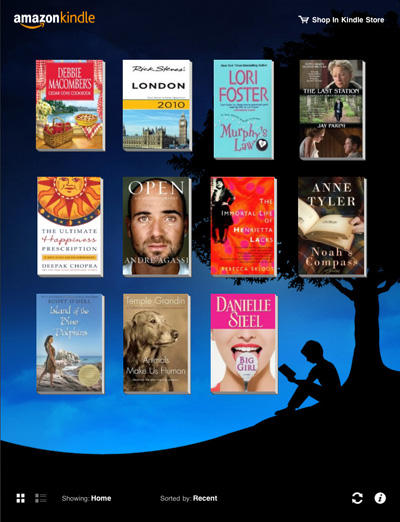
Make no mistake: this is basically a Kindle-compatible version of iBooks, right down to a re-skinned library screen. The New York Times describes it in action:

The Kindle app for the iPad, which Amazon demonstrated to a reporter last week, allows readers to slowly turn pages with their fingers. It also presents two new ways for people to view their entire e-book collection, including one view where large images of book covers are set against a backdrop of a silhouetted figure reading under a tree. The sun’s position in that image varies with the time of day.

The big question is whether or not Apple is even going to let apps like the Barnes & Noble reader or Amazon’s Kindle for iPad on the App Store. Both would compete with iBooks as an e-reading app, and Apple has a history of turning down apps because they duplicate existing functionality.

Even if Apple does let them in, though, Apple may not allow users to buy Kindle or Barnes & Noble e-books as in-app purchases, effectively hobbling them. In fact, I’m guessing that’s exactly what’s going to happen: Apple may be willing to let existing Kindle owners migrate over to the iPad, but there’s no way Apple’s going to allow Amazon to get a foothold as an e-book seller on their own platform.

MONDAY GIVEAWAYS: Win An Assortment of Helpful Productivity and Utility Apps

By

smooth movie iphone app

Our Monday giveaways for this week are shaping up to be a great one! This week we’re giving away 8 apps aimed at making you more productive and getting the most out of your iPhone experience.

Make sure you follow @cultofmac on Twitter and re-tweet your favorite article of the past week, and make sure you include the hash tag: #cultofmac <— very important, because that’s how we filter out the tweets that are entering the giveaway. We’ll pick five random winners on Tuesday and DM you on Twitter, plus we’ll @reply you, just in case you don’t monitor your DM’s very often.

Now, here are the apps we’re giving away this week:

Smooth Movie: Do your iPhone movies have “the shakes”? Smooth Movie is a video processing utility app that smooths out shaky videos taken on your iPhone 3GS.

2D barcode generator

QR + Emoji: QR+Emoji is an unique and elegant 2D Barcode Generator, which provides a quick and easy way to create 2D Barcode (QR Code) with Emoji icon hints. You can send hidden messages to your lover with a kiss, exchange phone numbers at the bar with a smiley, or post locations to friends with memorizable icons.

smart groups iphone app

Smart Groups: A pretty good organized address book is possible. Introducing Smart Groups, a powerful app enabling support for “smart” groups and effortless organization of your contacts. Just the perfect companion for the bundled Address Book application.

Battery Go iphone app

Battery Go!: a utility which helps you determine the amount of talk, internet, video, and music time you have remaining on your current battery charge. They also show your current charge percent and let you play around with the number using a slider to see what your hypothetical battery life would be if you were to keep using your phone for a while.
CNotes: short for Contact Notes, is the ultimate extension to the built in Contacts and Notes applications on the iPhone. With CNotes, you can write notes and associate them with the contacts in your iPhone (or iPod touch) address book.

Currencies: Convert more than 130 currencies on your iPhone and iPod touch. Sleek design, easy to use. Who ever said a currency converter had to be boring and ugly?

TouchPad: Tired of having a keyboard and mouse laying around in your living room? Get rid of that lousy setup with TouchPad! Use your iPhone or your iPod touch to remotely control your computer through WiFi (wireless network). With TouchPad’s intuitive use, you’ll feel right at home if you have already used a track pad on a MacBook. It’s almost like having a micro laptop in your hands!
Feathers: Decorate your tweets with Feathers!

Daily Deals: $990 MacBook Pro 2.46GHz, 1.8GHz MacBook Air, 17″ MacBook Pro

By

cult_logo_featured_image_missing_default1920x1080

736011-large736011-large736011-large

We close out the week (and winter in the U.S.) with a trio of MacBook deals. First up is a MacBook Pro with a 2.46GHz Core 2 Duo processor, along witha 15-inch screen for $999. Next is a 1.8GHz MacBook Air with 64GB of SSD memory for $1,199. Finally, is a fully tricked-out 17-inch MacBook Pro laptop running at 2.66GHz with three years of AppleCare for $2,090.

Along the way, we also have more deals on MacBook Pros, some musical hardware for your iPod or iPhone, plus a great laptop buddy. As always, details on these and many other bargains are available on CoM’s “Daily Deals” page right after the jump.