Mobile menu toggle

Search results for: Apple One

New App Challenges Skype’s VoIP Dominance

By

post-36814-image-6154743c0943f5a0a2fbc2e1c3dc062e-jpg

With the big news that Apple lifted restrictions on 3G VoIP calls in February and rumors that Skype might allow such calls in the near future, it’s no wonder that splashes from the opening salvos in the VoIP app wars can be seen around the App Store.

The latest combatant to enter the arena is Goober, who launched their iPhone app about two weeks ago (though the service has been around for computers since 2006). And while we’re still waiting for Skype to release a 3G-capable app, Goober’s is already here.

Daily Deals: iPad and App Store Freebies, $169 8GB iPod touch

By

cult_logo_featured_image_missing_default1920x1080

773454-large773454-large773454-large

We kick off the first week of the iPad with a number of free iPad apps, including “Dictionary! for iPad.” We also check out a new batch of freebies from the App Store, including “Arcade Hoops Basketball.” We wrap up the top trio of deals with a number of iPod touch devices, starting at $169 for an 8GB model.

Along the way, we check out other Apple software and gear for the Mac fan. As always, details on these and many other bargains are available at CoM’s “Daily Deals” page which starts right after the jump.

Cult Favorite: Omni Apps Prove iPad is Not Just a Toy

By

post-36793-image-0845500e37710b3a01216ea87a532fbe-jpg
OmniGraffle brings professional diagramming to iPad.

OK, class, weekend playtime is over. Time to get to work. More than 300,000 of you have had fun since Saturday playing games, watching movies and lazing around in bed with the Sunday New York Times on your new iPad. Now it’s Monday morning and the question is: can you justify bringing Apple’s new gadget into the office and putting it to work as a productivity tool?

Well, should your work involve producing graphs, flow charts, schematic designs or anything similar the answer is a resounding yes if you’re hip to the productivity apps from Omni Group.

Jailbreakers Get iPad Root Access in Less Than 24 Hours

By

post-36748-image-6dd98850f2864e75f564c9fa0e596f7d-jpg

httpvhd://www.youtube.com/watch?v=dgHNayVtHkQ

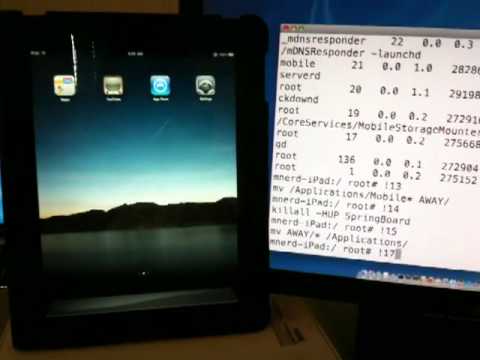
Always plucky, ingenious and defiant, it already looked pretty good that the iPhone OS hacking community would manage a zero day jailbreak… and it looks they they’ve done just that in under 24 hours, courtesy of hacker Musclenerd.

It appears that this jailbreak is using the same “Spirit” technique that Geohot demonstrated working on 3.1.3 last week, strongly implying that iPhone OS 3.2 doesn’t close any of the previous firmware’s exploitable holes.

When can the command-line-disinclined expect an idiot-proof iPad jailbreak? No word yet, although Geohot has said that he’s waiting to release his software until Apple rolls the 3.2 firmware across all devices.

The iPad Review For The Rest of Us

By

P1060501_2

The first thing I notice about the iPad is that it’s wicked fast. Everything happens in a snap. Apps fly open. They close even faster. Web surfing is lickety-split, especially on a fast Wi-Fi connection. Netflix movies load almost immediately, and scrubbing through them is quick and painless.

I marvel at how seamless it is. Turning the pages of Winnie The Pooh is so gorgeous, I spend five minutes just turning and returning the pages.

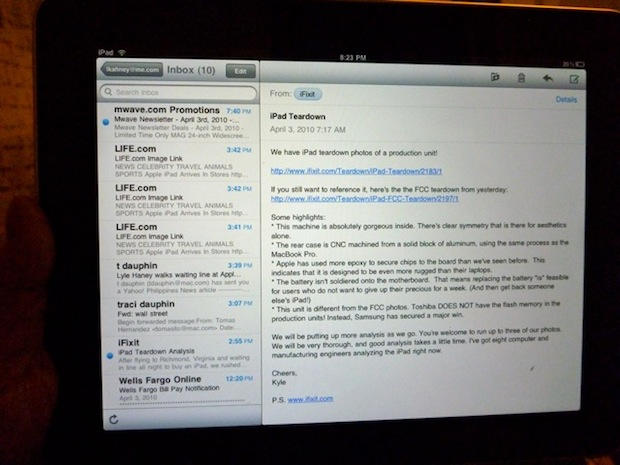
Some new email comes in. Everything’s synced: email, address book, calendars, music and movies — all thanks to a two-minute setup in iTunes. I dash off a quick reply, and am pleased how easy it is to type on this thing. Woah — this is one slick gadget!

I know what you’re thinking. Should I get one for the kids instead of a nasty netbook? Can we replace our old PowerBook with it? Should I take it to a confernece next month instead of my heavy MacBook?

Read on…

iPad Not Charging Over USB? You Need a New Computer

By

IMG_9149
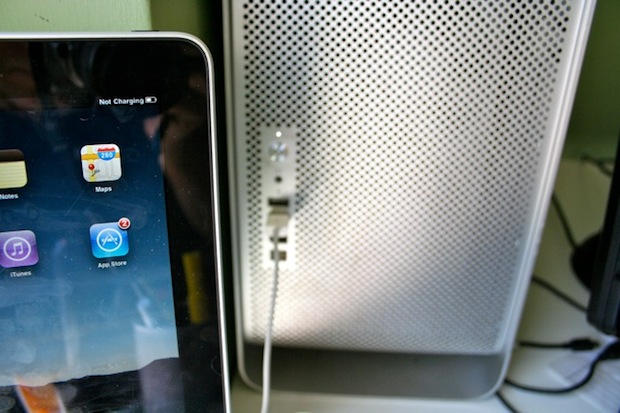
The iPad won't charge using the USB 2.0 ports of some older machines, like my $2,500 Mac Pro from 2006.

Lots of people are complaining that their iPads aren’t charging when plugged into their computer’s USB port. The battery indicator in the upper right corner says “Not Charging.” The iPad still syncs, however.

Don’t worry, it’s not a glitch. The iPad needs a high-power USB 2.0 port to charge, which are less common on older computers. Many USB hubs and keyboards with USB ports won’t work either.

The complaints seem to be coming from users of older Macs and some Windows laptop users. The front-facing USB ports on a 2006 Mac Pro, for example, don’t put out enough power to charge the iPad, but the ports on a 2009 MacBook Pro (13-inch) do.

Apple has published a support document that advises charging the iPad using the included power brick.

Better get a new Mac to work with your new iPad.

The Biggest Reason iPad Isn’t a Computer Replacement — Yet.

By

dimensions_20100127

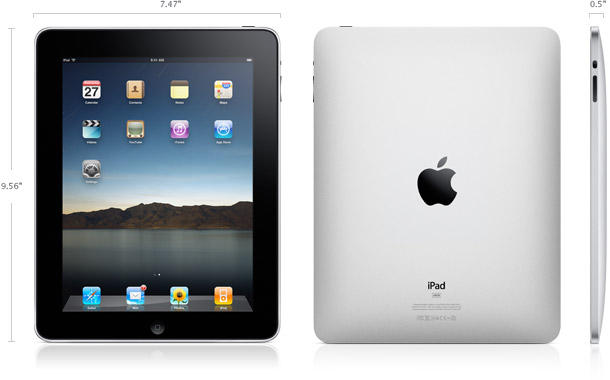
The hottest debate going at the moment is whether or not the iPad is a laptop or netbook replacement. The conversation has focused on the quality of the virtual keyboard, the power of the processor, the storage capacity, and the simplified UI. But we now have a definitive opinion on the topic — Apple’s. Hinted at in the technical specifications now confirmed in Leander’s unboxing, the iPad won’t even turn on unless it has been synced through iTunes.

I sincerely hope this changes. You’re not going to attract an army of non-computer savvy users to a revolutionarily simplified platform if they have to own a regular computer, too. It’s time to cut the umbilical cord, Apple. Let the iPad exist unto itself. If you never connect it to a computer, it should still work brilliantly. If you want to connect it to a computer to transfer files, so be it. But the Mac didn’t need to sync to an Apple II. The first PowerBook didn’t have to dock into a Quadra to turn on. You’ve made a serious new computing platform for the rest of us. Don’t treat it like it’s just an iPhone, dependent on a big brother computer to be truly useful.

How To Find In-Stock iPads

By

The iPad line in Miami. CC-licensed pic by Gubatron.

If you’re looking to score an iPad this AM, it may be wise to check the shopping site Milo.com before heading out.

The site has a page listing the availability of iPads at Apple’s retail stores and Best Buy.

The system hooks into the internal stocking systems at Best Buy and thousands of other retail stores (not sure how it has data from Apple).

Milo.com, tracks the real-time in-store availability of Best Buy products, and almost 50,000 other retail stores nationwide. No more driving to or calling all of the Best Buy stores in a hundred mile radius to locate what you are looking for. Early adopters in hot iPad pursuit can simply enter their location and type “iPad” on the Milo.com Web site or from their mobile phones and Milo.com will find the nearest Best Buy location with it in stock.