This week’s must-have iOS games features one of the best 2D platformers yet for the iPhone, GTA goodness in high-definition and golfing that claims to be as real as it gets. There’s also some pooping pigeons thrown in for good measure!
Check out a few of our favorite games from the past week after the break.
This weeks must-have iOS apps include Nike’s latest to help you track your run stats, professional HTML emails on your iPhone with MarkdownMail, quick and easy invoice creation for your business, and AppShopper’s new app that helps you keep track of the App Store.
Check out a few of our favorite apps from the past week after the break!
The Bundleeicious folks are back with a $10 bundle of six Mac apps, worth over $100 if each were bought separately.
Included are the $29 iDatabase, a database app that has a companion iPhone app (available separately for $3) and Punakea, a $25 app that allows users to organize files with tags.
The bundle will be around for nine more days before disappearing. Hit the jump for a preview of what else is included:
Last year, Apple pulled Google Voice’s official application from the App Store without either ceremony or explanation. The move always seemed pretty suspect, and intended more to protect the interests of AT&T than iOS users, but it seems that there is good news on the horizon: Google Voice is likely heading back to the App Store.
According to the developer of the third-party Google Voice application GV Mobile, he emailed Apple’s approval board after the release of yesterday’s App Store guidelines, pointing out there seemed to be no provision at all explaining a Google Voice ban, and asking what the chances were of getting his app reinstated. Apparently, the response was encouraging, and Kovacs was led to believe that if he resubmitted his app, it would likely be improved.
On Google’s part, they say they have nothing to announce at this time, but if third–party Google Voice applications start getting approved again, it’s very likely the official app will soon possible. Let’s hope that Kovac’s exchange wasn’t a fluke and Apple has come around on its senseless ban against Voice once and for all.
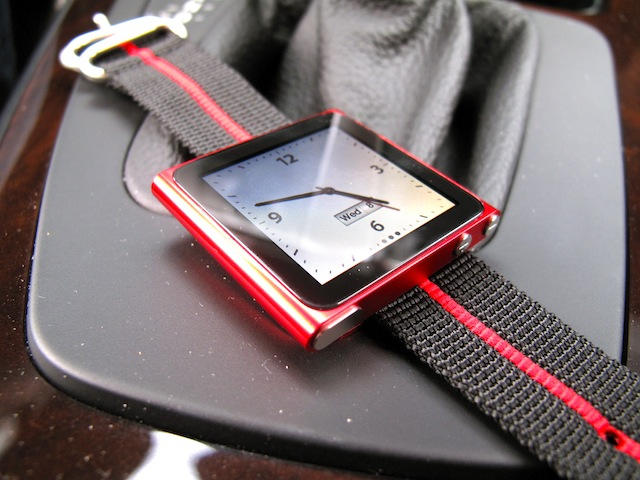
The moment Steve Jobs quipped about the new Nano’s perfect suitability as a time piece, we all all recognized the obvious accessory void that would quickly be filled: iPod Nano watch bands.
Here’s the first: a 22mm Maratac Nylon band that will slip through your nano’s clip and comes in matching colors for just $17.
The wisdom of tethering your headphones to your wrist is, of course, debatable, as is the necessity of charging your wristwatch once per day, but if you’re so inclined, it’s now just a Jackson away from being done.
All Mac applications and system functions have preferences, but there are often more options available than are accessible via the User Interface. Using the Terminal in Mac OS X in conjunction with the defaults write command, you can control behavior of the Finder, iTunes, etc. in ways that you otherwise can’t.
We noted the use of this command with the iTunes 10 button fix last week: defaults write com.apple.iTunes full-window 1
Following is a list of some other useful commands I’ve compiled which will work in Snow Leopard.
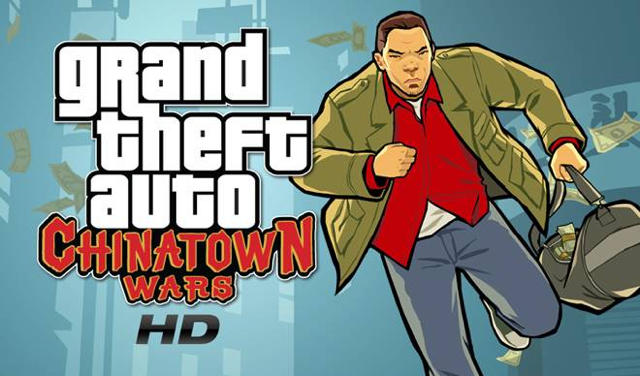
Rockstar Games’ superb iOS entry into their infamous Grand Theft Auto series has finally hit the iPad with Grand Theft Auto: Chinatown Wars HD, a native port that improves the already superlative game’s lighting, polygon counts and even the games’ already impressive explosions.
The biggest advantage, though, is the controls: while an up-sampled Chinatown Wars was technically playable (if ugly) before, the control scheme really needed some tweaking for more adept thumb control. The new iPad accomplishes that quite nicely.
Ultimately, it’s a fine update… but it’s hard to recommend because it’s not a universal app. Instead, Grand Theft Auto: Chinatown Wars HD is a whole new $9.99 to spend on a game you probably already own, if you were interested at all to begin with, on the iPhone, Nintendo DS and Sony PSP. If this is your first go at the title, though, Chinatown Wars is an easy recommendation: it’s one of the best games on the App Store.
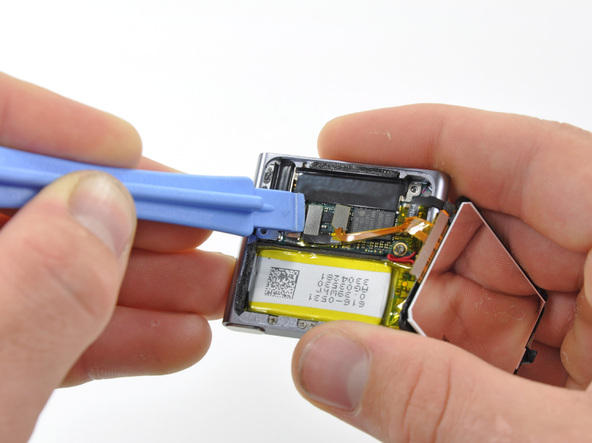
With their usual amalgam of surgical precision, egghead obsessiveness and rock star attitude, the boys at iFixIt have sliced into the last of Apple’s new iPods: the touchscreen iPod nano. And, like we thought, it’s really more of a Shuffle with a screen than a nano with multitouch.
It’s the claims of multitouch that really sticks in the iFixIt boys’ craws: they claim, rightly, that multitouch is officially determined by being able to detect and resolve a minimum of three touch points, where as the nano only employs two… and even then, only for rotating the display, “although how anyone is supposed to comfortably fit more than one finger on the display is a mystery.”
Other interesting facts: the battery is twice the capacity of the Shuffle’s to power the screen, and the display has the most dense packing of pixels this side of the Retina Display on the iPhone 4 or iPod Touch. Additionally, the glass on the touch isn’t quite flush with the case, but sticks out 0.3mm due to the size of the headphone jack. It’s a pretty interesting commentary on how tiny and compact the innards of the new nano are when the headphone jack is one of the thickest components… and perhaps how anal Apple is about device thinness when they’d rather the glass protrude from their device minutely than minutely expand the body.
iOS 4.1 is now live, and along with the much anticipated software update comes Game Center, Apple’s new Xbox-Live-like gaming service that brings officially sanctioned achievements and multiplayer matchmaking to supported iPhones and iPod Touches.
Game Center seems promising, but unfortunately, it’s been hard to figure out exactly what games have Game Center support and which ones don’t… making early testing of the service frustrating. To make things easier, Apple has just updated the App Store with a dedicated Game Center section, highlighting all of the apps that have baked in Game Center support so far.
Unfortunately, most of the games currently on display are a little lackluster, with Flight Control, Fieldrunners and Zen Bound 2 being the real standouts… but hopefully that will change sooner rather than later.
Those unconventional iconoclasts at Psystar might have been ground down to a gelatin paste by Apple’s legal team, but that’s not to say you can’t have a business selling Mac clones… as long as you don’t sell them with OS X pre-installed.
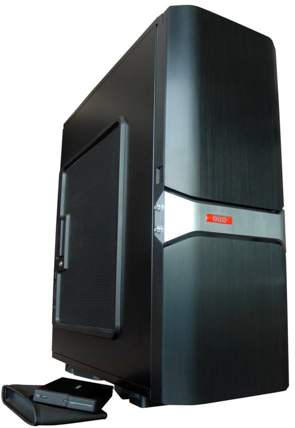
Just ask the guys at Quo Computers, “Apple enthusiasts who breathe and bleed Mac OS X” who have just announced their latest hackintosh: a truly ghastly tower called the maxQ2 with beefy hardware placing it somewhere between the performance of a high-end iMac and the Mac Pro.
Inside the chassis, the Q2 features an Intel Core i7 3.6GHz CPU, 12GB of RAM, a 240GB SSD, a 1TB hard drive and an NVIDIA 285 GTX GPU. The real appeal here, though, is the addition of Aestek’s liquid / copper cold plate cooling system, which will keep the innards frosty regardless of what you throw at it.
The maxQ2 will run Windows, OS X or Linux through EFI support… although Quo isn’t stupid enough to install OS X on it for you themselves. The Quo maxG2 starts at $3,675, and if you’re willing to trade aesthetic for horsepower while breaking OS X’s EULA in the process, it seems like an option worth considering.