Photo: Jim Merithew/Cult of Mac Photo: Jim Merithew/Cult of Mac
Now that Apple has made iBooks available on all iOS devices users can read their purchased eBooks on a number of different devices. But what if you have a couple large RTF, DOC, TXT, or LIT files of your own that you want to view in iBooks you’re out of luck. In this tutorial we’re going to show you how to get digital and convert your documents into eBooks so that you can enjoy reading them on your iPad, iPhone or new iPod Touch.
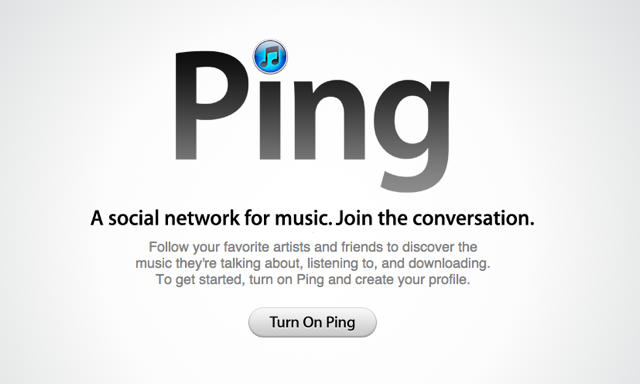
Apple’s new social network for music fans, Ping, has had a rough start. People didn’t expect it to be a Facebook for music right away but they did expect more from Apple. After years of social media hype many people thought Apple would have learned from the mistakes others have made. While Ping might not be the best idea Apple has ever had, I think when will look back years from now we will wonder what took them so long! For those of you who have turned on Ping, here are some things Ping should have and a few tips to make your Ping experience a little better. Read more after the break.
There’s an interesting change in the way iOS 4.2 handles orientation lock on the iPad… one that indicates a curious design backpedal on the part of Cupertino.
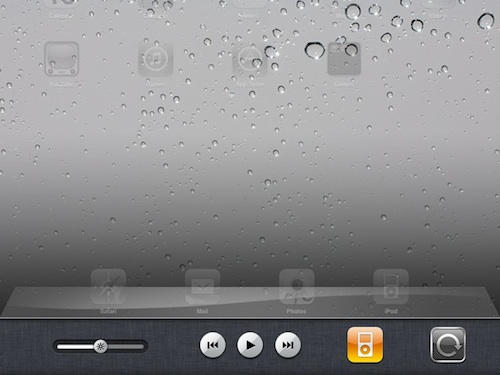
Previously, orientation lock on the iPad was handled with a physical hardware switch on the side of the device, but in iOS 4.2, it has been repurposed as a physical “Mute” button, with the orientation lock achieved the same way it is on the iPhone 4 or iPod Touch under iOS 4: through the multitasking tray.
It’s a minor but significant change that, I suspect, portends the elimination of the mute/screen orientation button on the second-generation iPad. For famously minimal and streamlined Apple, a physical mute button doesn’t make a lot of sense on an iOS device that isn’t a phone.
Avid will soon begin offering packages of its M-Audio branded audio hardware bundled with an entry-level package of its Pro Tools recording software that could well make a dent in the progress Apple has lately made with Garage Band.
Three offerings priced under $130 will make it easy for first-time Pro Tools users to easily create and record music at home using Avid’s Key, Recording and Vocal studio products with the included Pro Tools SE recording software. Whatever Pro Tools SE may lack in Garage Band’s take-you-by-the-hand user friendliness, it more than makes up for in multi-track recording capability and direct compatibility with higher-end professional grade Pro Tools installations.
Recent updates to Apple’s iLife suite of software included a revamped, juiced up version of Garage Band with well-received interactive learning features that solidified the software’s status as a highly capable tool for creating great-sounding recordings at home. But soon it will become possible to do the same things using an inexpensive version of Pro Tools — with the resulting tracks being readable and usable by the same more expensive studio versions of Pro Tools used by nearly every major recording facility in the world today.
Although Valve released their other Source engine titles with astonishing rapidity when they finally brought Steam to Mac earlier this year, but one sad lingering hold out in the games library disgorgement was the team-based zombie-shooter series, Left 4 Dead, with the delay largely chalked up to some bugs in OS X’s graphics drivers that Valve helped Apple iron out.
We’d previously heard tell that now that those graphic issues are fixed, Valve as hard at work to bring Left 4 Dead and Left 4 Dead 2 to OS X by October… and now, if a casual mention over at Macworld is anything to go by, it looks like that date might have been further locked down to October 5th, along with the latest Left 4 Dead and Left 4 Dead 2 add-on pack, “The Sacrifice.”
Looks like for us Mac gamers, the Halloween season is going to be filled with even more zombie mutilating than usual. Expect Cult of Mac to organize a few games of Left 4 Dead once it finally hits our platform.
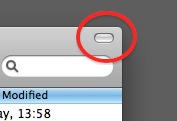
Look at this button in the top-right corner of a Finder window. Ever wondered what this is for?
It’s called the “toolbar control button” and you’ll see it all over the place in OS X. It lives in the top-right corner of an application or document window.
But what does it do? Simple: it hides the toolbar from view. The toolbar is that strip across the top of the window where buttons and controls live. You can choose to leave it there all the time, or you can reclaim that screen space by getting it out of sight. That’s what this button is for.
This new app from Epson significantly ramps up iPhone or iPad print capabilities: PrintJinni for Epson will allow users to print from an iDevice, via a web-based cloud service, to any network-connected Epson. It also comes with an impressive range of print options, even allowing the user to print attachments directly from an email — without requiring an app associated with the attachment to open it.
The range of document types the app can work with includes pdf, jpeg and most versions of Microsoft Office documents.
PrintJinni doesn’t come cheap. The app is $10 (though offered now at an intro price of $7 for an unspecified time), and continues to ding the user at what Epson says will probably be $7 each additional year for the cloud services; though they also say that these recurring fees won’t be necessary for all document types (users just wanting to print jpegs, for instance, won’t need to pop for the yearly fee), and that the yearly fee can be opted out of, should the user just wish to print on local networks not need to print MS Office documents.
Apps are so easy — maybe too easy? — to buy on an iPad even a three-year-old can do it.
Toddler Sienna Leigh in Sydney racked up about $50 in app purchases before her mom noticed the shopping spree.
“She uses it every day for a few hours, but I didn’t think anything of it.
“She was just playing with it until, later, when she had gone to bed and I was checking my email and I saw that I had paid for a whole bunch of apps that I didn’t remember buying.”
Mother Lisa Leigh had to go to a Mac forum to figure out how her kid did it — it seems she went to a recently-purchased app and continued shopping with the saved password.
Sienna bought $17 Docs to Go app and a flight control app among others before mom managed to stop the spending spree. “But the main thing is that I’ve completely turned off the Wi-Fi on her iPad so she has no chance of accessing the app store at all now.”
Leigh decided not to ask Apple for a refund, since by the time she figured it out her other children had already opened and played with them.
Apple said it wasn’t the first time parents had contacted them about iPad purchases made by their kids.
If you have a tech-savvy toddler, here’s how Apple Fiona Martin spokesperson suggests you keep the tyke from shopping: “The restrictions preferences are located under Settings > General > Restrictions > Allowed Content (In-App Purchases) OFF. When this is activated, in-app purchases is turned off.”
The Parallels Desktop
has been updated to version six today, bringing over eighty new features to the Windows virtualization program, including enhanced performance and vastly improved 3D graphics rendering speeds…. but maybe it’s neatest trick is finally letting you run Windows 7 on your iOS device.
Well, kind of. Parallels isn’t actually virtualizing Windows on your iPhone or iPad. Rather, the Parallels Mobile App is basically a VNC, allowing you to seamlessly connect and control your Parallels Windows install from any network-connected iOS device. Fair warning, though: things get a bit cramped trying to drive Windows from your iPhone.
Parallels Mobile is a free download from the App Store, while Parallels Desktop 6 costs $80, or $50 if you already own version 5.
Well that didn’t take long. Steve Jobs quipped that the new iPod nano would make a good wristwatch, and last week brought news of the first iPod nano watch band. Now several contenders are offering products for sale.
And the iWatch was born. And it was Good.
Provided you’re willing to look like a geek with a headphone cord dangling from your wrist when you listen to music.