Mobile menu toggle

Search results for: Apple One

How the Mac Got Started, in its Birth-Father’s Words

By

511px-Macintosh_128k_transparency

Image via Wikipedia

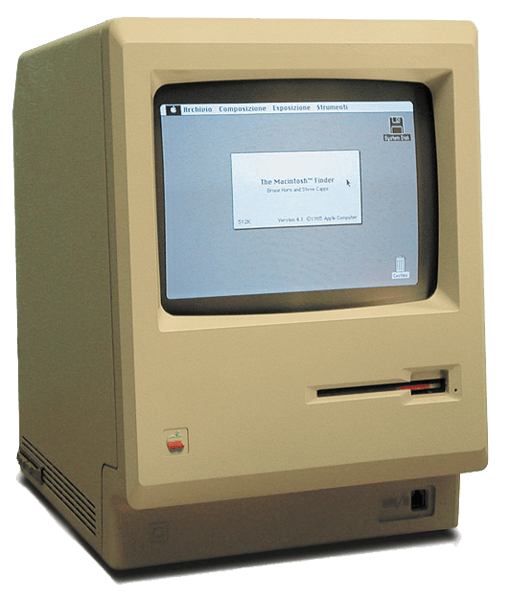
Fast Co.Design has a very interesting Apple history artifact posted up today: the birth of the Mac, as told by Jef Raskin, the late founder of the Mac project. Jef’s son Aza wrote the piece and provides scans of the original document if you’re into authenticity instead of legibility.

It’s worth noting before you dive in, which I highly recommend, that Raskin’s vision for the Mac was very different from what Apple actually produced once Steve Jobs took over the development team. Raskin wanted the most unified hardware and software imaginable. One screen, one keyboard, one processor, one memory configuration, no expansion slots, one box. Oh, and he wanted a printer built into the box.

He also wanted to get rid of all modality in a computer. So, for example, if you started typing, the word processor would open and capture what you were typing (rather than having Clippy note that you’re writing a letter). A lot of that stayed in, but Jobs made it much more powerful and, ultimately, diverse and fragmented a platform than Raskin ever envisioned (see the Canon Cat for that).

As Aza Raskin notes, his father’s philosophy is much closer to what’s going one with the iPhone and the iPad. After all, you can have any iPad you want, so long as it comes in brushed aluminum.

This item of controlling appearance is quite significant: for example it is impossible to write a program on the Apple II or III that will draw a high-resolution circle since the aspect ratio and linearity of the customer’s TV or monitor is unknown. You can probably promise a closed curve, but not much more. You cannot promise readable characters, either. Therefore, a predictable, documentable system must be entirely under Apple’s control. LISA is Apple’s first system to allow us to design in context, without depending on chance for the all-important visual aspects of the computer’s output.

Well said. And one of the few places Jef and Steve really saw eye-to-eye, in the long run.

Could Extended Free Access to ‘The Daily’ Mean iOS 4.3 Coming Feb 28th?

By

the_daily_subscription-1

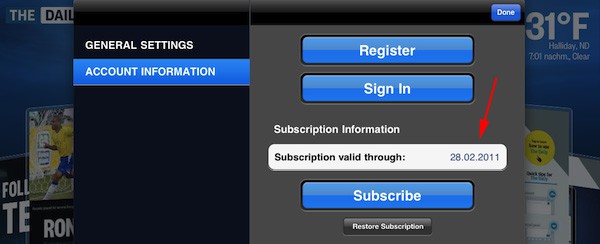
While the wait for iOS 4.3 and in-app recurring subscriptions continues, free access to The Daily has been extended beyond the original two-week trial period until February 28th, sparking rumors that suggest Apple’s next iOS update could also drop on the same date.

The extension to free access was picked up by German Mac blog Macerkopf, after the expiry date of their subscription changed within the “Account Information” in The Daily application. Because the application’s billing method relies on the recurring subscriptions feature iOS 4.3, customers cannot be charged for access to the service until the update is available.

Of course, Feb 28th may be nowhere near the release date of 4.3, and The Daily could be just extending its free trial to a random date in the hope that the update is available by then.

There have been rumors that the public debut of iOS 4.3 would be at 10 AM EST today, however, a quick glance at your clock right now will show that predication was an inaccurate one.

[via 9to5 Mac]

Enjoy the Hubble’s Most Remarkable Images with HubbleSite [Must-Have App]

By

HubbleSite for iPhone

HubbleSite(Free) iPhone – Education

Today’s must-have iOS application is HubbleSite, the online home of NASA’s Hubble space telescope. For over 20 years Hubble has orbited the Earth, beaming home images of celestial splendour; now you have access to the world’s most remarkable Hubble images at your fingertips, to enjoy on your iPhone anytime, anywhere.

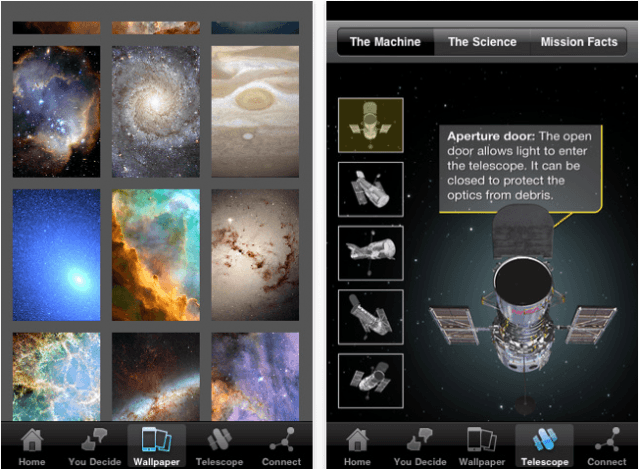
Cast your eye over a vast collection of spectacular sights from the Hubble archives and vote for the images that you find the to be the most astounding. Download a selection of wallpapers for your device, all of which have been chosen and edited to deliver beautiful results on the iPhone & iPod touch with a Retina display. Read a compilation of amazing facts about the Hubble telescope’s history and the scientific discoveries it has revealed, from the age of the universe to the mysterious force known as ‘dark energy’ – all within the official Hubble iOS app.

For anyone interested in space and the universe around us, HubbleSite should be the next application you download from the App Store.

N.O.V.A. 2 is the Best Sci-Fi FPS for iOS, On Sale at $0.99 [Must-Have Game]

By

N.O.V.A. 2 on iPhone

N.O.V.A. 2($0.99) iPhone – Games

Although it’s not strictly a brand new release, today’s must-have iOS game has been chosen simply because it’s one of the most exciting first person shooters available in the App Store, and it’s on sale today for just $0.99!

N.O.V.A. 2 is the sequel to Gameloft’s first hugely successful sci-fi FPS – Near Orbit Vanguard Alliance, and this follow up title boasts new enemies with improved AI, a larger range of weapons and powers, and 10-on-10 online multiplayer – you won’t want to miss it!

Find out more after the break!

Pic of the Day: Pinup Sends a Valentine to Her Mac

By

Christy Pelland poses with her Apple devices. @Christy Pelland


Christy Pelland isn’t exactly a pinup, but you’d be forgiven for making that assumption viewing the pic above.

Pelland is a photographer by trade who specializes in retro-pinup portraits. And she loves her Macs.

Read on for more about her love affair with Apple, what makes Mac nerds sexy, her studio set-up, and yes, more pics.

This Week’s Must-Have iOS Apps: Free-App Hero, Google Translate, Pillboxie & More!

By

Screen shot 2011-02-13 at 20.34.11

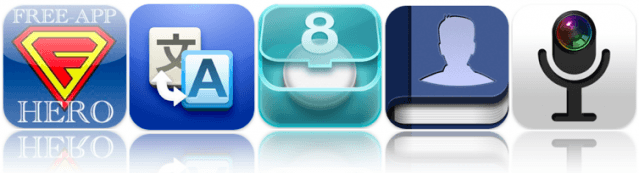
At the top of our must-have apps list this week is Free-App Hero, a fantastic app tracker maintained by experienced, professional game reviewers with an encyclopaedic knowledge of thousands of iOS apps. Unlike other free app recommendation services, Free-App Hero recommends only the best games, because they’re the best – not just because its developer paid them to recommend it.

Google’s latest application, Google Translate, is also in this week’s choice of applications. One of the best language translation services is now available on your iPhone, with the ability to translate words and phrases between more than 50 languages. It has some great features that make using Google Translate a pleasure on your iPhone.

Pillboxie is an excellent application for those that require regular medication, providing you with an incredibly simple way to create a schedule for your medication and get reminders when your pills are due. Never forget your pills again and discover the easiest method of managing your medication on your iPhone.

Find out more about the applications above and check out the rest of this week’s must-have apps, including Friended and Camera Mic, after the break!

This Week’s Must-Have iOS Games: NBA Jam, Karoshi, Hungry Shark 3 & More!

By

Screen shot 2011-02-12 at 22.52.13

Kicking off our list of must-have iOS games this week is NBA Jam, the latest App Store hit from EA Sports, featuring all the over-the-top, high-flying, 2-on-2 arcade basketball action, just as you remember it. Relive that ’90s nostalgia with the hottest new arcade sports game for the iPhone, with the voice of Tim Kitzrow, the original NBA Jam play-by-play announcer.

Also in our favorites this week is Karoshi, an incredibly popular PC game which has now made its way to the iPhone, and also into the news headlines this week thanks to its dark storyline. Unlike the majority of games in which your sole purpose is to survive, in this one you take control of an overworked Japanese businessman whose mission is to end it all. As horrific and offensive as it sounds, it’s nowhere near as bad as you think, and it’s actually a lot of light-hearted fun.

Hungry Shark – Part 3 is the third of our choices this week, as well as the third in this series of top-selling aquatic eat ’em-ups. Chomp your way to the top of the food chain as you trawl the depths of the ocean in search of food to satisfy your voracious appetite in the most exciting Hungry Shark yet.

Find out more about the games above and check out the rest of this week’s must-haves, including Carnivores: Ice Age and Chicken Coup, after the break!

Huge Music-Making App Sale Ends Tomorrow

By

ishred sale

Oh, there’s gonna be a bumper crop of iPhone musicians born this weekend if Frontier Design Group has their way. Practically all their music-slinging iPhone apps are on sale to celebrate the iPhone coming to Verizon, including the highly regarded iShred app — sister app to the free iShred LIVE app required to use Griffin’s GuitarConnect and StompBox accessories — GuitarStudio and PianoStudio, all three of which are normally $5 each, but on sale for a buck apiece.

As musician and fellow Cult of Mac contributor Lonnie Lazar says, these apps won’t turn you into a Rock God; but they’re certainly a truckload of fun and great tools to learn with. Sale ends tomorrow, so don’t mess around if you want ’em.

Sparrow for Mac Treats Gmail A Lot Like Twitter… And That’s A Good Thing [Review]

By

Screen shot 2011-02-11 at 9.07.14 AM

Over at Geek.com, I took Sparrow — the new Tweetie-esque Gmail client for Mac, now available on the Mac App Store — for a spin.

What’d I think? I really liked it… so much so that it has dislodged Postbox 2 as my e-mail client of choice.

Here’s a bit of my review:

Sparrow treats email a lot like Twitter, a four-year old micro-blogging medium still in the process of evolving. It’s a presumptuous move on the part of Sparrow’s developers, and one many users will just never be able to get beyond, either because they needmore functionality from an email client… or, after decades of using email one way, they just can’t believe that they could be more productive treating it more ephemerally…

How seriously do you take your email? How much can you go with its flow? Power users will be driven mad by the lack of sophisticated mail wrangling functionality in Sparrow, but that’s the whole point. Sparrow wants you to treat your inbox like a stream that can be dipped into, not an ocean to be tamed; it’s the equivalent of skipping stones, not piloting a submarine.

You can read the whole review here, and stay tuned to Cult of Mac for an interview with the Sparrow team next week in which we discuss the philosophy and future of the app.

Pic of the Day: Egypt is a Mac

By

Picture 2

The profile image on Twitter for Egyptian activist Wael Ghonim shows him wearing a Pharoah’s crown, typing away on a Mac laptop. Ghonim, a Google marketing exec in Cairo, was released after 12 days in custody by authorities for a  Facebook page Facebook Page about the death of everyman activist Khalid Said that catalyzed protests.

I got to talk to a researcher this week about social media in the Arab world – and how the services many of us use to keep in touch with far-flung old flames and cousins serve as portable microblogging and news distribution tools in places where most media is state-run or party-funded.

We’ll try to catch up to Ghonim after the euphoria dies down to ask him what role Apple devices play in these historic events.

UPDATE: we corrected the FB page thanks to reader ademsemir who says that iPhones played a big part in recent events. 

Via @ghonim