Mobile menu toggle

Search results for: Apple One

Leaked iOS 5.1 “Pre-GM” Build Reveals New Camera Slider, Japanese Siri Support

By

Camera-slider-iOS-5-1

While registered developers have already been testing iOS 5.1 betas for some time, it seems the firmware holds several new features that Apple is yet to release to developers. A leaked “pre-GM” build has reportedly been obtained by a Brazilian iPhone blog, which reveals a new camera slider for the lock screen, and support for the Japanese language within Siri.

How To Sync Your iOS Device With Multiple iTunes Libraries [Jailbreak]

By

Screen Shot 2012-02-16 at 10.50.14 PM

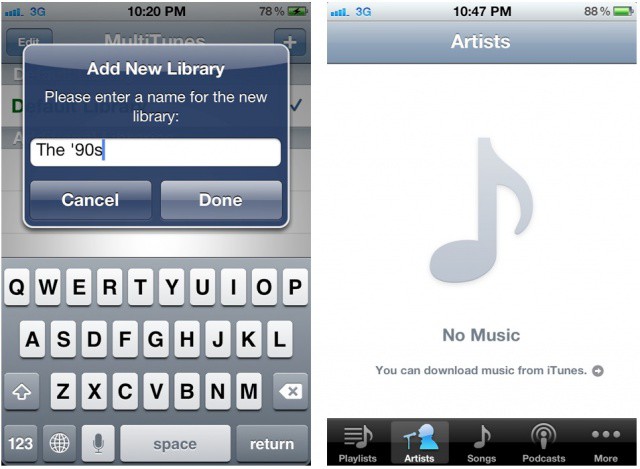
A new jailbreak app called MultiTunes lets you sync with multiple iTunes libraries on your iOS device. Apple limits you to one iTunes library at a time by default, and while iCloud and iTunes Match make it easier to access your music from anywhere, some would still like to sync with different libraries without deleting all locally stored music first. That’s where MultiTunes saves the day.

Relive the 1980s With Paint FX For iPad [Review]

By

With just a few moments' work, I turned a perfectly innocent young boy into a Smurf. Photh Charlie Sorrel  CC BY-NC-SA 3.0
With just a few moments' work, I turned a perfectly innocent young boy into a Smurf. Photo Charlie Sorrel CC BY-NC-SA 3.0

If you grew up during the 1980s, many of its style tropes will have been burned indelibly into your brain. Shoulder pads, snow-washed jeans, pleated pants, and tacky, tacky poster art, exemplified by selective-colored black and white photos. If you can imagine a monochrome image of a rose, with the petals colored lipstick red, then congratulations: your mind just traveled back to 1985. Now, with Paint FX, your iPad can do the same.

OS X Messages Is The Future Of Chat, But Still Kinda Buggy [Hands-On]

By

Message

When Apple announced iMessage for iOS 5 last summer we were excited to finally have a universal messaging app that sought to free our cellphones from the slavery of wireless carrier texting plans. Today with the announcement of Messages for OS X it looks like Apple is serious about creating a messaging service that supplants texting and chat services by providing a one size fits all solution that works well on every screen. The new Messages app is pretty awesome and it’s a needed step forward that finally unifies iChat, iMessage, and Facetime, but it is not without its flaws.

Mountain Lion Kills OS X Support For A Number Of Macs, Here’s The List

By

denvercougar

Chances are, you’re already salivating to download the latest version of OS X, Mountain Lion, when it’s released later this summer. For a fair number of Mac owners, though, installing Mountain Lion is going to require buying a new machine, as Apple has abandoned support for Intel’s GMA 950 and x3100 chipsets.

Here’s a list of the machines that can run Lion that can’t run Mountain Lion.

Will OS X Mountain Lion’s Docs In The iCloud Kill Dropbox?

By

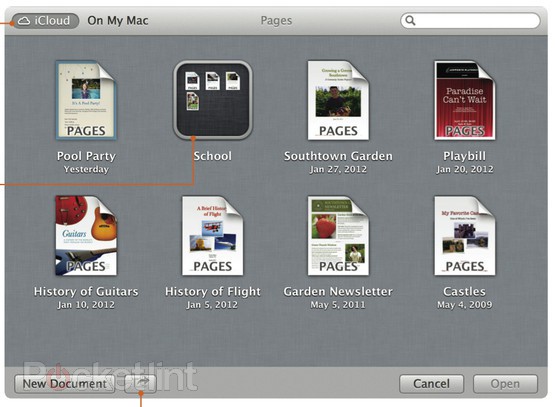
The Finder's new iCloud view works just like iOS. Screenshot: Pocket Lint

With Mountain Lion, Apple has finally tied iCloud to the Mac desktop. While iCloud has worked seamlessly on iOS since launch, moving documents between iCould and your Mac was embarrassingly awkward, involving web browsers, dragging and dropping.

Now, it has been shoved deep into the heart of the OS, in the form of a kind of alternate Finder.

Game Center On The Mac Will Finally Bridge Mobile And Desktop Gaming

By

Game-Center-Mac-iOS

In case you hadn’t already noticed, Apple announced OS X Mountain Lion earlier today, its latest operating system for the Mac which will make its public debut this summer. Mountain Lion will further increase the iOS influence on Apple’s desktop operating system, with the arrival of features like Notification Center, Messages, and Notes.

But for gamers, undoubtedly the most exiting new feature will be Game Center’s arrival on the Mac. With promises of cross-platform multiplayer and the ability to rack up achievements on both your Mac and iOS devices, this is set to create a new bridge between mobile and desktop gaming that will revolutionize cross-platform play.

Software Update Moves To The Mac App Store With Mountain Lion

By

Screen Shot 2012-02-16 at 12.12.02 PM

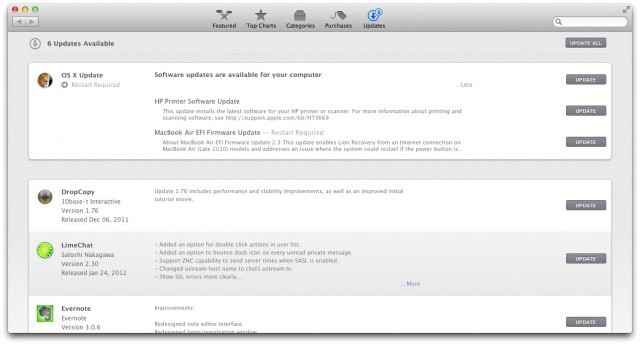
This is interesting. With OS X Mountain Lion, Apple has ditched Software Update as a standalone application, and instead baked its functionality into the Mac App Store’s “Updates” panel. Now if you hit Software Update, the Mac App Store loads and all of the integral software updates are found under a drop-down box under OS X Update.