Mobile menu toggle

Search results for: Apple One

OS X Mountain Lion’s GateKeeper: Bad For Businesses, Great For Consumers [Opinion]

By

gatekeeper.jpg

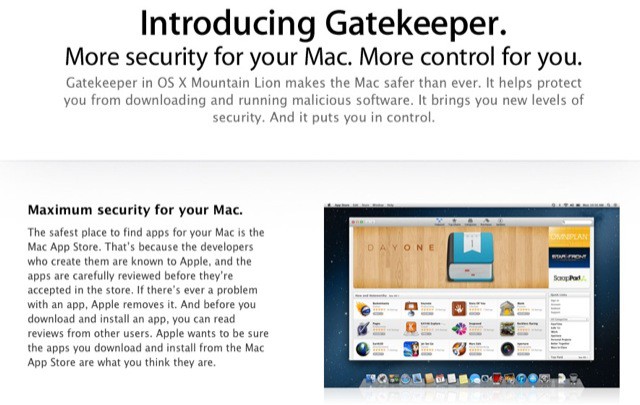
GateKeeper is one of the big new features in Mountain Lion. It’s designed to protect against malware by limiting what kinds of software gets installed on your Mac. GateKeeper offers Mac users three levels of security: Mac App Store purchases (which have been fully vetted by Apple), Developer ID apps purchased outside the Mac App Store that are digitally signed so your Mac can verify their authenticity via Apple, and apps from all other sources.

The GateKeeper model looks great from the perspective of an individual user or family – easy to understand and use while being fairly effective at leveraging Apple’s developer program as a security solution. How it will stack up in business and enterprise environments, where mass deployment are commonplace, may be a different story.

Screw You, Facebook! OS X Mountain Lion Proves Twitter Is The Most Important Social Network

By

osx-twitter

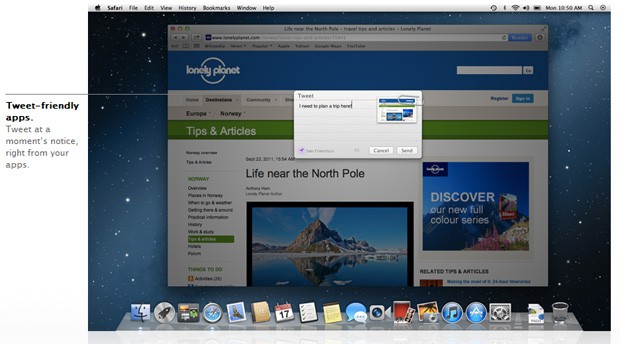
One of the big marquee features of Mountain Lion is deeply-baked Twitter integration, built right into every Mac apps. If there was any doubt about it after iOS 5, erase it from your mind: after some aborted experiments like Ping, Apple is doubling down on social networking, and the horse they’re backing isn’t Facebook… it’s Twitter.

John Gruber: ‘Schiller Tells Me They’re Doing Some Things Differently Now’

By

You won't be able to purchase Mountain Lion if your Mac can't handle it.
Instead of the usual high=profile launch event, Apple treated journalists to their very own personal keynotes

Imagine yourself at an Apple keynote event. A special, one-off launch for the newest version of Mac OS X. You see the familiar format: Phil Schiller and a couple of other Apple execs run through the successful sales numbers. Then they announce the new product, and then they work their way through a deck of pitch-perfect keynote slides.

It seems familiar, right? Only now imagine that you are alone. This presentation is for one person: you. This bizarro scenario is just what happened to Daring Fireball’s John Gruber last week when Apple briefed him on Mountain Lion.

OS X Mountain Lion Could Make Many Popular Third-Party Apps Completely Obsolete

By

Goodbye Growl, hello Notifications

Apple’s new version of OS X, 10.8 Mountain Lion, bakes in a lot of new features that may make existing third-party apps obsolete. Notification Center, Reminders, Messages and Twitter all step on the toes of independent developers. And worst of all, these apps come from some of the most popular categories in the App Store.

iCloud In Mountain Lion Could Be A Big Headache For IT

By

documentincloud

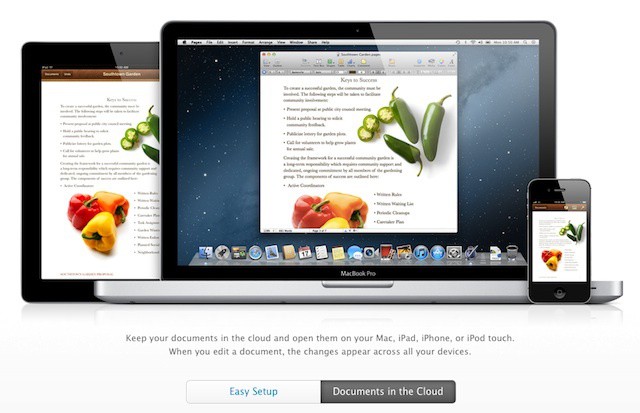
One of the big threads in the Mountain Lion features that Apple has posted is much deeper integration with iCloud that Lion offers. That isn’t a surprise given Lion began a trend of bringing iOS functionality to the Mac, but it may raise some concerns for Macs in the workplace.

In Mountain Lion, Apple is bringing the iOS document syncing feature to OS X along with Mac versions of the iOS Notes and Reminders apps. There’s also a Mac version of the iOS 5 Notification Center. These are all tremendously valuable features for business users, but the fact that they function by passing business content to Apple’s iCloud servers and onto the devices of employees and their family members is likely to be a big concern for CIOs.

Gatekeeper: First Step Towards App Store-Only Software On The Mac? [OS X Mountain Lion]

By

gatekeeper.jpg

One of the big headline features in Apple’s new Mountain Lion OS is Gatekeeper, designed to keep malware and other nasties away from your computer. So is this another step towards App Store-only software on Macs?

The short answer is yes, it is. But it doesn’t have to be. Gatekeeper gives you the choice: do you want to stick to App Store-only apps, or be able to install anything from anywhere?

AssistantConnect: An Easier Way To Use Siri On Non-4S iOS Devices [Jailbreak]

By

siri-on-ipod-touch

A new jailbreak app called AssistantConnect claims to bring Siri to non-4S iOS devices without needing a proxy. Unlike previous ports, AssistantConnect lets you email your Siri data between jailbroken iOS devices to enable the digital assistant. It’s a much simpler process than having to setup your own network voodoo and rely on a server that may not even work anymore.

Sound too good to be true? There’s one catch…

Centrify Makes iOS Management Easy For Windows IT Pros And Does It For Free [Feature]

By

Centrify offers DirectControl for Mobile and DirectControl for Mac

Earlier this week, Centrify launched an open beta of the company’s DirectControl for Mobile service. The service, which supports managing iPhones, iPads, and Android devices in business and enterprise settings, currently includes a subset of the features typical in other mobile device management (MDM) systems. Centrify, which is known for providing enterprise integration technologies for OS X as well as various Unix and Linux distributions, plans to maintain the current selection of controls as a free solution when the product emerges from beta while adding further management capabilities to a commercially licensed version.

Most MDM solutions are of the bolted-on variety – they run on a dedicated server or cloud offering that can pull information from enterprise systems like Microsoft’s Active Directory but use a separate management interface and data store for management profiles and other information. Centrify’s DirectControl does offer a cloud management system, but it uses Active Directory itself as the primary interface and data store, an approach that has several advantages including a very minimal learning curve for experienced systems administrators.

Skip Tunes: A Simple Way To Control iTunes Or Spotify From Your Mac’s Menu Bar [Review]

By

Screen Shot 2012-02-14 at 12.31.57 PM

I’m always looking for ways to enhance my music listening experience on the Mac. For the last several months I’ve been using Bowtie to control iTunes with keyboard shortcuts, and Ecoute is another great alternative for managing iTunes in a minimal, simplified way.

When the developers of Skip Tunes contacted me, I was intrigued by the app’s menu bar interface. For quick access to simple music playback controls, it doesn’t get much better than this.