Mobile menu toggle

Search results for: Apple One

Photosmith 2 Brings Lightroom Syncing To iPad

By

photosmith-2.jpg

If you own Lightroom and an iPad, buy this app now

Lightroom-using iPad owners, get ready for some good news: Photosmith 2 has just launched a few hours early, and is just as amazing an update as we hoped it would be.

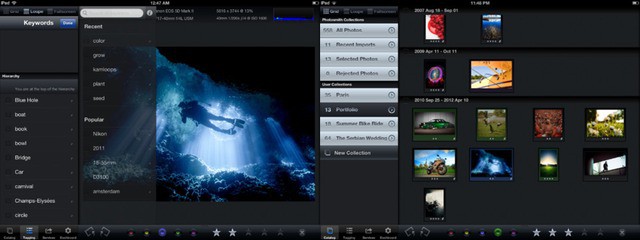
Photosmith is a combination of iPad app and Lightroom plugin (Mac or PC) which will sync photos between the two machines, and let you edit metadata, add keywords and otherwise triage your photos on your iPad before sending them off to Lightroom for editing.

V2 adds batch tagging, two-way sync (for sending photos from your Mac to the iPad), smart groups, metadata presets and a lot more. A full review will follow, but our first impressions are below.

Zenprise Focuses On Mobile Inventory As Well As Management [Mobile Management Month]

By

Zenprise delivers solid management and inventory capabilities

May is Mobile Management Month at Cult of Mac, where we will be profiling a different mobile management company every weekday. You can find all previous entries here  and read our Mobile Management manifesto here.

Zenprise focuses on the complete lifecycle management of mobile devices in enterprise environments. The company provides the core set of device and app management needs and offers integration with enterprise systems. Zenprise puts a particular emphasis mobile device inventory for both company-owned and BYOD devices.

3-Ways Are So Passé, Participate In A 12-Way, Free Video Chat With ooVoo

By

post-168838-image-7903e078573606cf79228591f49821be-jpg

Today, independent video chat provider ooVoo, announced a significant update across multiple platforms as well as adding a new Facebook application. ooVoo allows users to HD video chat, text, or make phone calls with up to 12 friends across Android, iPhone, PC, Mac and now also on Facebook. According to Yuval Baharav, Chief Executive Officer, today’s release was a direct result of their over 46 million users:

Sync Reminders To Your Mac And Other Devices [iOS Tips]

By

iCal Reminders Sync

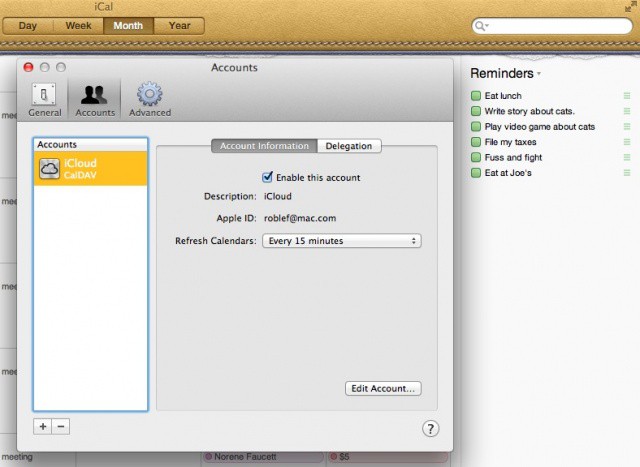
Making a list of tasks is a great way to be sure you’re getting things done, right? Without being able to see those reminders across all the devices and computers you may use in a given week, though, that list is going to be fairly useless. That’s the reason services and apps like Evernote have become so ubiquitous: instant access to your notes across all the digital environments you frequent.

Apple’s Reminders system is the company’s foray into a task list, but figuring out how to sync the lists across devices is somewhat non-intuitive. Here’s how to do just that.

Zipcar CEO Shares Secrets Of iOS Success

By

Zipcar customer interactions now come from the company's app more than its site

Zipcar was one of the first companies to showcase the potential of iOS apps using location services. The company’s demo during Apple’s 2009 WWDC keynote was one of early harbingers of the ways that mobile devices and data have become integrated with our daily lives. Zipcar continues to have its finger on the pulse of what’s possible when local services are transformed by iOS and other mobile platforms.

Speaking today at the MIT Sloan CIO Symposium, Zipcar CEO Scott Griffith spoke about how quickly smartphone apps revolutionized Zipcar and the ways it interacts with its customers and offered  insights into the company’s success.

The Best iPad Note Apps [Best Of]

By

notes_collage


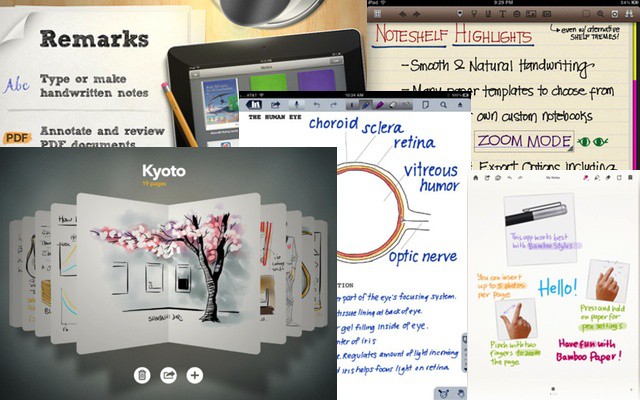
One of the first things about the iPad that caught people’s attention was the touch screen, and it goes without saying that some of the first apps to start taking advantage of that touch screen were handwriting/note taking apps. Apps that let you write, draw, sketch—-and sometimes type–notes on your iPad. Something that combined technology with the age-old practice of scribbling notes on paper.

Since there are so many apps to choose from, and I’ve tried virtually all of them over the past couple years, I thought I’d give you a jump start on switching to virtual paper with my top 5 favourite note taking apps.

Free & Cheap Ways To Become A Mac IT Master [Feature]

By

Beyond the classroom, there are some amazing Mac IT training resources

Recently, we’ve done a couple of features on the core tools and skills needed by IT professionals who support and manage Macs and iOS devices in business environments. Knowing what those tools and skills you need is a step in the direction to becoming a killer Mac tech or multi-platform sysadmin, but to really succeed, you need to acquire those skills and learn how to use the appropriate tools.

There are a range of training options available with price points ranging from free online resources to professional IT training companies and Apple-authorized training centers. Which options (or mix of options) are best for you will vary depending on your learning style, the skills and experience that you already possess, and your budget.

In this feature, we’re going to focus on some of the best low-cost (and no-cost) options out there.