Mobile menu toggle

Search results for: Apple One

Flabby Info Habits? Get On the Google Now Diet!

By

post-227062-image-afe735febf17bd66af7ec89634d1b550-jpg

I’ve decided to use Google Now exclusively for a long list of tasks. I’m calling it the Google Now Diet.

Here’s why I’m doing it. New technology is great. Trouble is, we’re all stuck with habits formed by old technology.

For example, when you want to search, what do you do? I habitually type in a search in the URL address bar or go to Google.com.

When I want to give myself a reminder, I tend to open the Gmail app on my phone and send myself an email.

And when I want to play a YouTube video, I thumb through the apps, find the YouTube app, open it, tap on the search field and type in the name of the video or song I’m looking for.

I know that Google Now does all this stuff easier, faster and better. Yet my habits were formed in olden days before Now existed. So I forget to use Google Now.

The good news is that there’s a way to break old habits and form new ones. And that is the diet concept — limit yourself only to the new way of doing things.

And that’s why I’m going on the Google Now diet.

Mastering Notification Center On Your Mac [Feature]

By

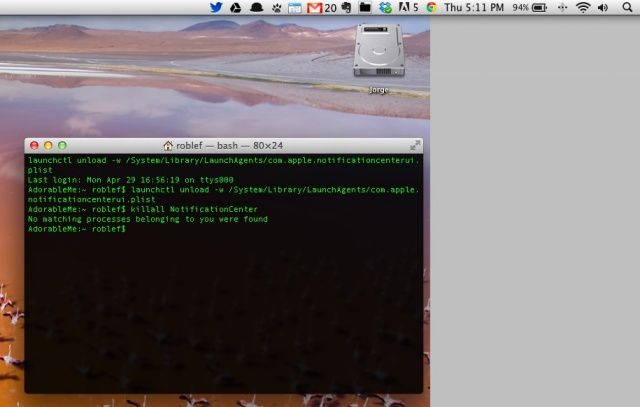
My desktop is rarely this clean.

Notification Center, introduced with OS X 10.8 Mountain Lion, has quickly become an integral part of the Mac OS experience, replacing third-party apps like Growl and the like with a built-in system for notifying you of system and other events on your Mac.

Let’s take a look, then, at five tips and tricks to help you get the most out of your use of Notification Center, including getting rid of it all together, if that’s your thing.

A Realistic Idea Of What iOS 7 Will Actually Look Like

By

message-icon

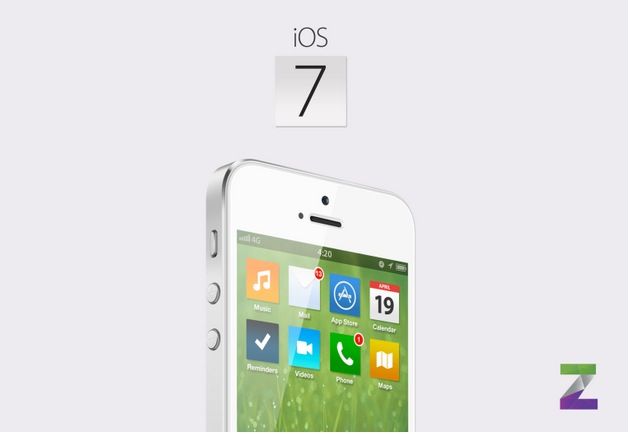
iOS 7 concepts are a dime a dozen these days. Everyone is coming up with short video walkthroughs of what they think the next version of Apple’s mobile operating system will look like.

Rumors say that Apple is making iOS 7 “flatter” and less skeuomorphic (no pool table felt in Game Center, for example). That has led a lot of concept creators to what I think are, frankly, some overdone conclusions. Yesterday on Twitter I made the comment that, “My gut somehow tells me that all of these iOS 7 concepts are horribly wrong.” I haven’t seen a single iOS 7 concept that actually looks believable, well… until now.

Hipstamatic’s Oggl Is Live In The App Store Right Now

By

Oggl

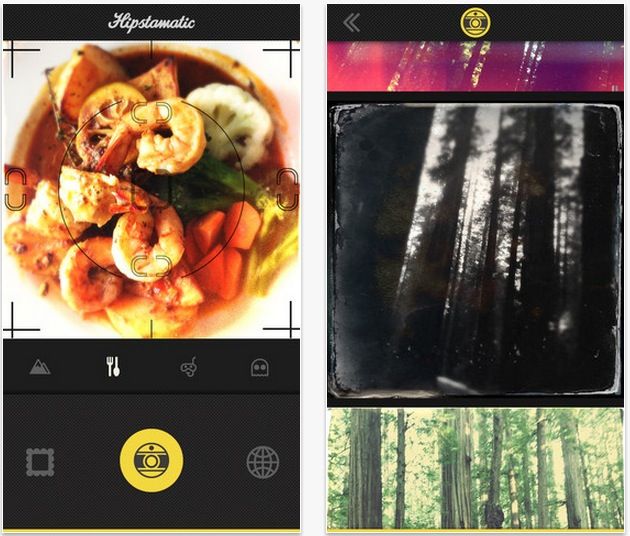
Oddly named social photo sharing app, Oggl is available now in the App Store. It’s currently invite-only, so you’ll need to download the app and request an invite. Once you do that, you’ll be in line to get a spot in this new experiment from Hipstamatic, one of the first “put a filter on it” photo app developers in the iOS space.

Hipstamatic wants to position this app as more than just a way to snap retro-looking photos of your dinner, but a way to capture and curate some of the best iPhone photography around.

Hero Academy Hits The App Store, Brings iOS Strategy Board Game To The Mac

By

Hero Academy Splash Screen

Hero Academy is a pretty fantastic iOS strategy game that plays out like a cross between chess and a tactical role playing game (RPG), played against a single opponent in asynchronous turns. Developer Robot Entertainment has created an experience that’s equal parts dead easy to learn and super fun to play, with a depth of tactics and strategy gameplay that hits the sweet spot for a fun on the go game.

Well, Hero Academy is now available on the Mac App Store, and it’s free to download and play.

Add Unsupported Passes, Cards, And Tickets To Passbook [iOS Tips]

By

PassSource Passbook

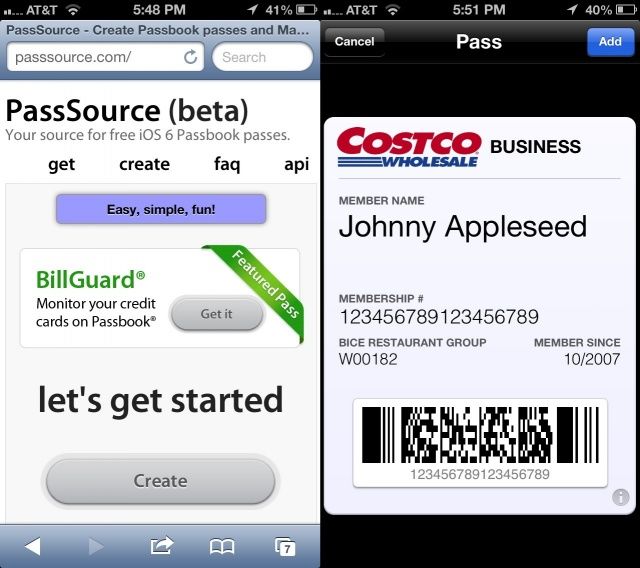
Yeah, we get it: Passbook is awesome. It’s also woefully under-populated with only a handful or three of official apps.

But look, Passbook files aren’t even that special. They’re just specially formatted computer files with a .pkpass extension. What’s neat about that is that anyone can create one of these files, and then send them to you in email, or have you download them from the web. That way, you can take advantage of Passbook system without being limited to the official Passbook apps on your iPhone.

Here’s how.

This Is What Jony Ive Dreams iOS 7 Should Be [Video]

By

Screen Shot 2013-05-10 at 9.59.17 AM

Nothing’s driving design nerds as crazy as the rumor that Jony Ive is taking a torch to iOS’s egregious skeuomorphic design elements and coming up with something for iOS 7 a lot more modern and flat like Windows 8.

In truth, any hopes that Ive is going to completely raze the ground of iOS skeuomorphism for iOS 7 are probably optimistic: Ive hasn’t had enough time, and it’s just too deeply ingrained into the operating system. More likely, Ive’s sensibilities will more immediately be felt in more subtle pairing-downs, like the way Apple’s Podcast app had the reel-to-reel player removed in a recent version.

But what does Jony Ive eventually want iOS to look like? A stunning new concept video has a very compelling take on that question.

Mastering Notification Center: Dump It Entirely From Your Mac [OS X Tips]

By

Get Rid of Notification Center

While I think I’m finally coming to terms with Notification Center, and it’s becoming a normal part of my daily work routine, there are some folks out there who may not like it at all.

For those people, here’s a pretty simple way to get rid of the Notification Center from your Mac, menu bar icon and all.

Android Powers Almost 60% Of All Mobile Devices Sold, iOS Just 19.3%

By

post-226960-image-cb73c4530a9aa0d67b95659bfa0d666a-jpg

Android doesn’t look like it’s about to lose any of its market share to competing platforms any time soon. During the first quarter of 2013, Google’s platform powered a whipping 59.9% of all smart mobile devices sold as total shipments hit 308.7 million units.

Apple’s iOS, on the other hand, was installed on just 19.3% of devices — despite the success of its iPhones and iPads.