Mobile menu toggle

Search results for: Apple One

How to measure distance in Google Maps for iOS

By

measure distance google maps
Measuring distances in Google maps is now easier than doing it on paper.
Photo: Georgie Pauwels/Flickr

Remember how, if you wanted to measure distance between two places, you’d have to either a) spend the next half hour searching the App Store for a non-hideous free app that wouldn’t be too frustrating to use, or b) contrive to force Apple or Google Maps to give you more-or-less direct directions between two points?

Those dark days are over, because now Google Maps on iOS has distance measuring built in. Now you can finally see how far it it from here to there. And back again, if you like.


Upgrades for your email, mobile photography, and more [Week’s Best Deals]

By

This week's best deals include a powerful email platform, a waterproof all-purpose camera, and lots more.
Photo: Cult of Mac Deals

Every week here at the Cult of Mac Store, we’re busy finding great deals on tech tools, gadgets, and courses. This round, we’ve got an email app contender for Outlook and Gmail, and an all-purpose, waterproof HD camera. Also check out the comprehensive course in the Microsoft Office suite, and a video editor packed with 60 video assets. So there’s something here for everybody, read on for more details:

Best shelf apps for iOS 11 so far

By

shelf apps
Shelves are super-useful, in real life and in iOS 11.
Photo: Ismus/Flickr CC

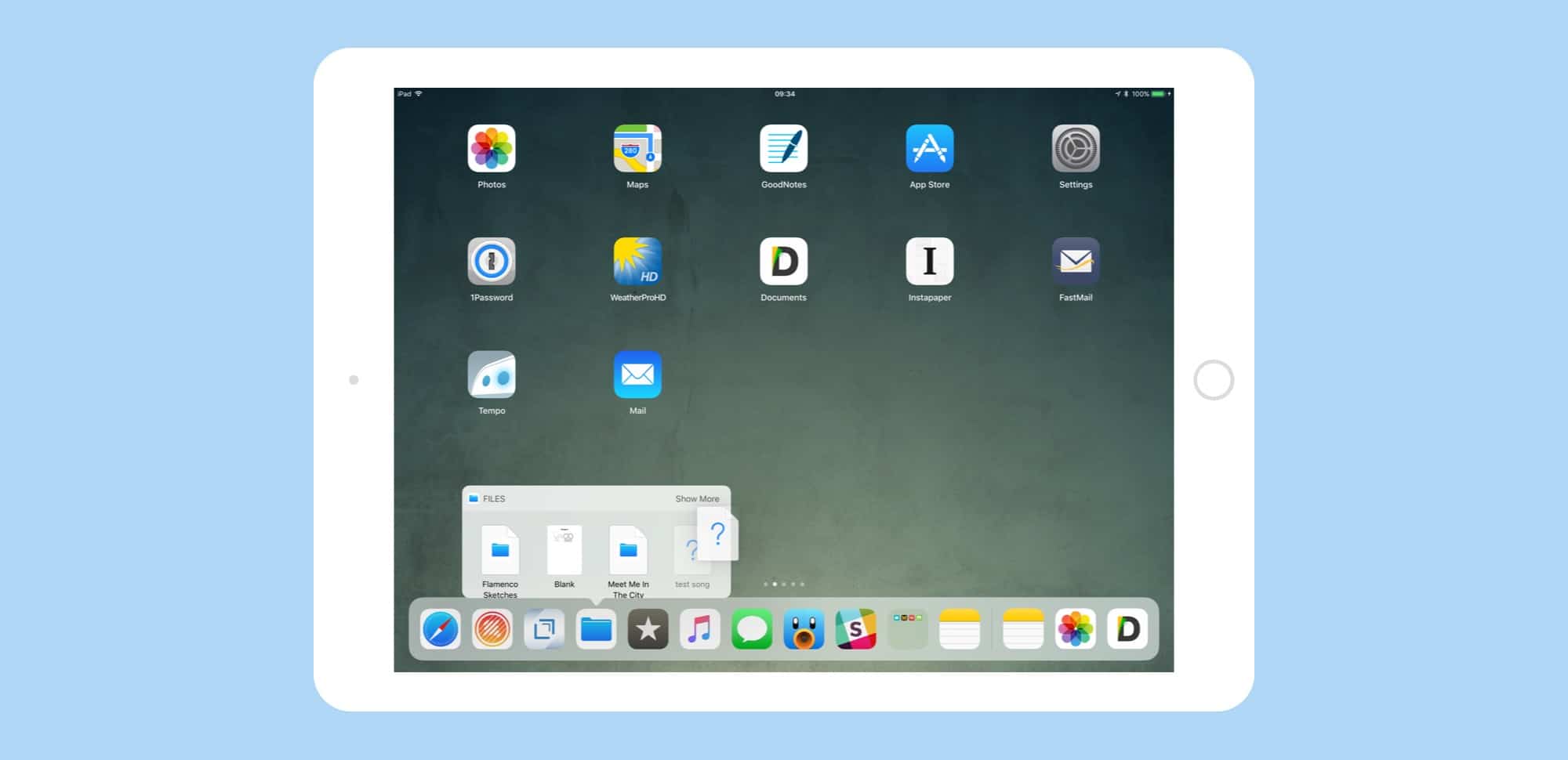
iOS 11’s neat Split View and Drag and Drop implementation has spawned a new class of apps, for iOS at least: shelf apps. These apps provide a slide-out shelf, or junk drawer, into which you can drag items for temporary storage.

This proves useful for all kinds of reasons. You may want to gather up a whole bunch of files for different places before dragging them into an email. You may want to have oft-used files, or snippets of text, or URLs close to hand, or you may like to use a shelf to organize a project, keeping everything together.

However you use them, you can find several shelf apps on the App Store so far, with more arriving all the time. Here’s a look at the Cult of Mac pick for best shelf app (along with a few other options that offer different features).

Search better and faster with this powerful email app [Deals]

By

Postbox 5 is packed with tools that can save frequent emailers a lot of time and effort.
Photo: Cult of Mac Deals

Anyone who sends a lot of emails knows that a little extra efficiency goes a long way. Whether it’s typing out the same canned response over and over, combing endless threads, or just entering your name. Apple Mail and Outlook are great, but they can fall short for power users.

Yay? Snapchat is ready to bring us augmented reality ads

By

This guy
Who knows? Your corporate mascot could become as popular as this guy!
Photo: Snapchat

Advertising is the life blood of many tech companies, so it’s no surprise that people are already tripping over themselves to find a good way of monetizing augmented reality, the technology Apple has brought to the masses with ARKit.

The company that’s first out of the gate with AR spam is Snapchat, which has just announced that it’s opening up its 3D World Lenses to advertisers. Ever wanted to have fun™ by interacting with a beloved corporate mascot? Well, now you can.

iOS 11 Drag and Drop is great, but not for everything

By

drag drop iOS 11 dock
Drag-and-drop is a great. way to get things done, but not the only way.
Photo: Cult of Mac

iOS 11’s biggest new feature, for iPad users at least, is drag-and-drop support, which goes way beyond just letting you drag a file or snippet of text between apps. I’ve been using iOS 11 since the first beta last summer, and while drag-and-drop was neat, it didn’t really come into its own until third-party apps started supporting it.

Two things have surprised me. One: How useful drag-and-drop is inside a single app (which works on iPhone, too). And two: How bad drag-and-drop is for certain tasks.

Dreamy game Flower blooms on iOS

By

iOS game
Award-winning video game Flower is now on iOS.
Photo: thatgamecompany

The power to control the wind and create an ethereal flight of blowing flower petals is now possible with your iPhone or iPad.

An iOS version of Flower, a hit PlayStation game when it debuted in 2009, became available for purchase Thursday on the App Store.

How to capture FaceTime Live Photos

By

facetime live view
FaceTime can capture LivePhotos and save them to your camera roll.
Photo: Cult of Mac

You know how when you’re on a FaceTime call with your parents, and your father holds his favorite recipe up to the camera, and you use the screenshot to capture a photo of it? Well, now there’s a proper, official way to capture images from FaceTime calls. Even better, they’re not just stills. The captures are Live Photos, so you can relive that goofy smile from your grandparent long after they’re gone.

Why Steve Jobs’ Playboy interview was his most revealing ever

By

Jobs
This was one of the most in-depth interviews of Jobs' career.
Photo: Esther Dyson/Ann Yow-Dyson/Flickr CC

Playboy magazine may be more closely associated with bunnies than with bytes, but back in February 1985 it was home to one of the most revealing interviews of Steve Jobs’ career.

To mark the passing of Playboy founder Hugh Hefner, who died Wednesday at the age of 91, we revisit one of the most in-depth interviews Jobs ever gave, which was conducted at a particularly tumultuous time in his career.