We start the day with deals on applications for the iPad and iPhone. First up is a new crop of price cuts on select iPad apps, including “Spider-Man HD.” Next is a group of free iPhone apps from the App Store, including “Text Nanny,” a text-scheduling service. We wrap up our deal spotlight with a bargain on 8GB iPhone 3GS handsets. AT&T Friday begins offering the devices for $49 plus a two-year plan.
Along the way, we also take a look at an eMac G4 for just $150, plus a number of software packages for the Mac. As usual, details on these and many more items can be found at CoM’s “Daily Deals” page right after the jump.
So, you were a very good boy or girl this year and Santa brought you a brand new Mac.
Maybe it was a sleek MacBook Air, perhaps a studly MacBook Pro or a bright and shiny iMac for your desktop. You say it was an old-school Mac Pro workstation? Well, bully for you!
Isn’t it time to make a few resolutions about how you’re going to love and care for your new machine so you can get the most out of it and keep it running in tip-top shape long after your Apple Care subscription runs out?
Here are five suggestions to help you do just that:
1. Have a back-up plan.
The number one mistake made by 99% of the people who wake up one day with an empty feeling in the pit of their stomach as they realize all their photographs, all their music, all their software and the outline for that Oscar-winning screenplay are just…gone — is having no backup.
Fortunately (or unfortunately), Apple has left you no excuse for not having your data backed up, at least since the introduction of Time Capsule and its integration with Time Machine, a built-in backup solution that’s been part of OX X since 2007.
A 1 terabyte Time Capsule is only $299 and unless you are one of those Pirate Bay or LimeWire scofflaws you’re probably never going to fill it up.
Don’t want to pay the Apple premium for seamless integration and “Designed in California” panache? Dozens of excellent third-party backup solutions await from the likes of LaCie and Seagate — there’s even an eco-friendly Green solution from Hitachi subsidiary SimpleTech, the USB 2.0 [Re]Drive, made from bamboo and recycled aluminum.
Regular backups for your computer system are like roughage in your diet: just do it and you’ll never never be sorry you did.
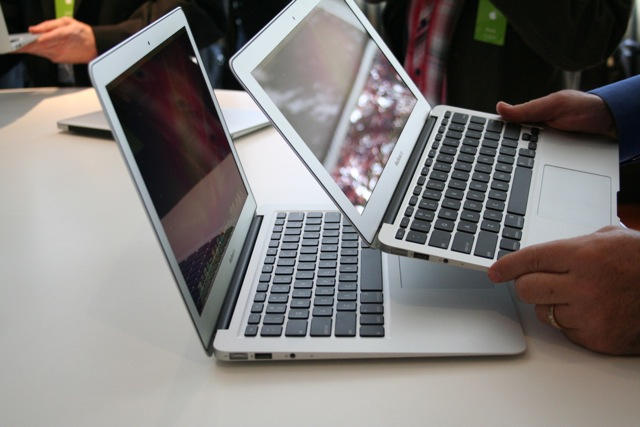
Apple’s new 11-inch Macbook Air with a 64Gb SSD drive is said to be very popular and flying off the shelves at Apple Stores everywhere and beyond. It represents the smallest notebook computer that Apple makes and the default base model ships with the smallest system disk drive available in any Apple notebook. Therefore it makes sense for users to seek ways to optimize the way they use disk space on this tiny new notebook and it was the computer that inspired me to write this How-To — which actually applies to any Mac.
Just six months have passed since the iPhone 4 launch, so it may seems a little premature to be speculating about its successor. But given the long lead times involved, you can bet that Steve Jobs’ A-team is already hard at it, toiling away in a maximum security lab, under his close personal supervision.
But where next for the iPhone? What can you add to the smartphone that has everything? With the growing competitive threat from Android, I think that Apple’s roadmap for iPhone in 2011 will switch from adding new features to product diversification, targeting multiple consumer segments and price points.
Instead of the iPhone 5, Apple will launch the iPhone Play and the iPhone Air. Here’s why…
We start out with some free iPhone applications and some reduced prices on popular apps for the Apple handset. First up is the latest crop of iPhone App Store freebies, including “iDestroy,” billed as a bug destroying game. Next is an assortment of price drops on iPhone apps, such as “Skeletal Anatomy,” a medical application. We wrap up our featured deals with an 8GB iPod nano for $120 plus free shipping.
Along the way, we make the case for cases, whether it is for your MacBook Air, your iPad or your iPhone 4. As always, details on these items, along with much more (such as as 64GB iPod touch or Morphie’s iPhone credit card reader) can be found at CoM’s “Daily Deals” page right after the jump.
Apple gave us plenty to play with in 2010: most notably the iPad, the iPhone 4 and the new MacBook Air. But get ready, because in 2011, Apple will switch from giving to taking.
In his ongoing pursuit of Zen-like simplicity, Steve Jobs looks set to take away two key features of the Mac platform in 2011: optical drives and scroll bars. The impact is likely to be eye-watering for diehard Mac users, but we’ll probably come to see the wisdom of Jobs, eventually.
You got another Apple gadget for Christmas, didn’t you? And you love it, don’t you?
So at what point do you officially declare yourself to be one of those Cupertino Kool-Aid-guzzling, Steve Jobs-worshiping, pathetically devoted Apple fans you used to loathe?
Ten years ago, there were two kinds of people: PC users (a.k.a. “regular people”) and Apple fanboys. At least that’s how it looked from the PC side.
Macs were pretty, but considered by us PC users to be overpriced, underpowered, insufficiently supported by either software or hardware, too hard to customize, optimize or repair and completely devoid of key application areas, such as games.
The world was black and white. You were either a PC or a Mac. Then things got complicated.
Our favorite gadget vivisectionists over at iFixIt have just released a new iPad app that aims to be a free, easily-referenced glossary for their healthy library of open source self-repair manuals for every gadget under the sun: from the first generation iPod to the new, nigh-un-self-serviceable MacBook Air.
As Christmas draws ever nearer, we have a trio of app deals for your favorite Apple device. First up is a new crop of price cuts on iPad applications from the iPad App Store, including “SuperBadminton 2010” for just $0.99 – a $4 price reduction. We also have new freebies from the iPhone App Store, including the seasonally-themed “Snowing Screensaver.” We wrap up our deal spotlight with “SoundHound,” a free music-recognition application for your iPhone.
Along the way, we’ll also check out some hardware deals, such as various iPads reduced by $100, and a 2.53GHz Core 2 Dup Mac mini for just $589. Also on tap is a variety of cases, screensavers and other items perfect for your i-product. As always, details on these and much more can be found at CoM’s “Daily Deals” page right after the jump.