Mobile menu toggle

Search results for: "MacBook Air"

Back To School: Every App & Gadget You Need To Survive College [Buyer’s Superguide]

By

cult_logo_featured_image_missing_default1920x1080
Going back to school? Then let us help.

You lucky thing. The summer’s over, or nearly over, and you’re already planning on heading back to school. Just like last year, you will begin this year fresh and full of energy and enthusiasm, only to be ground down by the man. Luckily, we’re here to help with advice on the best apps and gear to get you through the year and into next year’s summer vacation with the least effort possible.

So sit back, relax and take a look at the Cult of Mac back to school/college superguide.

Get Seamless, Free Document Access On Your iPhone or iPad [iOS Tips]

By

Drive Dropbox iOS

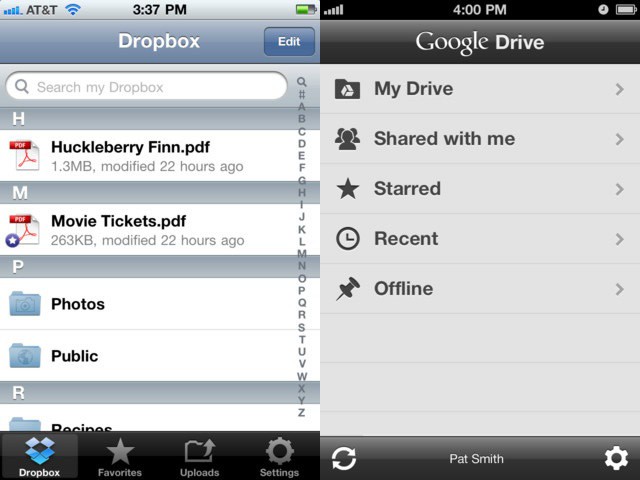
I use several different Macs during a given day, from a trusty Macbook Air to my Mac Mini to an iMac at my office job. I also use an iPhone and an iPad for various personal and business activities. It helps to have access to all the documents I need to deal with during a given day, regardless of what device I’m using, or what environment I’m in.

iCloud is a great idea, and OS X Mountain Lion and iOS 6 will continue to take the service forward. Today, however, I’d like to show you how I use two similar products to achieve a seamless document experience on my iOS devices. For me, Dropbox and Google Drive represent the best in class iOS apps to interface with my documents for home and work.

Apple May Be Working On A Top Secret Asymmetric Screw To Lock You Out Of Your Devices Forever [Updated]

By

fkyQS
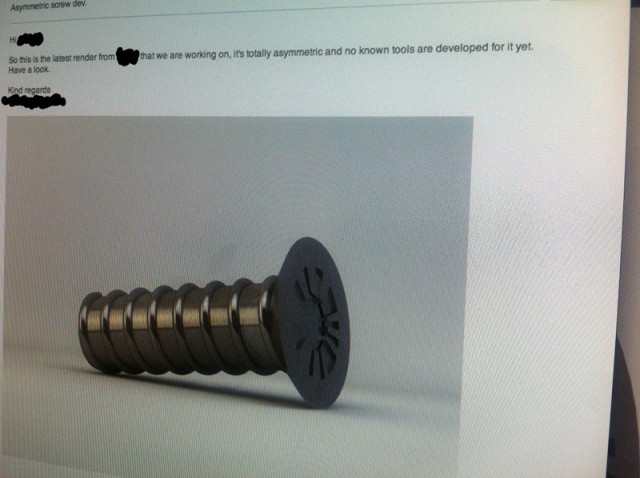
Forget Pentalobe screws, Apple's next-gen screw design could lock DIYers out of their Macs once and for all.

Self-repairability is often an aspect of Apple’s modern product design that gets Cupertino blasted by critics, with the Retina MacBook Pro being deemed “the least repairable laptop yet” by repair experts iFixIt. But if the leaked image above of a next-generation assymetric screw Apple is reportedly working on is to be believed, things are about to get a lot worse for Mac and iDevice owners who like to tinker with their devices.

iPad, LTE, Shared Data Plans Will Make Tablets A $15 Billion Business For Carriers by 2017

By

The new iPad's LTE success seen igniting a serious new revenue stream for carriers.

The LTE version of the new iPad may cost $130 more than the Wi-Fi version, but the throughput that LTE delivers makes the iPad into a phenomenal mobile solution. The performance easily tops a large segment of home broadband services, which delivers tremendous value. Add the free personal hotspot feature available to Verizon customers and a MacBook Air (or other notebook) and you get a powerful business solution for professionals on the road.

Right now only 13% of iPad/tablet users worldwide have an active mobile broadband subscription, but that will change significantly over the next five years according a new report by research firm Strategy Analytics. The potential that the new iPad with LTE offers both mobile professionals and consumers will be one the key factors contributing to that change.

Twelve South’s BackPack 2 Is The iMac Shelf You Probably Never Knew You Needed [Review]

By

IMG_1071

Twelve South is really good at making attractive, beautifully packaged and well marketed accessories for Apple lovers.

Often, their accessories seem born from a small idea — what if your MacBook could look like a book, or what if you could attach your iPad to an arm connected to your Mac — but through excellence in execution, these small ideas quickly become indispensible.

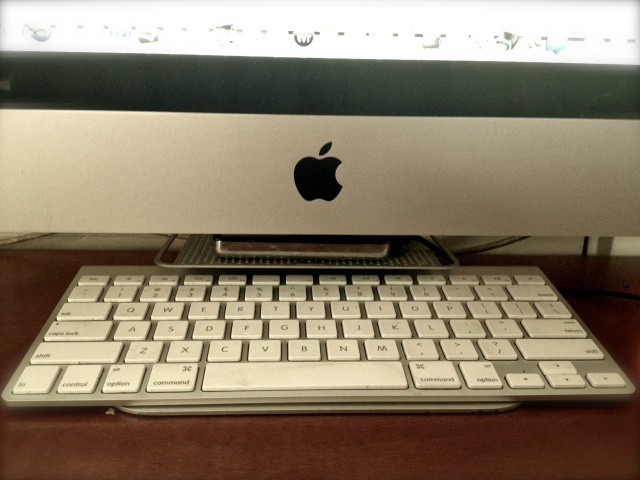
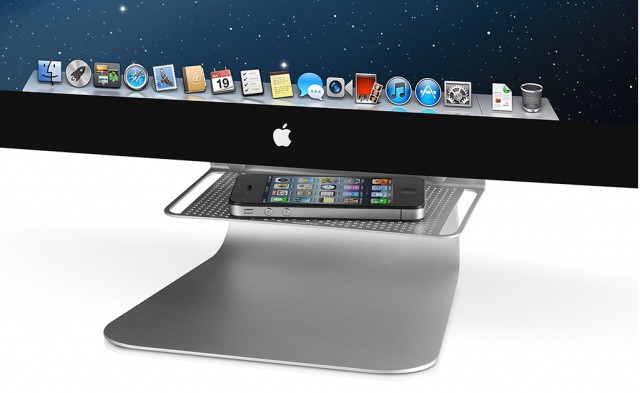
The BackPack, first released in late 2009, is such an indispensible small idea: a little shelf to for your iMac or Apple Display. It doesn’t sound like much, but if you’ve ever struggled with a way to manage the external drives or devices connected to your desktop, that little aluminum shelf quickly became such an integral element to your Mac that it’s as if Apple had built one into every Mac.

Now here comes the BackPack 2, and it’s better than the original in every way.

Send Audio-Only To Apple TV Via AirPlay In Mountain Lion

By

AirPlay Audio Options

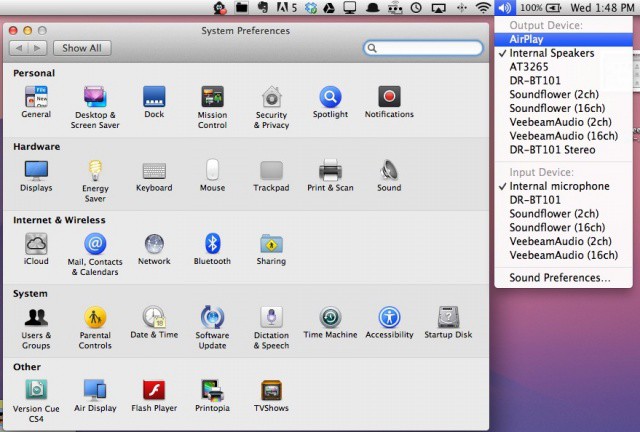
The other day, I was goofing around with one of the slick new features of OS X Mountain Lion, AirPlay streaming from my Macbook Air to my Apple TV. I played some videos to my LCD TV right from the laptop, and then sent Diablo III up there as well. All worked well.

Then I wanted to get back to some writing, so I figured I’d send some music from iTunes over to my Apple TV, using the same AirPlay menubar icon that I’d sent the video over with. While I could hear the music from my TV, the Apple TV also displayed my computer screen. I didn’t want that, so I stopped AirPlay screen streaming, and clicked the button in the lower right corner of iTunes, and chose my Apple TV as an external speaker, like I’ve been able to for a while.

Turns out, there’s an easier way to do this, and one that doesn’t rely on iTunes.

You Can Now Hang Your Twelve South BackPack From The Front Of Your Mac

By

twelvesouthbackpack

Twelve South has just announced a new update to its aluminum shelf accessory for the iMac and Apple Cinema Display. Called the BackPack 2, the redesigned shelf adds a couple of new features to the best wedge of aluminum you can attach to your Mac desktop, including some support pegs that can hold your hard drive or MacBook Air in a vertical position, some new rails that help with cable management and, best of all, the new ability to mount the shelf on the front of your Mac instead of the back.

The BackPack 2 is now on sale for $34.99. We’ve got a review unit: expect to see our review on Friday.

Source: Twelve South

Apple Brings Power Nap To Retina MacBook Pro With New Update

By

Screen Shot 2012-07-27 at 6.36.22 PM

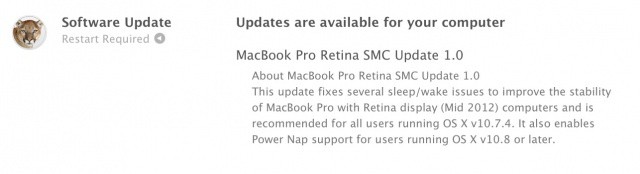
One of the new features in OS X Mountain Lion is called Power Nap. Touted as a tool that get things done while your Mac is sleeping, Power Nap enables a Mac running Mountain Lion to download email, sync with iCloud, check for system updates, etc. while in sleep mode. There is a big caveat, however. Power Nap will only run on Macs with an internal solid-state hard drive (SSD).

During the developer beta phase of Mountain Lion and continuing into its public release stage, it was noticed that certain compatible Macs didn’t have Power Nap installed by default on the final release of Mountain Lion. Apple has since issued a firmware update to bring Power Nap to the MacBook Air, and now a new update today has been issued for the new MacBook Pro with Retina display.

Discover The New And Hidden Features Of Mountain Lion On The CultCast

By

cultcast-site-promo-pic.jpg

Our Mountain Lion Megasode is here, and on this minty-new CultCast, we’ll tell you what we like, what we love, and which hidden features we’ve discovered in Apple’s new big kitty.

Plus, should you upgrade or do a clean install of Mountain Lion? We ponder that very question, then tell you when a clean install makes more sense and how to do it the right way on this all-new megasode.

Subscribe to The CultCast now on iTunes, or easily stream new episodes right on your iPhone or iPad with Apple’s newly updated and freshly debugged Podcasts App.

Show notes up next!