Mobile menu toggle

Search results for: "MacBook Air"

OS X 10.8 Mountain Lion [Review]

By

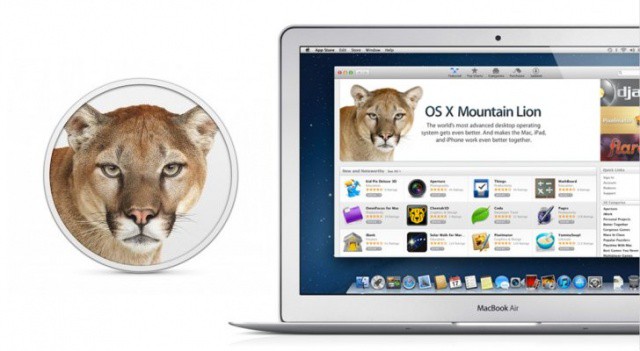
OS X Mountain Lion is here, and it's even sleeker than Lion.

It’s hard to believe that it was just a little more than a year ago that Apple released OS X Lion. Only twelve months later, and we’re now staring right down the maw of Apple’s ninth major release of Mac OS X: Mountain Lion.

OS X 10.8 Mountain Lion signifies a new approach on Apple’s part towards OS X updates: instead of going years between major releases, Cupertino is trying to take the rapid release approach that has worked so well for them with iOS and apply it to the Mac.

Mountain Lion, then, feels in many ways less like OS X 10.8 than OS X 10.7.5: a smaller, more tightly focused update continuing what OS X Lion started, taking iOS’s best ideas and bringing them to Mac.

Thanks to major breakthrough features like iCloud syncing, Notification Center, Sharing, AirPlay Mirroring and more, there’s less of a distinction in Mountain Lion between the Mac and iOS than ever. But is that a good thing, and how will it change the way you use your Mac?

Just What Does Power Nap Do While Your Mac Is Sleeping?

By

wpid-Photo-26072012-1129.jpg


We showed you how to switch on Power Nap on your Mountain Lion-running, SSD-equipped Mac, but just what does this new feature do?

We know that you Mac enters a kind of robotic REM sleep, where it’s brain activity spikes and the network connections power up to download various bits of data, just like Newsstand on iOS. But a new Apple Knowledge Base article outlines the surprising number of tasks which are going on under the sleepy-lidded hood.

Half Of Steam For Mac Gamers Play On A Macbook Pro

By

Macs can be used for serious gaming, mmmkay?

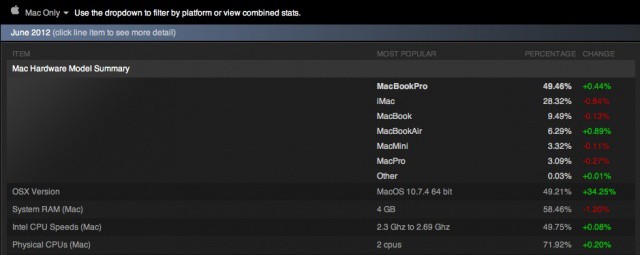
Steam, the online computer gaming portal, keeps track of what hardware its players are using to access the many games in its service.

Of interest in the exhaustive list of specs is the fact that 49.46 percent of Mac gamers on Steam game on a Macbook Pro. Which makes sense, of course, as that’s a pretty powerful laptop. From there, we see the iMac coming in at 28 percent, plain-jane MacBooks garnering 9.49 percent, and the MacBook Air, my personal machine, used by 6.29 percent of Mac Steam gamers. The MacBook Pro and MacBook Air both rose in the hardware charts, with an increase of .44 and .89 percent, respectively.

How To Install Mountain Lion On Your Mac The Right Way [Feature]

By

OS-X-10-8-Mountain-Lion-System-Requirements

Apple’s latest jungle cat is called Mountain Lion, and the new version of OS X is available as a $20 purchase in the Mac App Store. If you’ve updated to a new version of OS X before, you know that getting everything in order isn’t always as easy as Apple makes it out to be. In this how-to guide, Cult of Mac will show you how to get your Mac ready to install OS X Mountain Lion the right way.

Beyond The Numbers: What Tim Cook Really Said In Apple’s Q3 2012 Financial Call

By

Beyond just offering up the latest quarterly financial numbers, Apple CEO Tim Cook gave us glimpses of where Apple is heading.

Beyond the numbers, there were some tantalizing tidbits about Apple and the company’s future plans during today’s quarterly financial call. While nothing quite lived up to Tim Cook comparing Windows 8 to someone trying to converge a toaster and a refrigerator into a single device during the last call, there were several choice comments.

Pro Vs. Air: It’s A Battle Of The MacBooks On The CultCast

By

cultcast-site-promo-pic.jpg

On The CultCast, our listeners ask us all the time whether they should go for the Macbook Pro or the Macbook Air. I say be a real Apple fan — get both. But if that’s not an option, we’ll tell you when which model makes more sense than the other, and which Macbook will be right for you on our latest episode.

And then, Faves and Raves! The fun but poorly-named segment where we pitch our favorite apps and gear then vote on which is best.

Don’t miss this stupendous new episode of The CultCast. Subscribe now on iTunes, or stream new episodes right on your iPhone or iPad with Apple’s new Podcasts App.

Show notes below!

Teens Use iPads To Transform Their Neighborhood [Sponsored Post]

By

enrique2
Teacher Enrique Legaspi at work for College Track.


This post is brought to you by Chase — a strong supporter of TRANS4M Boyle Heights, a program that provides multiple social services that address Boyle Heights’ particular needs. Learn more here.

While some kids are at goofing off at camp or watching re-runs this summer, a group of teens in Los Angeles are reinventing their neighborhood with the help of iPads.

They’re taking part in a new Digital Storytelling class and the first assignment – run as a contest – is to see who comes up with the best ideas for transforming Boyle Heights. This East Los Angeles neighborhood, described by singer will.i.am who grew up there as a “wasteland” is also home to one of the youngest populations in the city.

Find Out How Fast Your SSD Or Hard Drive Really Is [OS X Tips]

By

Geeky, yes. Cool? Yes, again.

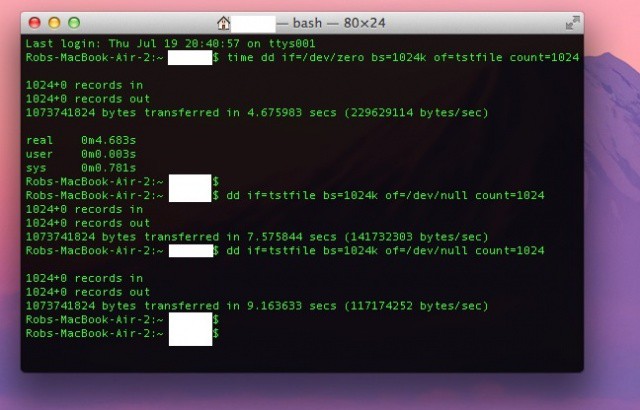
Sometimes, it’s just fun to compare scores with your friends. Without the urge to compete, we wouldn’t have sports, national videogame competitions, or reality television. Now there’s a new way to measure up against those around you – Solid State Drive (SSD) speed.

Ok, so it’s not really a thing, but here’s how you can benchmark your own SSD to compare it with other SSD devices, if you need to know how much faster one computer you own is than another. In fact, it’s a ton of fun to compare the speed of an SSD, say in this here Macbook Air, and that of a hard drive, like in my Mac Mini. Here’s how.

Carriers Charging For FaceTime Over 3G? Listen To Us Nerd-Rage On Our All-New CultCast

By

cultcast-site-promo-pic.jpg

We’ve had it with wireless providers charging us more money for less data and fewer features, and on our brand new CultCast, we’ll tell you why the prospect of carriers charging for FaceTime over 3G makes us mad as hell!

And then, Faves and Raves! The fun and poorly-named segment where we pitch our favorite apps and gear then vote on which is best.

Don’t miss a very fun new episode of The CultCast. Subscribe now on iTunes, or get all techie like the Dark Knight and stream new episodes right on your iPhone or iPad with Apple’s new Podcasts App.

Show notes below!

Got A New Mac? Here’s How To Get Mountain Lion For Free

By

Screen Shot 2012-07-20 at 3.03.53 PM

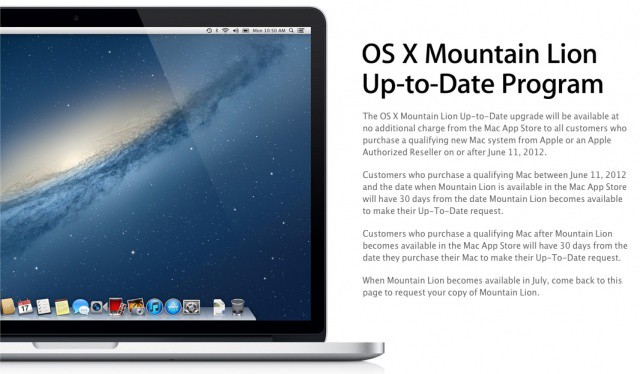
If Apple releases Mountain Lion on the same schedule they released Lion last year, they will unleash the latest version of OS X to the world the day after their quarterly earnings call. That means that next Wednesday, July 25th, everyone should be able to drop $20 on the Mac App Store for a copy of OS X Mountain Lion.

There’s one exception though: if you bought a Mac after June 11th, 2012, you’ll be automatically eligible to receive a free OS X Mountain Lion upgrade. That means if you’re the proud owner of a new Retina MacBook Pro, MacBook Air or 2012 MacBook Pro, or any older Mac purchased recently, you’ll get a free upgrade.

All you have to do is go to this page within 30 days of when Mountain Lion drops and tell Apple you’re eligible for an upgrade. Generous, no?

Source: Apple.com
Via: OS X Daily