Mobile menu toggle

Search results for: "MacBook Air"

Apple Says You Need To Stop Using Palm Rest Covers On Your Retina MacBook Pro

By

palmrests

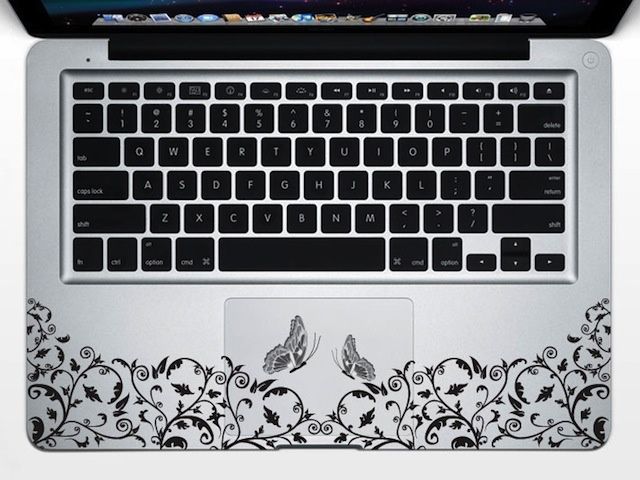
Tons of Apple accessory manufacturers make cute little palm rest covers for MacBook Pros and MacBook Airs so the metal of your cherished MacBook doesn’t get all scratched and nasty and damaged. They make your MacBook standout, but Apple thinks you need to stop freaking using them because you’re going to break your display if you keep it up.

In a note published on Apple’s support blog, Apple warned users that using palm rest covers might totally interfere with all of Apple’s fancy engineering that went into making the MacBook Pro with Retina display super thin. The added thickness might mess up your display and crack your screen when you shut your MacBook, leaving you super sad.

Here’s what Apple said about the palm rests –

Why The PC Is Dead: Five Years Of iPhone Benchmarks [Chart]

By

6a0120a85dcdae970b017ee3e42e5e970d-800wi (1)

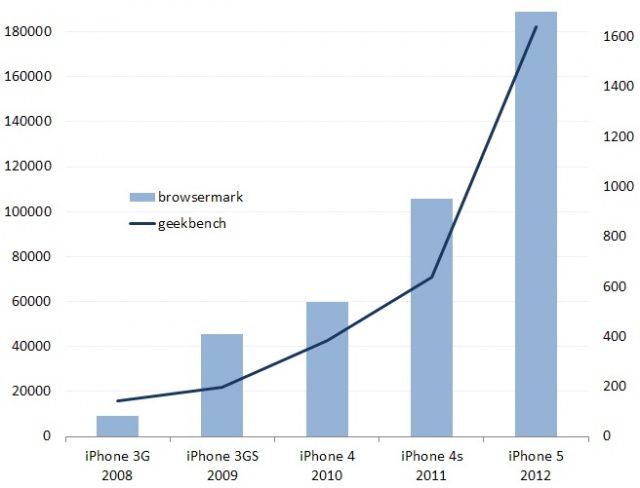
In a post by Jeff Atwood over at the excellent Coding Horror, there’s this brilliant chart showing the “hyperbolic performance improvement” of the iPhone since it first debuted in 2008. As Jeff points out, in just five years, the iPhone has seen a factor of 20 performance improvement in Browsermark and a factor of four improvement in GeekBench, at least doubling performance every year.

Why the iPhone 5 is Too Radical

By

iphone5rus

You’ve heard the collective judgement by the tech echo chamber: The new iPhone was just like the old iPhone, only taller.

The iPhone 5 is boring. Apple is too conservative. They didn’t really change the phone, but only made minor tweaks.

And that’s what’s wrong with the iPhone 5: It’s just not radical enough.

Here’s the problem: The echo chamber not only got this wrong, they got it backward.

The trouble with the iPhone 5 is that it’s too much, too soon.

Let me explain. 

Tiny Dongle Turns Hotel Ethernet Into Hotel Wi-Fi

By

1348572909.jpg

You're in a hotel room, and you want to hook up to the in-room Wi-Fi. And guess what? It sucks, just like at every other hotel you ever stayed at. So Instead you dig out your MacBook and hook it up to the hotel's Ethernet cable, and use internet sharing to generate your own wireless network.

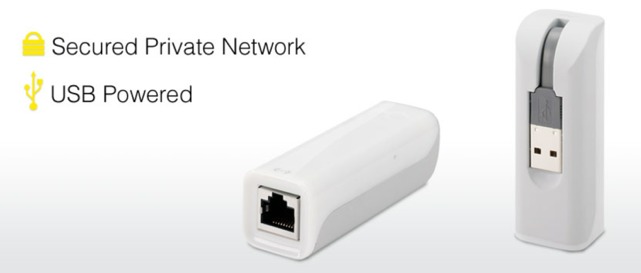
Wait… The newest MacBooks Air don't have Ethernet ports. But don't worry: you can pick up the $60 mySpot from Kanex, a little dongle which takes an Ethernet connector and turns its sweet network payload into a wireless cloud, ready for all your iDevices and your non-Ethernet MacBook Air.

The iPhone 5: A Smartphone Of Extraordinary Grace [Review]

By

Beautiful.
Beautiful.

After months of rumors and speculation, the iPhone 5 is finally here, featuring a thinner, lighter design, a taller 4-inch display, LTE, the new Lightning connector, redesigned EarPods, and more. It’s the first major iPhone redesign in twenty-seven months, and the first iPhone ever to change the aspect ratio of the device, to have LTE, to use a new connector or to have new headphones, but despite this, many have criticized the iPhone 5 for being boring.

What’s the truth? Is the iPhone 5 dull, or is it a major leap forward for Apple’s most iconic device? We’ve spent the weekend reviewing a 64GB white-and-silver iPhone 5 on Verizon’s LTE network, and put it through its paces. Here’s what we thought.

iPhone 5: How Can Apple Possibly Top This? [First Impression]

By

iphone5impressions
Holy crap.

Every review of the iPhone 5 makes great efforts to talk about how light it is. I’ve read those reviews over and over again since Tuesday. Even so, when taking my iPhone 5 out of the box for the first time, I so misjudged the weight that it went flying from my fingers and onto the floor. This is lightness to the point of ephemerability. It’s so hard to believe, and yet it’s testament to the iPhone 5’s construction that such a thin slate of glass and aluminum doesn’t break apart between your fingers like a communion wafer when you touch it, let alone when you — as I did — accidentally fling it across a room. But my iPhone 5 wasn’t even scratched.

This isn’t our review of the iPhone 5. Far from it: we’ll be posting an in-depth review first thing on Monday morning, once we’ve had a chance to put it through its paces in full. These are our first impressions, and let’s say it right off the bat: from the second it comes out of the box, the iPhone 5 seems like such a leap over the iPhone 4S that it’s like picking up your first MacBook Air after lugging around a lunky 2008 MacBook Pro for years. In a couple of years, Apple has improved the design of the iPhone 4/4S so much that the latter now seems absolutely antediluvian.

Motorola Going After The Whole Kit And Caboodle, Looking To Ban Just About Every Apple Product Under The Sun

By

post-191928-image-eb361e99f873b4466825080af273b40d-jpg

Motorola is looking to bring down the ban hammer on almost every Apple product out there, including every Mac OSX computer. I have no idea if Motorola is just looking to throw spaghetti at the wall or what, but they have a long list of infringements that apparently the International Trade Commission has agreed to investigate.

OS X Mountain Lion 10.8.2 Has Been Released With Facebook Integration, Battery Life Fixes & More

By

Screen Shot 2012-09-19 at 1.07.14 PM

Along with iOS 6’s release, Apple has just pushed out OS X Mountain Lion 10.8.2, adding Facebook integration to Mountain Lion as well as reportedly finally solving the battery issues people have been experiencing since OS X 10.8.0.

You can download it now through Software Update; the change list should be found here in good time, though the link is not functioning as of writing.

Main changes look to include:

• Facebook integration with Contacts, Photos, Sharing and Notification Center
• Power Nap support for late 2010 MacBook Air
• iMessages sent to your phone number now appear in Messages on your Mac
• Passbook support for Safari and Mail
• Shared Reminders lists
• FaceTime now receives calls sent to your phone number.
• Dictation now supports new languages.

Here’s the complete change list:

Bring Displays Menubar Item Back To Mountain Lion [OS X Tips]

By

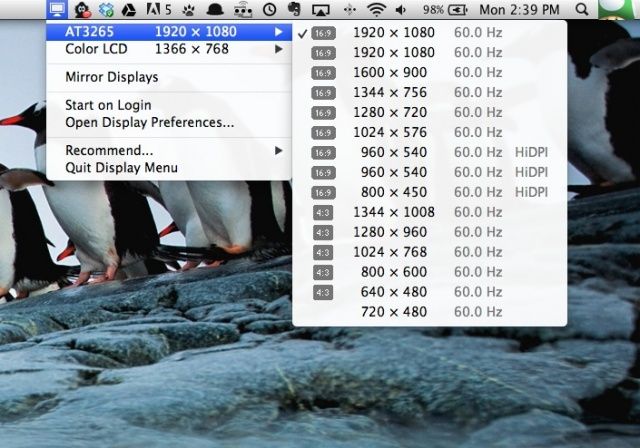
Display Menu menubar

Before the Display preferences were available in the menu bar in OS X, connecting my Mac to an LCD projector was a tedious thing. When it arrived a few OS X versions ago, I showed everyone I worked with how much easier it was to use this, instead of hopping into the System Preferences every time they hooked their Mac up to an external monitor or projector. Then OS X 10.8 Mountain Lion came along and replaced the Displays menubar item with an AirPlay focused one, and I’ve missed the original ever since.

The developers behind third-party app, Display Menu, thought the same thing and fixed things for us all.

The Best Bags [Best Of]

By

cult_logo_featured_image_missing_default1920x1080

Man-bag. Murse. He-purse. Call it what you like, but you need one. Finally men in the U.S are following the European example and carrying their day-to-day gear in a bag instead of stuffing it all into a wallet, and then jamming that into a back pocket.

Cameras, iPads, iPhones, chargers, e-books and — yes — even wallets need a place to go, and what follows is our roundup of the best bags to put them in.

And who knows? Maybe one day your adult males will stop wearing baseball caps and shorts and start dressing like grown-ups instead?