It didn’t take long for a French retailer to begin selling ‘unlocked’ iPhones, following a recent court ruling in that nation. FNAC Friday began selling the popular Apple handset without the usual carrier contract.
Despite the rather steep prices (an 8GB iPhone sells for the equivalent of $1,122), the FNAC offers seems to be the first to take advantage of a ruling by France’s Competition Council temporarily striking down the practice of requiring contracts tied to carriers.
Earlier this month, the competition board described Apple’s 2007 exclusive deal with France’s Orange carrier a “serious and immediate” threat to broader competition.
Besides an all-in-one design, new iMacs expected in January could sport new cooling technology for chips developed by chip giant Intel, two Asian-language publications are reporting.
Foxconn will create a “magnesium-aluminum alloy chassis,” according to the Economic Daily News. The Chinese-language pblication also claimed Foxconn’s Precision Components and Auras Technology will produce the iMac’s “cooling module.”
The news may dovetail with a previous report from DigiTimes that Apple was among a group of PC makers opting to use new quad-core processors from Intel expected to alter computer power requirements. The Core 2 Quad chips, ranging in speeds from 2.33 GHz to 2.83 GHz, require 65W rather than 55W for current iMacs, according to AppleInsider.
I love hearing and reading stories about the people who made great things happen. In much the same way that I enjoyed “Classic Feynman” and shared the book with many friends, I share with you the beginning of the Apple Macintosh. Andy Hertzfeld’s website, Folklore.org, chronicles the early days of Apple Computer and the creation of the Macintosh. It does more than that though, it brings back all the fun had in creating it, and gives us a first look in the original Cult of Mac: its creators.
Quite a few of the stories follow Burrell Smith. Originally hired as an Apple II service technician, Burrell was an amazing hardware engineer and generally crazy guy. It was his hardware and circuitry work that made the original Macintosh a reality.
“I’ll Be Your Best Friend” introduces you to one of the key men behind the Mac through his introduction to Andy Hertzfeld:
“Toward the end of my first week as an Apple employee in August 1979, I noticed that someone had left a black binder on my desk, with a hand-written title that read, “Apple II: Principles of Operation”. It contained a brilliant, concise description of how the Apple II hardware worked, reverently explaining details of Woz’s epic, creative design hacks, in a clearer fashion than I’d ever read before. I didn’t know who left it there, but the title page said it was written by “Burrell C. Smith”.
Later that day, in the late afternoon, I was approached by a young, animated, slightly nervous guy with long, straight, blond hair, who entered my cubicle and walked right up to me.“
Competition in the cell phone industry is legendarily cut-throat. The major carriers will do whatever they can to retain and induce people to sign long-term contracts ad buy new phones. This often includes ludicrous stunts and special offers that ultimately deliver little value.
That’s especially true with a wonderful little deal AT&T is offering right now with the purchase of an iPhone 3G. With your two-year contract and at-least-$200 investment, you’ll receive this handsome (?) car charger for Steve’s Amazing New Device worth almost $10!
Except you won’t. It’s only compatible with the original iPhone. (a Consumerist informant claims this is an inventory-clearing tactic) This is especially funny, because I can’t imagine someone deciding to take the iPhone plunge because of a crummy car adapter. The iPhone has broken most of the rules of the cell phone upgrade cycle, mainly by making OS upgrades and the addition of new applications a mandatory part of owning a cell phone.
What’s not a part of owning a phone anymore? Crappy plastic add-ons used as inducements to the purchase of an over-priced and under-delivering phone from Motorola.
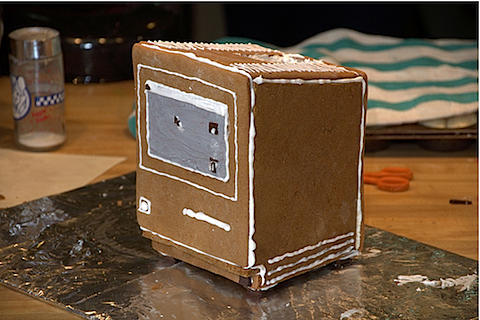
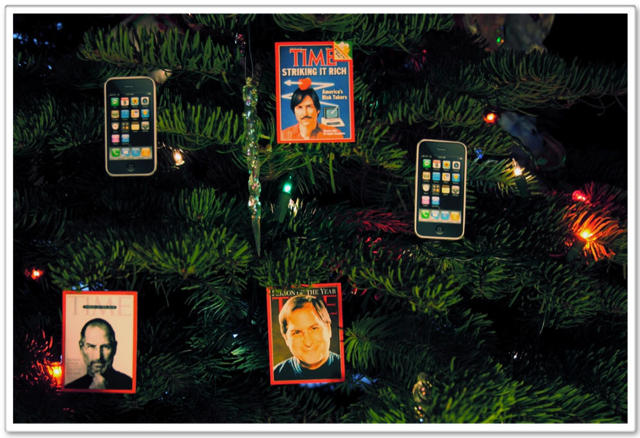
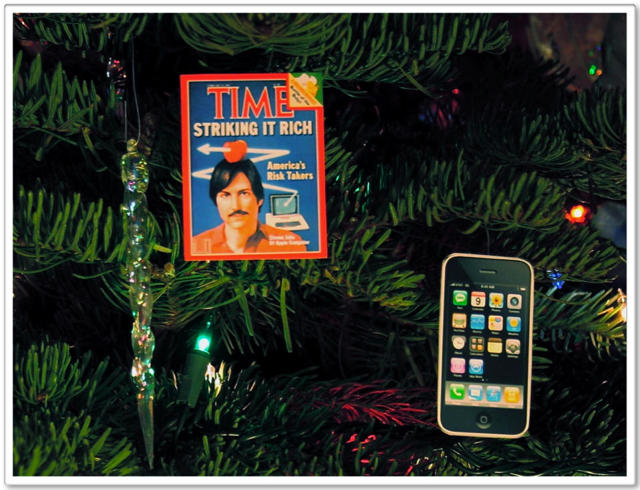
There’s really nothing like Christmas for a Mac cultist (except for Halloween, that is). This delectable Old School Mac is the awesome work from Flickr user MinorBug. Click through to see the full collection of pictures.
It seems that suing Apple is no longer just the sport of crazy chicks allegedly denied their dog-given right to resell iPhones at extortionist rates because Apple discounted them. Instead, we have crazy patent campers who think that 25 years after Apple pioneered the use of the GUI in personal computers, they’re entitled to license fees on a patent granted last March.
Join me in going totally off the deep end after the jump…
iPhone app developers iPaguri have a new offering on the AppStore today, called Walking Tour Fierenze, a one and a half hour audio guide for, you guessed it, a walking tour through the center of Florence, Italy.
The version currently available is in Italian only, with versions in English, French, Spanish and German coming. The developers promise anecdotes, curiosities, stories and legends about the famed center of Renaissance art and culture that “others can’t show you,” a claim we’ll have to get our Italy-based colleague Nicole Martinelli to suss out and possibly opine on regarding the true value of this $10 app.
In concept, however, iPaguri could be sitting on a gold mine. I envision Walking Tour versions for every major tourist destination and gallery in the world…
If you just can’t live without emoticon functionality on your iPhone, you may have cell phone users in Japan to thank. Perhaps with a nod to the centrality of “emoji” on all mobile devices in Japan, Apple has apparently enabled their use with iPhone 2.2 firmware, according to one report, but only through the Japanese virtual keyboard.
You must be willing to enter the brave world of jailbreaking your phone using cydia.app, but once there, you’ll be able to enable “emoji” right from the phone’s settings for International keyboard functionality: settings -> general -> international -> keyboards -> japanese -> emoji
Apple may be adding useful swipe gesturing functionality to the virtual keyboard on the company’s mobile devices, according to a report at MacRumors.
Blogger Arnold Kim describes two potentially effective additions to Apple’s touch interface contained in a patent application filed yesterday with the US Patent and Trademark Office.
Aside from the single finger swipes depicted in the diagrams below, multi-touch gestures (two and three fingers) could invoke other special functions. If a single finger left-swipe might delete a letter, a two finger left-swipe could delete a whole word, and a three finger left-swipe could delete a line. Similarly, a single finger right-swipe could add a space, while a two finger right-swipe could add a period. Up swipes and down swipes could also invoke different functions based on the number of fingers used.
As with Apple’s evolving multi-touch notebook trackpads, these optional functions could provide iPhone and iPod Touch users with useful and welcome shortcuts.
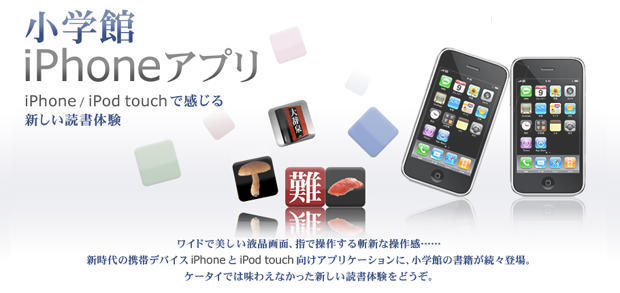
It’s not clear whether or not the Shogakukan Illustrated Sushi Guide would have helped Jeremy Piven with his mercury poisoning problem last week, but the company’s iPhone app is slated to hit the Japanese iTunes store any day now.
The $5 guide will contain pictures and descriptions of 82 different kinds of sushi, ideal for frequent travelers to Japan, and will sport an English appendix, according to a report at Crunch Gear.
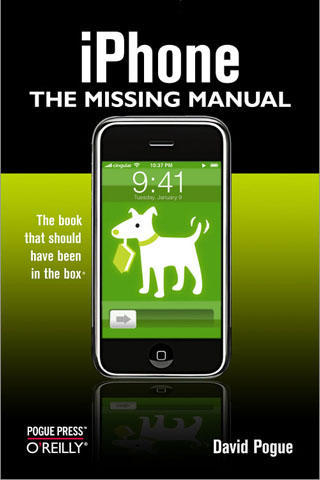
New York Times technology columnist David Pogue and publisher O’Reilly combine to bring those of you who just unwrapped your brand-new iPhone yesterday iPhone: The Missing Manual, a $5 application available at Apple’s iTunes AppStore.
According to the publisher, the app “shows you everything you need to know to get the most out of your iPhone. Full of humor, tips, tricks, and surprises, this book teaches you how to extend iPhone’s usefulness by exploiting its links to the Web as well as its connection to Macs or PCs; how to save money using Internet- based messages instead of phone calls; and how to fill the iPhone with TV shows and DVDs for free.”
The funny thing is if you can purchase and download the app to iTunes and sync your phone so the app gets on there, you probably don’t need the manual in the first place.
For those of you who remember the good old days of the Error Bomb and the SE-30, you may remember the old Broderbund game Shufflepuck Café. You were thrust into rough and tumble space bar, clearly the outsider, forced to prove yourself in a true game of wits and agility: computer air hockey. It was a simple game for simple times: a handful of wacky alien characters, mild nudity, and an animated screen crack when your opponent scored. Ah to go back for one more round.
But you’d need a vintage Mac for that, and you threw yours out with your velour leisure suit years ago. Fret not! There are a few free possibilities for a quick match on OS X! None line up perfectly with the original, and for that I am exploring the avenues of emulation, but in a pinch these will do.
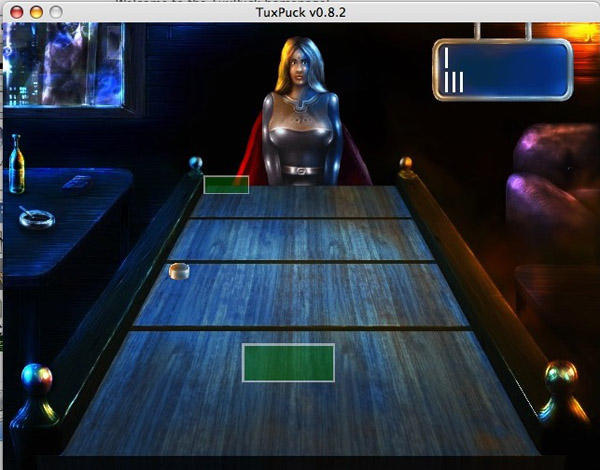
TuxPuck is perhaps the most reminiscent of the original, with a character closely resembling Princess Bejin. It is, however, limited in the characters you can play against and might need a bit of massaging to get it to play.
Shufflepuck REVOLUTION provides a bit more variety in the way of characters, including Woz and Jobs as opponents, but it’s also updated the system with 3D graphics. Unlike TuxPuck, Shufflepuck REVOLUTION insists on playing in fullscreen, which is a bit off-putting if you don’t know that right away.
The quest for the perfect OS X Shufflepuck match continues!
I recently started reading comic books from the 80’s that I’m borrowing from a friend. Every issue is a blast. The most interesting thing about these comics is that the advertisements in them are actually worth reading. There are bits for other comic books, grinning kids with Ataris and other paneled strips hawking Nesquik. It’s pretty cool, and even now I kind of want to buy some of that stuff.
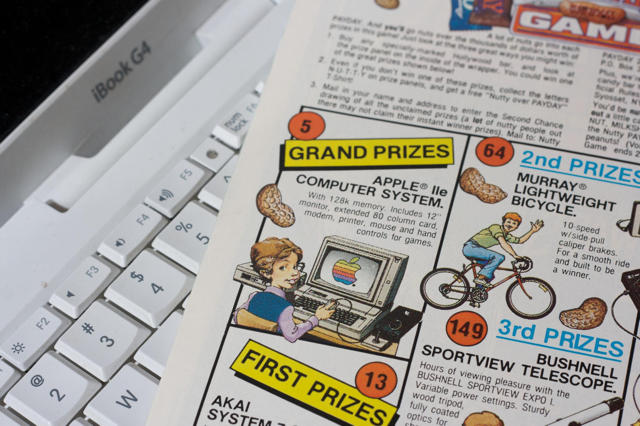
I’ve read a couple issues of the Flash, paged through a Green Lantern or two, but I really got hooked on Groo the Wanderer by the MAD magazine comic artist, Sergio Aragonés. Groo is great, but the real surprise was on the back of issue 6 in this ad for “The Nutty Over Payday Instant Winner Game”:
Yes, if you won the grand prize, one of five Apple IIe computers could have been yours!
Did you know the AppStore has a free app for iPhone and iPod Touch that will let you print borderless 4 x 6 photos (10 x 15 cm in Europe) directly from your device, without the need to upload them first to a computer or image processing program?
iPrint Photo, from HP uses Apple’s Bonjour technology to locate most WiFi enabled HP network printers wherever you are, letting you immortalize that once-in-lifetime capture on the spot. Printers with separate photo trays automatically select that option, and otherwise default to the main paper tray. The app is compatible with most industry standard WiFi environoments, including Apple Airport, Linksys, D Link and Netgear.
Sloane Crosby, author of essays “I Was Told There’d be Cake” and maker of creepy dioramas, has a bewitched iPod.
When asked by the New York Times to name her iPod playlist (Marvin Gaye, Bon Iver, New Order) Sloane rants about her MP3 player, which apparently has a few issues:
The worst example of this technological tyranny has to be my iPod. Our relationship has gone from one of pleasurable convenience to a series of baroque rituals and infuriating modifications, of tricks and mysteries, of songs that my iPod considers playing (as evidenced by the flashing image of album art) but, thinking better of it, decides to supplant with Carla Bruni’s “Quelqu’un m’a dit” juuuust one more time instead.
My iPod may be possessed. It may be infuriating. It may be trying to tell me something.”
These things happen, I have a temperamental iPod, too. But it started acting up after falling under the subway tracks. A three-person rescue team fished it out, but alas, it has never been the same since. Maybe she isn’t telling us the whole story?
Atif Shamin, a Phd student in electronics at Carlton University in Canada, has figured out a way of reducing iPhone battery drain.
He’s replaced all the internal wires and PCBs of his iPhone with an antenna.
The swap allows a wireless connection between a micro-antenna embedded within the circuits of the chip.
“This has not been tried before that the circuits are connected to the antenna wirelessly. They’ve been connected through wires and a bunch of other components. That’s where the power gets lost,” Shamim said in an article on the University website.
He estimates that his solution uses 12 times less power than the traditional, wired-transmitter module. That means more juice for the ever-expanding choice in apps.
“It’s a common problem. There are so many applications in the iPhone, it’s like a power-sucking machine,” said Shamim.
He’s filed for patents in the US and Canada, look out for details on his hack in an upcoming issue of Microwave Journal.
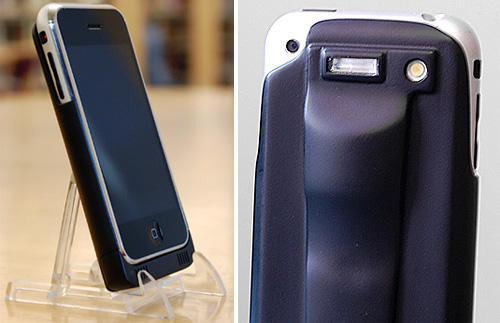
A promise to “unleash the true power of your iPhone” might not be the best marketing slogan for Snapture Flash, a xenon flash accessory with red-eye reduction for Apple’s mobile device. As snappy as it sounds, the slogan also calls attention to what is roundly regarded as the iPhone’s weakest attribute, its 2.1 megapixel, fixed focal length still camera.
The flash’s sleeve-like case is powered by the phone itself, which SnaptureLabs estimates will give you 1000 flashes on a single charge. As a bonus, the sleeve also provides amplification for the iPhone’s on-board speaker.
The downside here is that the flash is only a prototype and the accompanying Snapture camera software (which itself provides some interesting creative mods and controls for the iPhone’s camera), requires a jailbroken phone to avail yourself of its charms.
It will be interesting to see whether Snapture Labs can strike a deal to get it’s patent-pending flash technology to market before Apple comes out with a new version of the iPhone with some sort of flash built-in.
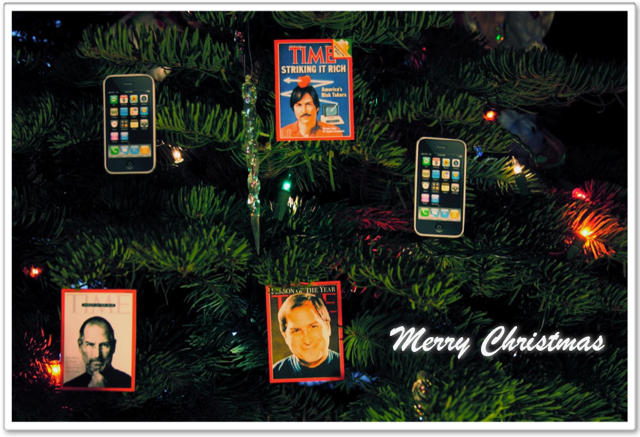
The kind Apple fanatics at iPhone Savior have done the great public service of creating Apple and Steve Jobs-themed Christmas eCard templates and posted them over at Flickr for anyone who still has a few last minute greetings to get out.
You can use a pre-made card like the one above, or choose from two styles of hi-res blank cards and add your own graphical text message to express your holiday sentiments and your love for all things Apple in the same vehicle.
As they put it over at iPhone Savior, “Sincerely wishing everyone an iPhone 3G for Christmas and some sweet dreams of Steve.”
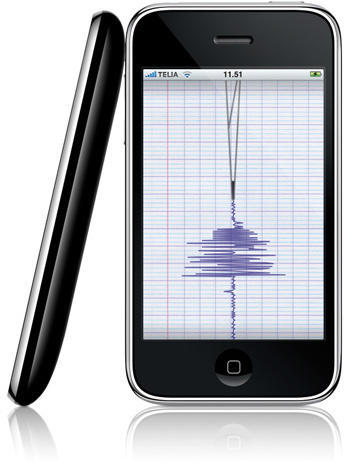
Seismometer is the iPhone app that can not only let you know if you’re in an earthquake (and how bad it is at your personal epicenter), but also records and displays the movement energy of just about anything.
Seismometer uses your iPhone’s built in accelerometer to measure movements in two axes, calculate the resulting energy and draw the results on a rolling scale.
Version 1.1 updates feature noise filtering, expanded frequency settings (20, 40 , 60 and 200hz), and choice of output to logarithmic or linear scale.
99¢ buys you fun for the whole family; no additional premium charged to iPhone users located on major fault lines.
Is there any social dynamic the iPhone cannot be leveraged to transform somehow?
Here’s a six minute video from digitalJournal TV detailing a “social taxi service” that San Francisco-based Avego Shared Transport hopes will one day expand the public transit system by enabling every private vehicle to operate as a public transport vehicle.
This free iPhone app has the potential to dramatically reduce wasted seat capacity in cars, reduce the costs of commuting and expand commuting options for riders and drivers alike. This is definitely not your father’s hitchhiking experience.
Using the iPhone 3G’s GPS capabilities and web services, Avego seeks to enable a cross between carpooling, public transport and eBay, by matching a driver’s wasted seat capacity – those seats which are unoccupied – to passengers, reducing commute costs for all participants. Avego automatically apportions the cost of the commute, providing a financial incentive to commuters frustrated by high gasoline prices.
The company is quick to point out that the arrangements it facilitates clearly fall under “carpooling” laws that exist in nearly every jurisdiction in the US since the oil shock of the 1970s, and financial transactions are carefully limited so that participating drivers only recover the expenses associated with providing transport and do not cross the line into making them commericial transport operators.
For the nitty gritty on how Avego works, see the further information page on Avego’s website, but definitely take time to watch the video here and marvel at yet one more example of how Apple technology is changing the ways people interact with each other and with the world around them.
In the wake of Apple pulling out of Macworld — and the prospect that Steve Jobs may leave the company — many are wondering if Apple will survive without him.
The answer is yes, Apple will definitely survive without Steve Jobs. It may even thrive.
I’m very interested in Wiimote projects for the Mac for two reasons. One is that the guy who came up with the idea (Johnny Lee) is an alumnus of my university. I’m so into his work that I even went to his thesis defense. The other is that my mom is a sixth grade teacher, and I helped her convince the technology department at my old middle school to buy two Wiimotes for her to use with the projector and iMac in her classroom.
Setting up the Wiimotes with the whiteboard is a snap, especially with the Wiimote Whiteboard program for the Mac. The only problems we’ve had are making the IR light pen and finding something simple for the kids to do.
In a quick demonstration last week, using a DVD player remote control since the IR light pen I made ran out of batteries, I set the kids up drawing in Appleworks. This was fun, and the ENTIRE class immediately jumped out of their seats and lined up at the chance to draw themselves. This was certainly one of the most excited and engaged audiences I’ve ever presented to.
Even so, Appleworks isn’t a really great program to be using for this type of thing. It’s obviously not designed for a pen interface, and it can’t use the Wiimote’s multitouch capabilities. This is why I was so excited to see Adrien Mondot’s effort to hook up eMotion to the Wiimote set up:
The video shows all kinds of wonders that sixth graders would lose their minds over. Drawing is cool enough, but I think we’d have to resuscitate some of them once we got them moving letters around, using multiple pens, affecting particles and giving them 3D graphics.
I’m going to try to make some little kids pass out after winter break. Have you tried the Wiimote whiteboard project?
Last week I asked Cult readers for their nominations for new Mac app of the year. Things, 1Password and Dropbox seemed to be the consensus choices, all of them excellent new software products.
It got me thinking, though: how has my computing behavior changed during the last 12 months? What new software am I using that I wasn’t using last Christmas, and why?
I’m a shy and retiring Englishman, so tooting my own horn doesn’t come naturally, but my brash American wife insist I post this: USA Today named Inside Steve’s Brain, my book about Steve Jobs, one of the best business titles published in 2008.
Says USA Today:
“Offers insightful nuggets on Steve Jobs, who helped create personal computers and digital music while moonlighting as a modern-day Walt Disney at animation studio Pixar.”
A good Apple t shirt is hard to find. You want to be unique, to be different. You want your shirt to be like your Birkenstocks and Uggs before they were cool. Some companies will mail these things out to you for free if you beg them enough (my friend got a Digikey shirt after a week of calling), but for Apple you’ve got to go out and get them from third party vendors. These are for the long time Mac users, and the nerds who want to look good.
This shirt lurks in its awesome. Most would think that it’s just another “power button” shirt. Those in the know recognize it from other places. There’s also a bandana for the truly serious.
Mac t shirts are all well and good, but when it really comes down to it, you probably don’t want to wear them to work. You want something with a little more sophistication, even if you’re locked in the server closet all day. The Spinning Beach Ball of Death polo shirt is the way to go for casual Fridays.
Insanely Great Tees could easily fill this entire list, but I’m just going to include two of their shirts. The Bomb is definitely a must-have for me, as I can’t remember how many times I saw that little popup window. It’s ingrained in my mind. This shirt says “Yes, I was around before OS X”, “Yes, this is a metaphor for my coolness” and “No, I don’t belong in airports”.
The second Insanely Great Tees shirt is also one of my favorites. The Campground Command symbol is a subtle nod towards your Mac side, but the general concept is there for Windows and Linux users as well. This shirt was even featured in the nerd-shirt gold mine of a television show The IT Crowd.
Finally, a parody of the most sold t shirt ever. There’s too much Mac nerdiness going on here to even try to get into it all.
For those of you looking beyond this list, I recommend that you click around the sites that these shirts are from. Blue Collar Distro and Insanely Great Tees have a great selection of Mac and otherwise geeky shirts. I recognize that there are lots of great Mac shirts on Cafepress, but I tried to steer clear of them because of some issues with quality they’ve been known to have. There are also lots of great expo and out of stock shirts to be had, but that’s no good for your wardrobe is it?