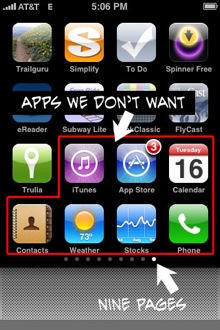
Macenstein has a beauty of a post, explaining precisely how to remove Apple’s own apps from sight on your iPhone.
If you’ve ever wondered how many screenfuls of apps the iPhone will let you store, the answer is nine – or a total of 148 apps. But it turns out that there’s a secret, hidden, 10th screen.
So if Calculator, Clock or Contacts drive you crazy and you want to be rid of them, all you have to do is get yourself nine screen loads of apps, and be sure that the 8th and 9th screens are full to the brim. Then get the icons wiggling and start shuffling from screen eight to screen nine. Boom!, as Steve would say.
The apps aren’t actually deleted, just removed from sight. And even then, they will re-appear after you restart the phone or sync it.
Full details are at Macenstein. And if you read it and think: “Why would I spend so much time doing that?”, then you and I both have great minds.

Giles Turnbull is a freelance writer in England. He also writes for the Press Association and The Morning News. You can find out more at his website, and follow him on Twitter @gilest.

