Mobile menu toggle

Getting More iPhone Home Screens – And Keeping Them

By

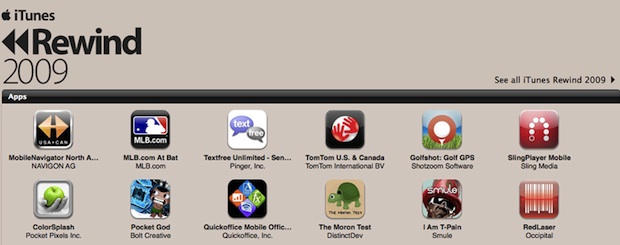
Extra iPhone screens in iTunes.

A couple of weeks back, I wrote Temporarily Get More iPhone Home Screens Via Cunning Bug Exploit, but had heard staying away from the iTunes Applications tab within my iPhone was probably a Very Good Idea. Reader Larry Pressnell noted that since the most recent iTunes update, his extra screens have been accessible in iTunes.

Since I needed to add some apps to my device, I decided to take the plunge earlier and, sure enough, my experience mirrored Larry’s: 11 home screens were shown, and extra ones were dimmed—see the grab above. Interestingly, items could be dragged from these ‘extra’ screens to the standard ones, with no problems, and a full sync didn’t find my extra pages vanishing into the ether. Whether this has anything to do with Voice Memos (the app used to get extra screens in the first place) being the last app on my final page, or the fact I’ve yet to update my iPhone OS to the latest point release, I’ve no idea.

Are you having fun with extra pages and managing to successfully rearrange your apps in iTunes? If so, let us know in the comments!

Coming Next Week, The Big Apple Interview

By

mystery_interview

If you liked Wednesday’s interview with Apple ad man Ken Segall, just wait until you see what we’ve got coming next week.

We have an exclusive interview with one of the top people in the Apple story. I’d say they were number 3: the third most influential person in Apple’s history.

This is the first time they spoken publicly about Apple in many, many years. They have some good stories, a lot of fascinating insights, and a couple of surprises.

Can you guess who it is?

Apple Unveils First Paris Store in Louvre

By

louvre-lg

Apple today opened the first of a series of stores planned for Paris. The first, located near the famous Louvre art museum, coincided with the release of the Musee du Louvre iPhone app showcasing among other exhibits, Leonardo da Vinci’s Mona Lisa.

The Paris store, first reported in 2008, includes a 7,700-square foot two-story layout with diamond-shaped windows.

Daily Deals: $799 MacBook Pro Laptops, Free iPhone Leather Holsters and 30-Inch Cinema HD Widescreen LCD Display

By

cult_logo_featured_image_missing_default1920x1080

755416-large755416-large755416-large

Today’s deals include MacBook Pro laptops with 15-inch screen and 1.83 GHz processor starting at $779.99. Next, buy an iPhone accessory at the PC Micro Store and get a free Lux iPhone leather holster. Finally, the Apple Store is offering its 30-inch Cinema HD widescreen LCD displays.

For details on these and other bargains (such as new price drops at the App Store on iPhone or iPod touch apps), check out the CoM “Daily Deals” page after the jump.

Steve Jobs Named ‘CEO of the Decade’

By

post-20572-image-4d2482eea0057ce59122a33e1788c516-jpg

Apple co-founder Steve Jobs was named “CEO of the Decade” by Fortune Magazine. The magazine calls the 2000s “the decade of Steve.”

Despite surviving a very public death watch, being tossed out of his own company in the 1980s and what Fortune calls “his own often unpleasant demeanor,” Jobs “has transformed American business.”

Apple’s come-back under Jobs spans 2000, when the company was worth $5 billion through today’s $170 billion valuation, edging out even the mega-bucks of Internet giant Google. In August, Apple reported having $31.1 billion in cash, a record for a technology company. Over that period, the Cupertino, Calif. company has become involved in music, videos and cell phones.

Launch Balloons From Your iPhone To The World

By

20091105-balloons.jpg

This is a great idea, and bound to go down very well with your kids.

Balloons is simple: you launch a virtual balloon into the air from your phone. You add a photo and a text message to the label that dangles below the balloon, and send it off.

Anyone with the Balloons app can catch that balloon and add their own message. If you shell out for the paid version, you can track the balloons you’ve launched and see what other people have added to them.

20091105-cultballoon.jpg

To celebrate and set things off, we’ve created a Cult of Mac balloon for you to catch. It’s purple with green stripes, and has a photo of the Cult home page at the top. If you catch it, let us know what you think about Balloons.

This is a particularly friendly application. I can see school classes all over the world launching balloons to make contacts in other schools. And Shiny development have wisely kept the choice of balloons fairly limited to start with; I wouldn’t be surprised to see custom balloons appearing soon, as an in-app purchase.

Mossberg: Droid ‘Credible Alternative’ to iPhone

By

500x_droidtop

The Droid provides Verizon Wireless a ‘more credible alternative’ to Apple’s iPhone, according to Walt Mossberg, a technology columnist for the Wall Street Journal.

“Like the iPhone, the Droid is really a powerful handheld computer that happens to make phone calls,” Mossberg wrote at All Things Digital. After testing a review version of the Droid, the Wall Street Journal writer told readers the Motorola-made device using Google’s Android 2.0 software has some advantage, as well as disadvantages to the iPhone.

Update: Fear of Flying App + Promo Giveaway

By

post-20552-image-d6cf38a5c66db1a26952f3dcc73b0ce6-jpg

Virgin’s new Flying Without Fear app — an interactive guide to easing panic — left us with a few questions that we got answered by Mickey Beyer-Clausen, who co-developed the app for Mental Workout.

CoM: Can you use the app during take off and landing?

MBC: Unfortunately, passengers cannot use any electronic device – including the iPhone in airplane mode – during take-off and landing but the app is developed to prepare users for flight whereby making the brief “no electronics” period at the beginning and end of the flight more manageable.

The panic button is intended to be used during the flight when turbulence is encountered or other events occur which make the user uncomfortable.

Gallery of Uncanny Steve Jobs Lookalikes

By

isamu_sanada.jpg

Isamu Sanada’s day gig is photography, but his passion is Apple mock-up design.

An amateur designer of fantasy Macintoshes with a website that showcases dozens of his speculative designs for Apple gear, Sanada got his mock-up cred back when he posted an amazingly prescient take on the Titanium G4 PowerBook months before the real deal was released.

Though he’s gotten lots of praise for his designs, Sanada has been quoted regarding his design chops humbly, saying, “Apple’s thought is more splendid than my thought.”

Hit the jump for more Steve Jobs lookalikes and if you find one out and about — or happen to be one yourself — send us a pic or post it on our Facebook wall and we may feature yours in a gallery post down the road.

Cult of Mac Favorite: MobileStacks Is the Best Reason To Jailbreak. Period.

By

post-18759-image-4fdda74c13b4e4c338802079935687ea-jpg

I really like Stacks on my Mac. Stacks makes it fast and easy to find files, folders and apps right from the Dock. It makes managing a Mac pretty slick with all sorts of little UI tricks. That’s why I recently gave MobileStack a go on my jailbroken iPhone.

I must say that it lives up to the challenge of making an interface that is intuitive and user friendly enough for the small iPhone screen. In fact, it’s definitely the best excuse to jailbreak.

Review: Waterfield’s Muzetto Urban Man Bag Is A Total Chick Magnet

By

post-18695-image-d3fa734cbdaa39ed811fbf5af53729e6-jpg

The San Francisco based company Waterfield presents the Muzetto laptop bag. This “urban man bag” will make the geekiest nerd feel hip. Don’t be surprised when your fashion-forward girlfriend tries to steal it.

Designed as a lightweight laptop tote, this bag is high quality; it’s made from distressed dark brown leather and offered in six accent colors. It’s a pleasant change from the over-used nylon of most laptop bags.

I really like the gold liner which makes items highly visible. On my first use I accidently scraped the bag with my keys and made a horrible mark. But no worries! The well-oiled bag is designed to scratch easily for a distressed look. The marks will blend in time or you can just give it a good rub.

IMG_0969

Gallery: Behind the Scenes From Two Classic Apple TV Ads

By

tank_commercial

Is this Steve Jobs driving a tank in a classic Apple TV spot from the late 1990s? That was the rumor at the time: Jobs was making cameos in Apple commercials.

Ken Segall, the TBWA ad man responsible for naming the iMac and Think Different, reveals the truth after the jump. He also shares some rare behind-the-scenes photos he took during the filming of this commercial and another from the same era.

iFixit Launches Community-Driven Site Devoted to Repairing Tech Products

By

iFixit CEO Kyle Wiens
Kyle Wiens, the CEO of iFixit, is launching an online community focused on fixing high-tech products rather than throwing them away.

Best known for its awesome teardowns, the Mac-oriented repair company iFixit is launching a online community devoted to fixing high-tech products, rather than tossing them away.

“The world has a problem with rapidly consuming devices and tossing them aside, ignoring long-term environmental impact,” said iFixit CEO Kyle Wiens on the company’s blog. “With your help, we are going to change that. I’m confident that we can change our culture of ephemeral ownership.”

Currently in private beta, iFixit Answers looks like a cross between a forum and a wiki. In a blog post announcing the launch, Wiens outlines four points that should be of interest to all publishers focused on building productive online communities:

  1. It’s important that posts get more useful over time. It’s not uncommon for a traditional repair forum response to become the canonical source for an answer to a problem, only to get outdated and stagnant as technology changes.
  2. It’s important that we recognize expertise. It matters if the author of an answer is a professional technician, or has helped 200 people fix their problems.
  3. It’s important to make helping people fun. There’s a rush that comes from helping someone solve a tricky problem, being recognized by people for the research you put into a question before asking it, or testing your hardware diagnosis mettle against others.
  4. And most important, we need to close the feedback loop between the people answering questions and those asking them. Repairing things is uniquely tangible — when you use a solution proposed by someone, you know for a fact whether or not it worked. Finding out that the answer you gave someone actually fixed their problem is one of the greatest feelings in the world.

It’ll be very interesting how iFixit makes good on these points. The future on online publishing is nurturing community, and Wiens has nailed some of the key points. We’ll be keeping a close on the project.

To sign up as an Answers beta tester, add your name to the list.

Support For Atom Processor Mysteriously Reappears in OS X 10.6.2

By

post-20506-image-9d07908408d7b1da73aa319923537413-jpg

Last week’s bombshell that Apple’s upcoming OS 10.6.2 update dropped support for Atom processors seems to be unfounded.

The Atom is the chip of choice in netbook hackintoshes, and many speculated that Apple was trying to kill the hackintosh market.

But Stell, the hacker who first sounded the alarm, now says support for Atom is mysteriously back.

“… in the latest development build Atom appears to have resurrected itself zombie style in 10C535. The Atom lives another day, but nothing is concrete until the final version of 10.6.2 is out.”

Daily Deals: MacBooks, iMacs and iPhone Accessory Bargains

By

cult_logo_featured_image_missing_default1920x1080

756113-large756113-large756113-large

We’ve reached mid-week and to celebrate, we lead off our top trio of deals with an offer on 15-inch MacBook Pros for $1,594 and a 27-inch 2.66 GHz iMac with AppleCare for $2,198. To mark Apple’s 100,000 available apps, we also feature the latest list of App Store freebies.

For details on these and other items (such as an 85 percent-off deal on iPhone accessories), check out CoM’s “Daily Deals” page after the jump.

Car Finder iPhone App Uses Augmented Reality To Find Your Wheels

By

post-20478-image-30830d807a89bb4227f1ac8260dbf317-jpg

New on the app store is Car Finder, a clever app that leads back to your parked car using augmented reality.

The app uses the iPhone’s camera to overlay the direction of your car and how far away it is. The app relies on the camera and a digital compass, and is  compatible only with the iPhone 3GS  running 3.1 or later.

Car Finder is available on the App Store for $0.99.

Via iClarified.

Beatles Collection on Apple-Shaped USB Kind of A Lemon

By

post-20463-image-ced90ae3024ad00ba232bb9c4cc472ad-jpg

The Fab Four still haven’t made it to iTunes, but if you want to shell out $280, you can have some of their stuff on a limited-edition USB stick.

Collectors may crave 16GB key that comes with 14 stereo titles, plus re-mastered 13 mini-documentary films about the studio albums, replicated original UK album art, rare photos and expanded liner notes.

The USB “core” pulls out of an apple, recalling the Granny Smith from the record company founded in 1968. Some 30,000 keys are available from the online store, from December 7  in the UK and December 8 in North America. (You can also pre-order online now.)

If you’re more interested in their music, it sounds like slim pickings for a hefty price —  at least one fan, alluneediscash, on the site argued:

But the BOX SET is only $219! ($179 at amazon) no one loves the beats more than me, but shouldn’t they charge LESS for the usb?

Which raises the perennial question of when this icon of Brit pop will finally make it to iTunes.  Although the Beatles settled the marathon trademark dispute with Apple two years ago, the use of this apple key, meant as a nod to Apple Records, might stir the embers of animosity rather than hasten them for Apple downloads.

iMac G4 Base Shines On as Desk Lamp

By

post-20457-image-3d8db038084b15ba4e95cb399613cf16-jpg

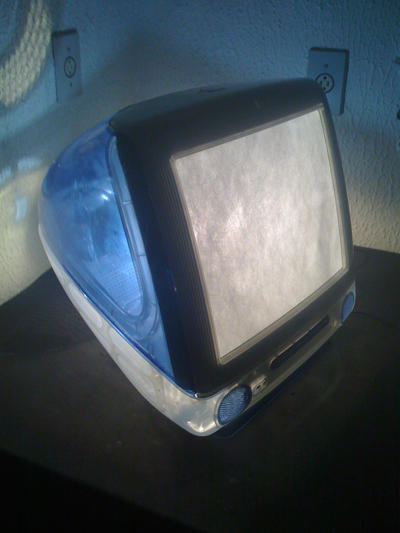
The swivel goodness at the base of the iMac G4 had a near-human flexibility and was nicknamed the iLamp in a nod to Luxo Jr., star of  a short Pixar film.

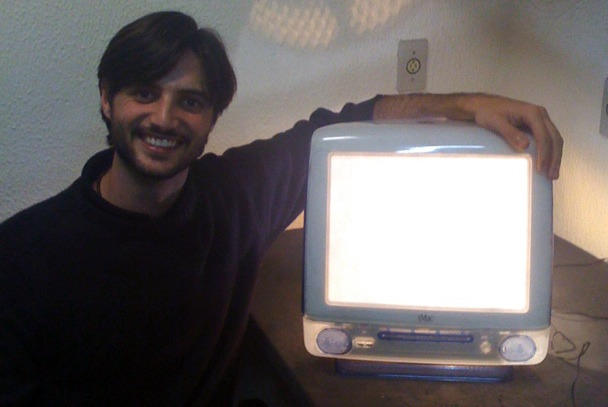
Now, one of those aging bases from the early 2000s is living out its retirement as a lamp.

Creator Nicolas didn’t tell hardmac exactly how he did it, but did say it was easy:

“I decided to recycle my old iMac G4. With some spare parts, one can easily transform it into a nice lamp fully articulated thanks to the famous arm.”

Another illuminating idea courtesy Apple.

Via hardmac

Interview: The Man Who Named the iMac and Wrote Think Different

By

ken_segall_1

Meet Ken Segall — the man who dreamed up the name “iMac” and wrote the famous Think Different campaign.

Segall is a veteran creative director who worked at Apple’s agency, TBWA\Chiat\Day, back in the day.

“I’ve put in 14 years working with Steve Jobs on both Apple and NeXT,” says Segall. “I’m the author of the Think Different campaign and the guy who came up with the whole “i” thing, starting with iMac.”

Segall collaborated closely with advertising legend Lee Clow, chief creative officer of TBWA\Chiat\Day, whose retirement was widely — but prematurely — reported last week.

In this exclusive interview, Segall talks about working with Steve Jobs, how Jobs initially hated the word “iMac,” and the importance of the Think Different campaign to Apple.