Mobile menu toggle

Microsoft Could Pull SkyDrive App For iOS As It Fights With Apple Over 30% Cut

By

SkyDrive's official iOS app could disappear if Apple won't negotiate.

The future of Microsoft’s SkyDrive service on iOS looks bleak today as the company appears to have entered into a fight with Apple over its 30% cut of App Store revenues. Microsoft recently gave iOS users the ability to upgrade their SkyDrive subscriptions from their iPhones and iPads, but until the company agrees to give Apple a 30% cut of the in-app purchases, it won’t get any future updates approved.

A critical bug fix that prevents the app from crashing has now had to be placed on hold. Should Apple’s rules be a little more flexible in certain cases?

Tiny USB Thumb Drive Stylish Enough To Penetrate Your MacBook’s Ports

By

1355223539.jpg

It is with bad memories of Apple’s original iPad case in my mind that I write about Elecom’s Ultra-Compact USB Memory. Forcing that hideous black rubber monstrosity on the beautiful iPad was like marrying a supermodel and forcing her to wear a wetsuit.

But thanks to Elecom, we never need to do this to our svelte MacBooks Air – this tiny USB dongle might be easy ot lose, but until you do, it’ll hand around looking beautiful. Just like that hot model (soon-to-be-ex-) wife of yours.

Share Links Quickly and Easily Over Bonjour With The Great Link [OS X Tips]

By

The Great Link

Are you constantly sending your buddies in the office links to funny Imgur pictures or hilarious YouTube videos? Is that why your office IT department shut down any non-corporate instant messaging services on the office network? Do you still want to send your co-workers funny links to lighten the monotony of the cubicle farm you all work in?

Whatever the reason, if you want to be able to send and receive links quickly and easily without having to copy and paste them into an IM client or email, The Great Link may be the app for you. It’s easy to set up and simple to use. Here’s how.

Google CEO: Apple’s Vendetta Against Google Hurts Users Most

By

post-205459-image-0e374516e8ad7e5619b6a9f36db0ee81-jpg

Apple’s relationship with Google is often rocky at best. While the Cupertino company has previously utilized its services for its Mac and iOS devices, it has never really forgiven the search giant for developing Android, the biggest competitor to the iPhone. In fact, Apple’s recently been working to distance itself from Google, removing some of its services from iOS, including YouTube and of course Maps.

However, Google CEO Larry Page feels that it’s Apple’s users that suffer when it can’t work with competing companies, and says it would be “nice if everybody would get along better.”

Strong iPhone 5 Sales Give Apple 27% Of Global LTE Market, But Samsung’s Still Top [Report]

By

post-205434-image-176db3ddf8904c821fbcc90402b48b57-jpeg

Strong sales of the iPhone 5 have helped Apple grab more than a quarter of the global LTE device market last quarter, despite the handset’s short time on sale. The Cupertino company now commands 27% of the market share, while arch rival Samsung’s 40% share means it maintains the top spot for the seventh quarter in a row.

However, increasing competition from its rivals means Samsung’s share has quickly slipped by more than 10% from 50.9% in the previous quarter.

New Guide Interface Comes To YouTube Android App, Mobile Web for iPad Users

By

post-205416-image-f8fbe82129816fa9fa97209217c4323d-jpg

YouTube announced today that its Android app has been updated to match more directly with the recent updates to its web homepage. On the video host’s Google+ page, they noted that the YouTube app on an Android tabled has now included a Guide like the one recently introduced on YouTube proper. It allows you to access your favorite channels and discover new ones.

In addition, YouTube announced that the mobile website, available to iPad and other mobile users, will provide the same easy access to the Guide interface, letting you connect with your subscriptions and playlists as well as easier controls for sending video to your HDTV via AirPlay and other systems.

Space Hulk Looms Ever Nearer To Your Mac, iPhone, Or iPad

By

Not the big green angry guy.

Games Workshop announced today a Space Hulk game for Mac, iOS, and (yes) PC. It’s scheduled for release in 2013, and is based on the Warhammer 40,000 franchise board game of the same name. The current digital version is planned to be a 3D turn-based strategy game with both single player and co-op modes of play, not to mention cross-platform multiplayer across iOS, Mac, and PC.

Apple Plummets To 42 On This Year’s List Of 50 Happiest Companies To Work For

By

sad-mac

Last year, Apple acheived spot number 15 on CareerBliss’s list of the top fifty happiest companies. This year, Apple came in at a near-bottom 42. What happened?

The list pulls info from anonymous job satisfaction reports that can be submitted to the CareerBliss site, not the most scientifically valid of methods. However, as TUAW notes, the average reported salary for Apple employees dropped from $59,559 per year to $57,269 per year this past year. Maybe that had something to do with it.

Twitter Brings Instagram-Like Photo Filters To Official Mobile Apps

By

post-205382-image-4cb157617907a3e37841c51a4b0d7d4f-jpg

Twitter has unveiled Instagram-like photo filters for its official mobile apps on Android and iOS. It’s been rumored that Twitter would roll out this feature by the end of the year, and the time has come.

You can choose from 8 basic filters and crop/enhance your pics before sharing them in the Twitter app. This addition comes after Instagram recently shut off photo previews for links shared in Twitter.

Apple Quietly Fixes “Potentially Life-Threatening” Maps Glitch In Australia

By

Screen Shot 2012-12-10 at 6.02.04 PM

Apple’s Maps struck again this morning when it was reported that multiple drivers were being guided into the wilderness when searching for the city of Mildura. The local police deemed the glitch in Maps a “potentially life-threatnening issue” because the Australian wilderness is not exactly a safe place to get lost in. The temperature gets really hot and there’s no water.

Since the fiasco started circulating in the media this morning, Apple has quietly fixed the inaccuracy in Maps and started pointing users in the correct direction.

Uber 2.0 For iPhone Goes Live With Complete Redesign, Ride Fare Estimates, iPhone 5 Support, And More

By

Screen Shot 2012-12-10 at 5.23.36 PM

Uber is a really great service, but the iPhone app has always sucked. It has been a real shame because Uber made me never want to take a taxi again. I’ve been wanting the app itself, which is arguably the crux of the whole experience, to be on par with the great driving experiences I’ve had in Uber cars.

Today Uber 2.0 went live in the App Store, and it just took everything to the next level. Not only does the app have a gorgeous new design, but you can finally get fare estimates before you book a ride. There’s also iPhone 5 support and plenty of other goodies.

Instagram Updated With Improved Camera Interface, Design Tweaks, Foursquare Buttons, New “Willow” Filter

By

post-205354-image-41bc45999f50ab7f634c3f2935969aec-jpg
Same Instagram, fresh coat of paint.

A big Instagram update is now available for Android and iOS devices. The camera interface of the app has been improved with a quick preview of the last picture you took on your device. Now there’s an optional grid guide for taking pictures and a permanent grid to help you with aligning when you’re scaling and cropping. For iPhone 5 users, Instagram has included an “improved Camera Roll image selector for quick access to your last photograph.”

Today’s update also includes a number of speed enhancements, Foursquare buttons, several design tweaks, and a new filter called “Willow.”

Apple Releases Firmware Update To Fix “HDMI Video Flicker Issue” On New Mac Mini

By

Mac Mini

Have you been having problems with the HDMI connection on your new Mac mini? You’re not alone. Apple has released a firmware update for all 2012 Mac mini owners that addresses a “HDMI video flicker issue.” The issue seemed to be originally related to an Intel driver, but it has been fixed now that Apple has issued an official firmware patch.

The update is available now in the Mac App Store.

Your Mac mini’s EFI firmware will update to version 1.7. The download is less than 5MB and is also available on Apple’s support site.

Source: Apple

This Simple Concept Fixes Everything That’s Annoying With Notification Center

By

iPhone5notificationsCenterComp

Notification Center in iOS and OS X is great in concept but kind of crappy in practice. First off there’s the linen background that doesn’t really make sense when you’re pulling down a curtain for notifications in iOS. There’s also those tiny little X buttons that you have to tap twice to close notifications, and a couple other annoyances that fill up the Notification Center page.

Alex Saretzky decided that Notification Center needs to be spruced up by simply applying Apple UI concepts that have been used in other apps. His new concept for the Notification Center isn’t a complete revision, but more like fine tuning, and it’s something that Apple should implement with iOS 7.

Cult Of Mac’s Awesome 2012 Advent Calendar: Day 10 – Supertooth Disco 2

By

day10adventcalendar

One of the better Yuletide traditions is the venerable holiday Advent Calendar, in which each day of December leading up to Christmas is marked off on a special calendar by opening its corresponding door to find a small gift, toy or chocolate squirreled away inside.

This year, we here at Cult of Mac decided we wanted to give our readers their very own Apple-themed advent calendar, filled with the year’s best apps, gadgets, stories and other curios. So each day in December, we’re going to lovingly peel back the door on the Cult of Mac 2012 Advent Calendar to reveal another delicious morsel, something really special that came out this year that we think every one of you should enjoy.

Today’s little morsel? It’s the Supertooth Disco 2.

Use The Volume Up Button To Take Photos With Your iPhone or iPad [iOS Tips]

By

(Credit: Sarah Tew/CNET)

This may be too basic of a tip for most of you, but there’s bound to be a few folks out there who haven’t heard this one. I ran into someone in real life (gasp!) the other day who hadn’t known that he could hold his iPhone in landscape mode, like a real point and shoot camera, and click the button now located in the upper right of the iPhone to take a photo.

It was like a light went on over his head as soon as he tried this. If you haven’t heard of this great way to take a snapshot, now’s the time to give it a try.

Office For iPad References Leaked On Microsoft’s Support Site

By

excelforipadreferrence

It’s been rumored that Microsoft Office for iPad will be unleashed on the world in early 2013. We haven’t seen any leaked screenshots, nor has Microsoft given an official release date, but it’s bound to come out sooner or later.

The latest signs that Office for iPad is coming soon come from Microsoft’s own support site where references to “Excel for iPad” have been found.

WynCASE Might Be The First iPhone Gaming Case That Doesn’t Suck

By

wynCASE

I suck at playing video games on my iPhone. Well, I suck at playing video games period, but I’m even worse on an iPhone because the lack of real buttons usually just gets me lost and confused. There are a lot of iPhone gaming cases on the market that add physical buttons to an iPhone, but most of them suck and add extra bulk to an iPhone or drain the battery.

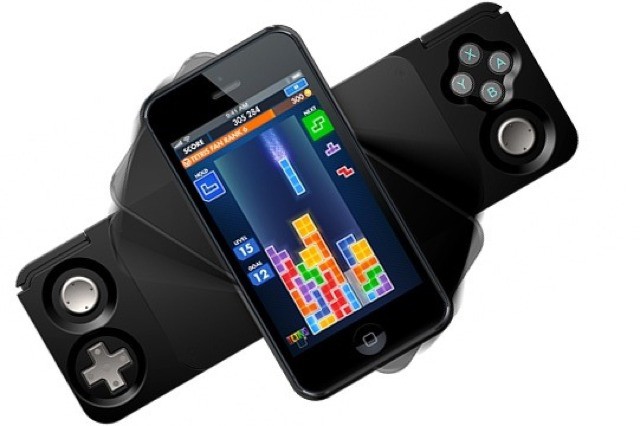
The WynCASE is the first iPhone gaming case that actually looks pretty freaking awesome because it doesn’t add any accessories onto the screen, it doesn’t need batteries, and it’s so thin you might just decide to keep it on your iPhone even when you’re not playing a game.

Apple Is Now Shipping 27-Inch iMacs To Early Buyers

By

newimacs27inches

Apple customers who purchased the new 27-inch iMacs as soon as they were available for pre-order should be getting their new desktops pretty soon. Apple has notified customers that the first orders of the 27-inch iMacs are now shipping.

According to numerous people on Twitter and other forums who have ordered the new iMacs, they’ve received noticies that their order status has been changed from “Preparing for Shipment” to “Shipped.”

These 160 Mac Minis Got Stuffed Together To Make The Ultimate Custom Apple Server

By

macrack


Ever since Apple discontinued the Xserve, network administrators have had to come up with creative ways to build new OS X based servers. You can still purchase a Mac Mini with OS X Server on it, but one Mac Mini isn’t enough to support some hardcore server needs.

Steve was trying to put together a Macintosh processing based rack, but when he couldn’t find any XServes in the marketplace, he decided to come up with his own homemade solution – stuff 160 Mac minis into a custom made rack. The end result is brilliant.

Best Buy Slashes $50 Off All iPhone 5 & iPhone 4S Models Until January 5 [Deals]

By

Best-Buy-50-off-iPhone-5

Best Buy is currently offering $50 off all iPhone 5 models, reducing the 16GB handset’s starting price to $150. The discount comes less than three months after the handset made its big debut, but it won’t stick around forever; you have until January 5 to take advantage of it.

The retailer has also knocked $50 off the price of the iPhone 4S, which now starts at $50.

Change Your iPhone’s Brightness Settings With Your Volume Buttons Using BrightVol [Jailbreak]

By

BrightVol

I am forever adjusting my iPhone’s brightness settings, whether it’s to make the screen as dark as possible so that I can use it in bed without keeping my girlfriend awake, or to make it as bright as possible when I’m rummaging around in the attic for the Christmas decorations. The problem is, Apple doesn’t make it easy to alter brightness levels on the fly.

If you’ve got a jailbroken iOS device, however, you can take matters into your own hands. Install the new BrightVol tweak on your handset and you’ll be able to adjust your display’s brightness levels using your volume buttons. It couldn’t be quicker.

Last Chance: Get The iStack Mac Bundle 2.0 Today! [Deals]

By

CoM - iStack 2

You’ve got just one more chance to get The iStack Mac Bundle 2.0. In this worthy sequel to the original bundle, we’ve got 10 killer apps (and a bonus e-course for the first 3000 buyers) lined up at a massive savings of 93% off the regular price you’d pay for them separately.

That’s right…you’ll get this Cult of Mac Deals offer for only $49!