We’ve already heard one crazy rumor about the iPhone 5S today, and now we have another, even more ludicrous one, about the iPad. Apparently, Apple is planning to launch a bigger “iPad maxi” in early 2014 which will step up the tablet’s fight against ultrabooks and other small notebooks with a 12.9-inch display.
Quora is a fantastic site in which members ask questions of experts in various fields, and for the past year or so, there’s an absolute fantastic thread going asking about how Apple keeps its secrets… and it contains not only some fantastic insight there on what lengths Apple will go to be secretive about new products, but about how information on new products leaks… like, say, the time the Pentagon leaked the 1998 iMac to the world.
The old rainbow Apple menu had a function that let you find recent documents, along with the ability to place folders in it for quick and easy access. This was replaced in Mac OS X with stacks, a visual way to do a similar thing, but from the Dock. You can drag a folder into the right hand side of the Dock and have it open as a Stack, of course, but did you know you could get a list of Recent Apps, Documents, or Servers, as well as Favorite Volumes or Items as a Stack, as well?
You can, with a little Terminal magic. Here’s how.
Although we’re excited about the iPhone 5S, we’re not expecting it to be vastly different to the iPhone 5. We at least expect it to look largely identical. But according to a new rumor that has surfaced in China, the device could come with thinner bezels and a new display that offers twice as many pixels.
Back In The Day™, when men were men, cars were cars and boys were forced to work to support their families before their stupid brains were even half developed, we fixed automobiles by kicking their tires and sucking our teeth.
Fast forward to the Space Year 2013 and cars now repair themselves. All you have to do is take it to a repair shop, where they plug it into a computer which sucks the money from your bank account while you take a spin in a “courtesy” car.
But what if you want to tinker? If you own a Ford and an iPad, and don’t mind getting your hands (literally) dirty, then you’ll be happy to hear that there’s a (concept) app for that.
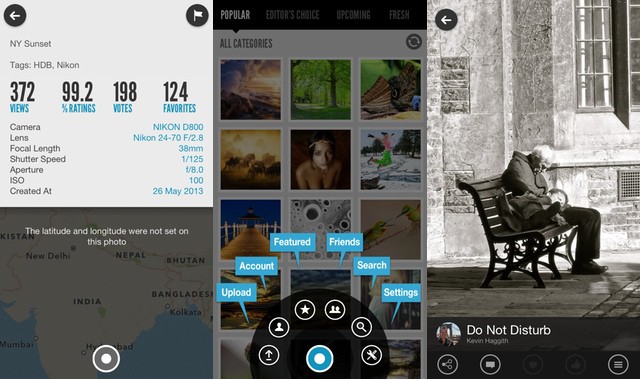
As Flickr is to Instagram, so 500px is to Flickr. 500px is a photo-sharing site that focusses (huh…) on showing only your best pictures. To this end the website and various apps bring beautiful hi-res images to your iDevices (it’s especially good on the Retina iPad), and the account upgrade options are geared towards professional portfolios.
But the quality of the official apps hasn’t deterred the folks behind ISO500, a brand-new iPhone app which brings a super-minimal interface to the 500PX site. And, like 500px itself, the app is free. Mostly.
This is the Bridging Book, and it “bridges” the gap between reality and virtual reality by combining an iPad app with an actual paper book. The concept is simple and yet looks to be very effective, if the smiles on the kid in the video are anything to go by: The iPad detects page turns made in the book using magnets. Yes, frikkin’ magnets.
Quick question: How do you feel about 60˚? That’s the angle, not the temperature. Do you like it? Still not sure? Then let me put it another way: Are you a fan of tilting things back by 30 degrees?
If so, and if you don’t like to adjust things, then the ChillTab2 might just be the perfect stand for you.
We know that the iPad’s dock hole is pretty much a USB port in disguise, and that the camera connection kit is also a stealth adapter which lets you plug in all kinds of USB accessories and use them.
But I never even thought that it might be possible to import photos from a floppy disk this way. Luckily for us, Niles Mitchell wasn’t so short sighted: He grabbed an old USB floppy drive and hooked it up.
It’s hard to believe, but some people don’t like the image-crunching, JPG-mangling special effects of app like Instagram. Instead, they want the output from the iPhone’s highly-tuned camera to be clean and as good as it can be. Which is why Olloclip’s new iPhone app goes in the opposite direction to most grungification apps and corrects errors introduced by the company’s clip-on lens of the same name.
My camera eats batteries. I’m not sure exactly why — maybe it’s because the NP-95 battery it uses is tiny; maybe it’s that its hybrid viewfinder is particularly power hungry; or perhaps it’s just that I refuse to engage any of the performance-slowing power-save modes — but my X100s is thirsty.
I get around this by carry a pocketful of those tiny batteries, but taking the giant Fujifilm charger on vacation is a pain. So I set out to find a USB charger that would do the job without frying the batteries.
Then I realized I was doing it wrong. Instead of a USB-powered battery charger, what I needed was a proper camera battery charger which had a USB port in the side. Thus I could charge everything from one wall socket, in one compact unit.
Later.fm is like Instapaper for music. And like Instapaper, it is beginning its life as a web-only app, although it works so well in Mobile Safari that you won’t care about the lack of an actual iOS app right now.
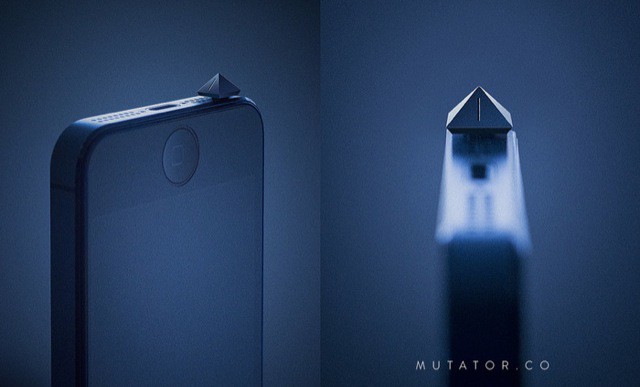
The Mutator is a hardware mute switch for your iPhone. What’s that you say? You already have a hardware mute switch on your iPhone? Well, yes you do. But – as the poor fellow who caused Mahlergate found out – mute doesn’t always mean “mute”.
I have three very good reasons to write this post. One is that the camera lucida is just a kick-ass gadget, the kind of thing that all you creative iOwning folks out there will presumably love. Second, the Kickstarter video which accompanies it is both interesting and educational. And third, I have an idea for a version that will use your iPad and iPhone.
Farensius is a simple menubar app for your Mac which will let you know what the weather is doing outside, should you be too busy to turn your head and steal an unproductive glance through the nearest window. You get a little icon showing you the type of weather you’ll find beyond the confines of your office, and a temperature in – yes – ˚F or ˚C.
I know what you bike nuts are thinking. You’re jealous of all the hue-controlled lighting available to the stay-at-home folks, and you want a little bit of that color-changing action for your ride. Well, the folks at Helios have heard you, and are just about to launch a couple of crazy handlebars with built-in LEDs. And that’s not all they do. Oh no…
The post-PC world is already dumbing young people down. Way down.
I’m hearing accounts by hiring managers that new applicants right out of school often lack not only basic “computing” skills (for example, they don’t really know how to do a Google search), but they lack the imagination, creativity or curiosity to even learn those skills.
There may be multiple causes for this phenomenon, but I’m here to throw the post-PC world under the school bus.
It’s not often that a product stands the test of time, making adjustments when needed to keep up with the speed of the changes that directly impact its use. Roxio Toast 11 Titanium has done just that, and this latest version has been completely redesigned from the ground up.
Roxio Toast 11 Titanium features a new user interface that’s up-to-date, innovative, and intuitive. With newly refined workflows, built-in video tutorials and much more, Toast 11 is the ultimate digital media toolkit for newcomers and experienced users alike – and Cult of Mac Deals has it for a limited time at a price that’s really appealing: only $49.99.
Designed for professionals around the world, Illustrator can be a mystifying program. The latest Cult of Mac Deals offer brings a video course your way that will help you take your design skills to the next level. The Adobe Illustrator CS6 Beginner Course breaks it down into easy-to-understand sections that even an absolute beginner can understand.
You’ll learn the ropes from an expert author and trainer who guides you through the variety of powerful tools and techniques that Adobe Illustrator CS6 has to offer. And all for the ridiculously low price of only $39.
Automatic, the California-based startup that turns the iPhone into your own driving assistant, had planned to start shipping preorders this month. Unfortunately, the $70 car dongle + iPhone app won’t be shipping until the end of August now. Automatic needs more time to finish its app before drivers around the country start using it on the road.
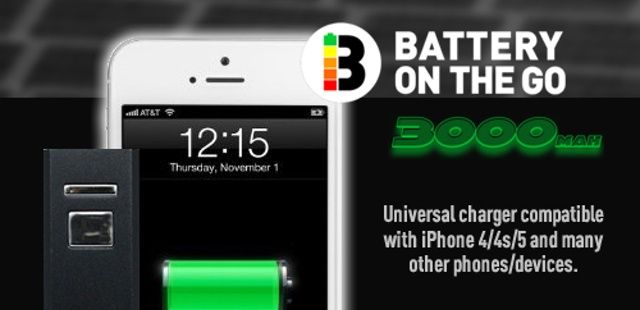
If you’ve been wishing for an easy way to charge your smartphone when you’re on the go, look no further because now you can with this portable PowerBar smartphone charger offer courtesy of Cult of Mac Deals.
Never have your smartphone die on your again with this powerful little portable charger. When you travel as much as I do, this device can be a real plus – now I don’t have to think about how much juice I’ve got left on my smartphone. I can simply plug the PowerBar into my smartphone and the charging will begin.
All work and no play makes any computer user a dull user. That’s why we’re excited to bring you a bundle here at Cult of Mac Deals that will keep you playing for hours on end – and you get to name the price you’re willing to pay for those hours of fun!
That’s right. We’ve partnered with 6 of the world’s best game developers to bring you The Name Your Own Price Adventure Gamer Bundle. You pay what you want for two different games including Gardenscapes and Storm in a Teacup. And if you pay more than the average price, you’ll also receive Pudding Panic, 4 Elements, Royal Envoy, and the Tiny Bang Story.
Apple’s iBooks provides one of the best, most accessible ereading experience on the iPad, in my opinion, and it’s pretty darn simple to use.
That said, there’s always room to learn just a few more tricks to make the experience even better for you. Here, then, are five tips to master iBooks on your iOS device of choice.
This week on The CultCast: Apple Chief Tim Cook brings his Southern charm to Washington, hints at an iHologram; we break down the Apple tax debacle and say why their overseas billions are too legit to quit; and Xbox One vs. Apple TV, should Apple be worried?
All that and more on this week’s CultCast. Stream or download new and past episodes on your Mac or iDevice by subscribing now on iTunes, or hit play below and let the good times roll.