Mobile menu toggle

Oenophile App Drync Now On iPads, Adds Its Own Wine-Loving Social Media Platform [Daily Freebie]

By

drync-ipad


Vodka is great for fruity drinks and drunken stupors; and beer is what you nurse, alone at the edge of the bar, after you’ve been dumped.

Wine, on the other hand, is the ultimate social lubricant. So it makes sense that Drync, a sophisticated app for oenophiles (the sophisticated method to describe wine-lovers), has just launched its own social-heavy website to go along with its new iPad app.

Top iOS Apps Of The Week

By

Whether

Every week, we highlight some of the most interesting new apps and collect them here for your consideration.

This time, our picks include a donut locator, a good-looking scheduler and a quick house-hunting app.

Here you go:

I’m kind of obsessed with monitoring and comparing numbers like blog views and podcast downloads. It’s probably a mild form of obsessive-compulsive disorder, but I made up my own word for it: “metriculous.”

Whether is an app that satisfies that part of your brain, if you have it. It lets you compare today’s temperature, precipitation, wind, and humidity to the same day last year. The temperature panel is free, but you can unlock the rest — and any future ones — for $2.99.

So it’s basically a cool-looking weather app with an extra layer of trivia on top of it for crazy people inquisitive, metriculous types.

Whether App – Free | Sturmware

Candooit

It can be stressful when you have way too much stuff to do and it’s hard to keep track of everything.

Candooit is a new app that lets you add your obligations with a few simple gestures and then presents it all in an attractive, easy-to-read infographic. Once you select the type of activity (the app includes eight color-coded categories with numerous sub-items), you drag left and right to set the start time and up and down to set the duration. You can make notes, view by week or month, and even sync with your Google calendar.

And the busier you are, the cooler it looks. So that might actually be kinda dangerous.

CandooIt – Free | Panurge

Doughbot

Not everything in the App Store has to be a Swiss Army knife. Sometimes, you find an app that does one thing and does the heck out of it.

Doughbot is one such app. It tells you where you can buy donuts.

You can also get directions, read Yelp reviews, and look at pictures from Instagram, but that’s just overkill. I can count on one finger the number of bad donuts I’ve had in my life. Just point me toward the nearest besprinkled blip on the map so that I can start pointing at lumps of fried dough I’d like to cram into my face.

Doughbot – $0.99 | Timothy Tolbert

Doorsteps Swipe

House hunting can be stressful and annoying, especially if you’ve never done it before. But the Doorsteps Swipe app wants to help you out by letting you quickly look through a bunch of listings in your desired location, then reject or save them with a single swipe. It also compiles data (average price, number of beds and baths, etc.) on the ones you’ve liked so you can get some idea what you’re looking for.

Unfortunately, I haven’t seen any cloud houses or big shells yet. But I haven’t gotten all the way through the list yet.

Doorsteps Swipe – Free | Move, Inc.

Five Must-Have Workarounds For Your iOS Devices

By

fix the OMW

Photo Credit: Rob LeFebvre/Cult of Mac

Look, we all know that Apple makes some of the greatest products around. We use iPhones, iPads and Macs because they work well, and they’re fairly intuitive.

That said, even the most dedicated fanboy has to admit that there are still a few places that just don’t quite work as advertised.

Here are a few of those, along with their fixes, for iOS devices, including the iPad, iPhone and iPod touch.

Change That Stupid OMW iMessage Shortcut

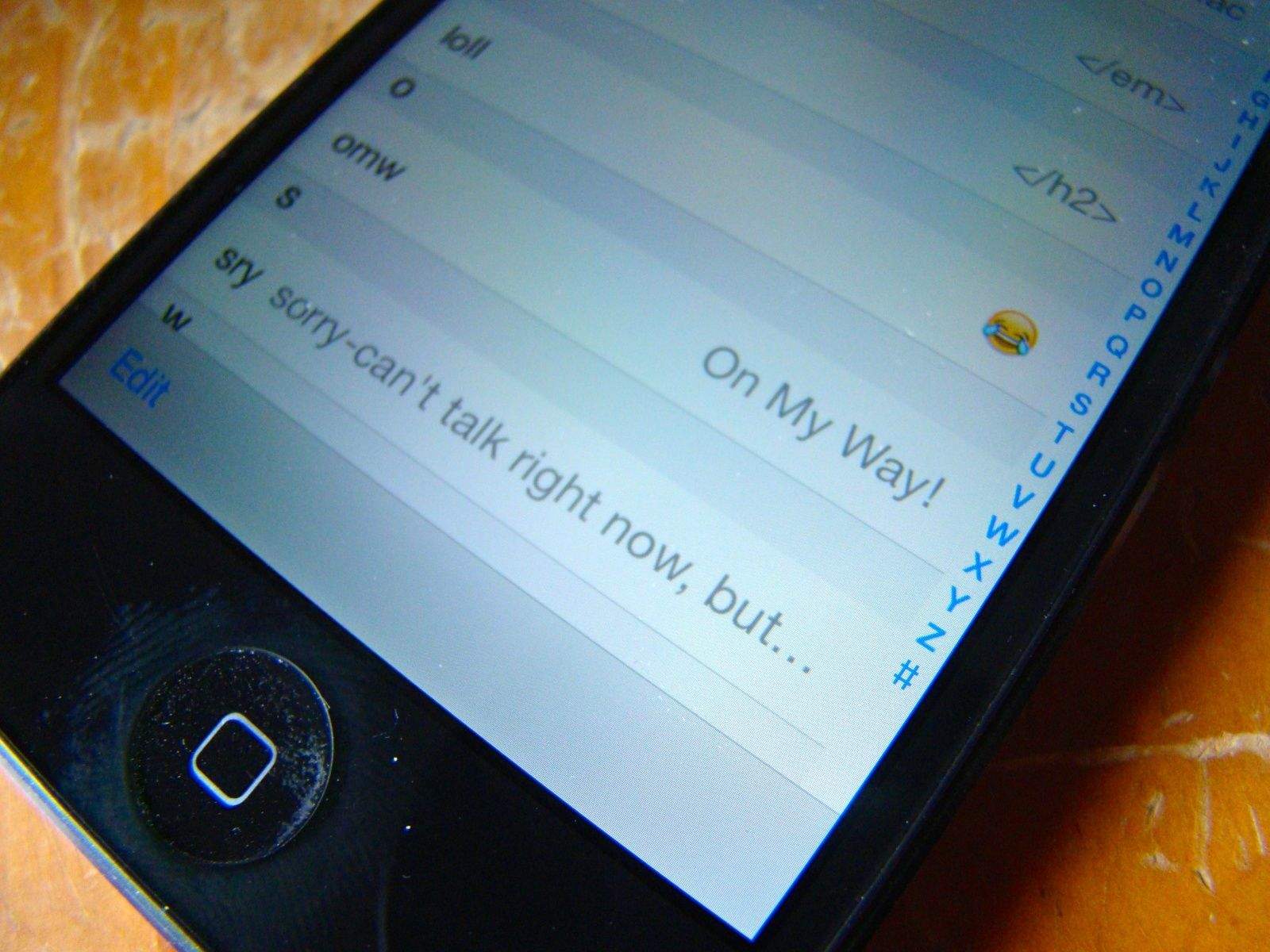
Some folks like the auto-expand of omw to “On My Way!” Honestly? I’m rarely that enthusiastic when sending a text about my plans to head over to a buddy’s house. Just sayin’. If this bugs you, here’s how to fix it, as well as add others to your texting repertoire.

Hop on over the Settings app. Tap on the General tab, then scroll down to Keyboard and tap through to Shortcuts. The omw! shortcut is built in right there. Tap it, and change it to whatever you want it to say. Be sure to hit the Save button in the upper right, or you’re back to square one.

Want to add your own shortcuts? That’s pretty easy, too. Simple tap the Add New Shortcut…field at the bottom of the Keyboard settings pane, and add one in. Try to keep your shortcut (bottom field) 2-4 letters, or it’s really more of a longcut, right? The top field contains the actual phrase you want the shortcut expanded to. Try not to get them confused, like I did the first one I added. You’ll get an error saying your Shortcut cannot contain spaces. That will be the tip you’ve gotten it backward.

Control Your Data – Turn Off Cellular For Certain Apps
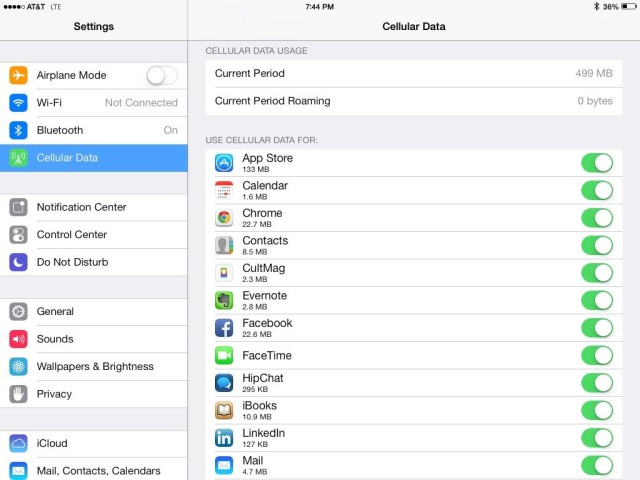
We’re all data hoarders now, what with our iPads and iPhones having the ever-present connection to the cellular and Wi-Fi networks all around us. Unfortunately, unlimited cell data plans are as rare a programmer who doesn’t own a single hoodie, so it’s paramount to keep track of which apps are sucking up the cell bandwidth.

Luckily, iOS 7 lets you control which apps will use cellular, and which apps will only connect to and use the network juice via a stable WiFi connection.

Tap into your Settings app on your iPhone or iPad and then tap on the Cellular icon. Once there, you’ll see the option to toggle Cellular Data OFF completely, disable LTE, or enable Data Roaming, as your heart (and wallet) allows.

Swipe down to the bottom, however, and you’ll see a long list of all the apps on your iOS device that use cellular data. For each app that you want to restrict to using only Wi-Fi networking, tap the toggle next to each app name to OFF.

Now, when you’re strictly on LTE, 4G or 3G, your iOS device won’t let those specific apps connect to the cell network and take up all your precious, metered data. They’ll be able to connect once you’re in range and hooked up to a WiFi signal, so have no fear.

Respond With Funnier Messages When You Get Calls
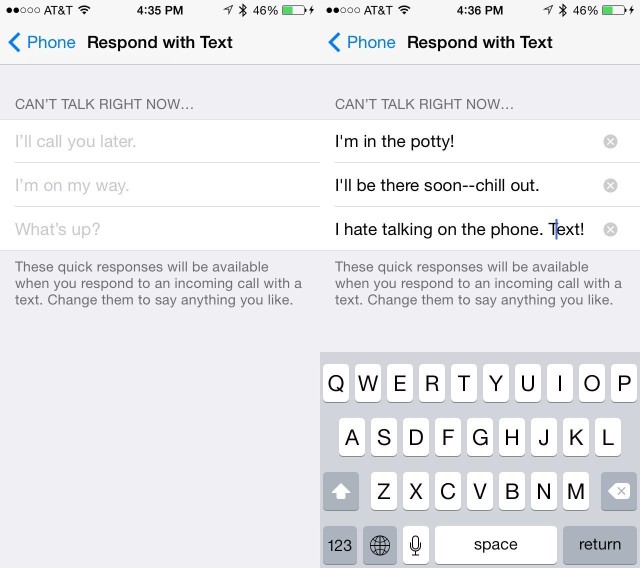
On My Way is dumb

It’s pretty easy to reply to a phone caller with a text message in iOS 7. When the call comes in, tap on the little phone icon in the lower right and slide up. You’ll get the option to either reply with a message or have your iPhone remind you to call the person back later.

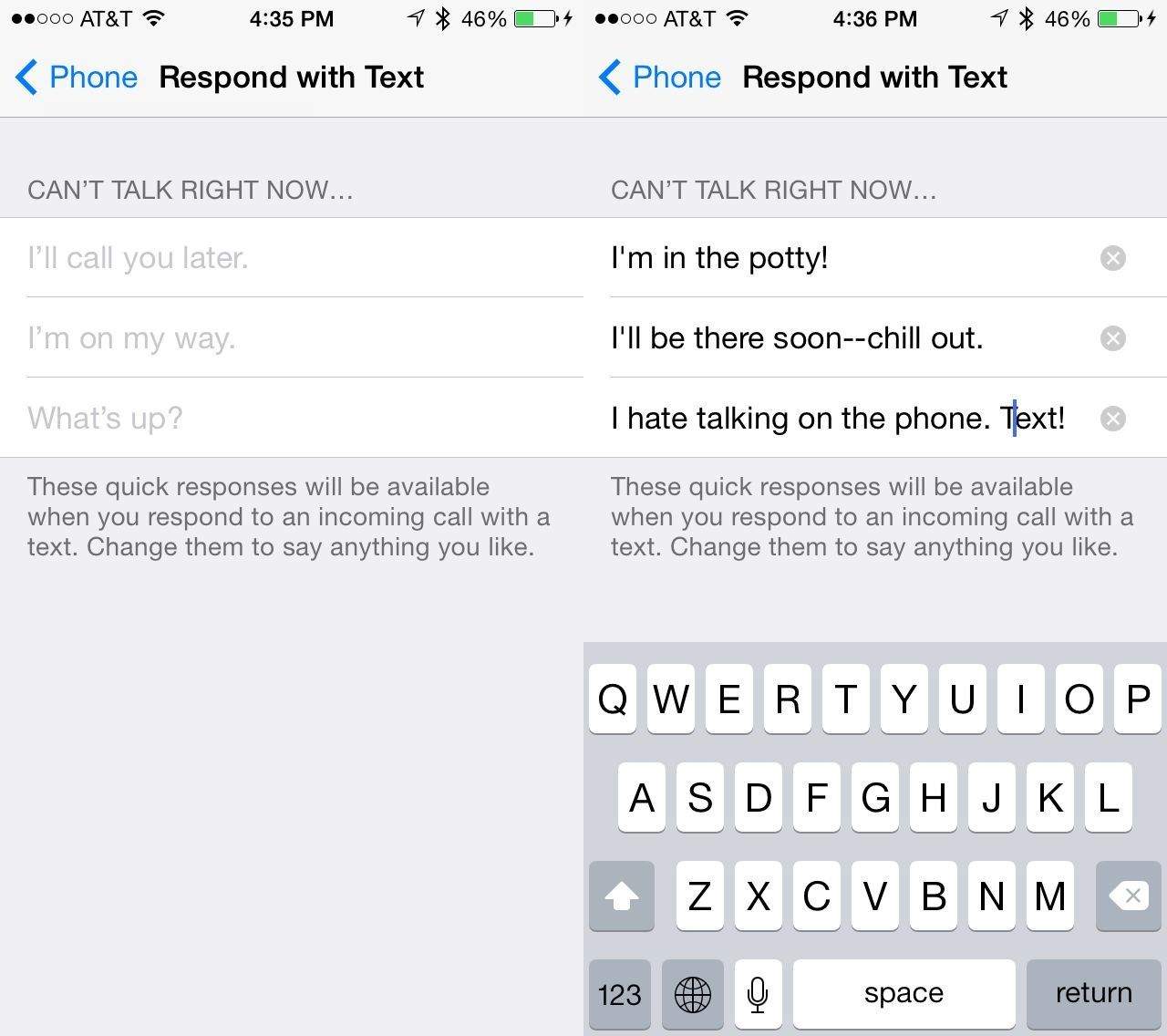
If you choose to reply with a text message, you get a couple of built in replies–Call you later, I’m on my way, What’s up–or you can type a custom message. Ever wanted to change those pre-written messages to be just a little bit funnier? You know you have.

Here’s how: Launch your Settings app, and find and tap on the Phone settings button. Then tap on Reply with Message. You’ll then be able to type in three custom missives. And you’ll still be able to type your own custom message, when the phone rings, too. Interestingly, the typical auto capitalization doesn’t seem to apply here, so maybe the developers wanted you to work at using proper English.

Whatever the case, this is a great way to personalize the way you interact with people when you tell them that you can’t answer the phone right now.

Clear Those Annoying Notifications Without Leaving The Lock Screen
iPhone-Lock-Screen

I like some notifications. I try to keep it down to a dull roar, of course, but I want a head’s up when I get a phone call, text message, or email from specific clients or friends. But when I see a flurry of these notifications in my lockscreen, I mentally dismiss them, only to have them appear again the next time I check my iPhone for the time.

I messed around with it and came up with this solution, thanks to iOS 7.
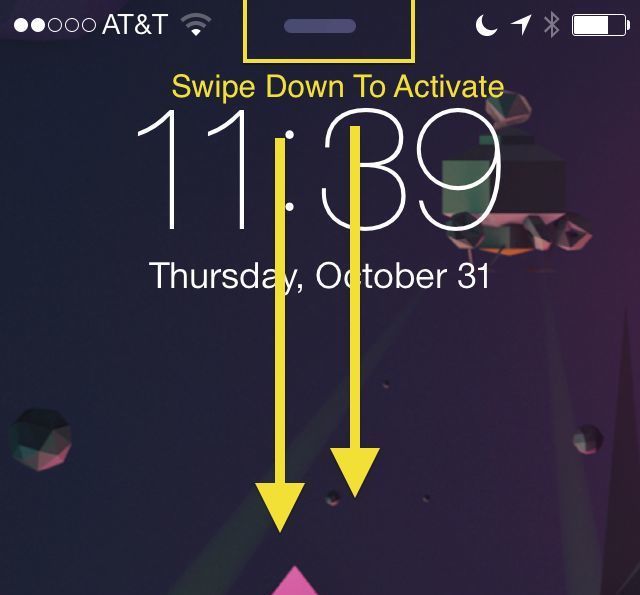
While your iPhone is locked but on (just hit the Home button), check out the little horizontal line at the top of your screen. That’s the Notification Center and it can be accessed without unlocking your iPhone.

Slide down from the line with your thumb or finger, and that will activate Notification Center. I tapped to the “Missed” notifications tab at the top to make sure the iPhone thought I saw everything, and then dismissed Notification Center with a swipe up.

Once you’ve done that, and you get to the lock screen again, you shouldn’t see any notifications hanging around in your lock screen. That is, of course, until you get new ones.

Troubles Sending Text Messages On iPhone? Try This Fix
Send-as-SMS

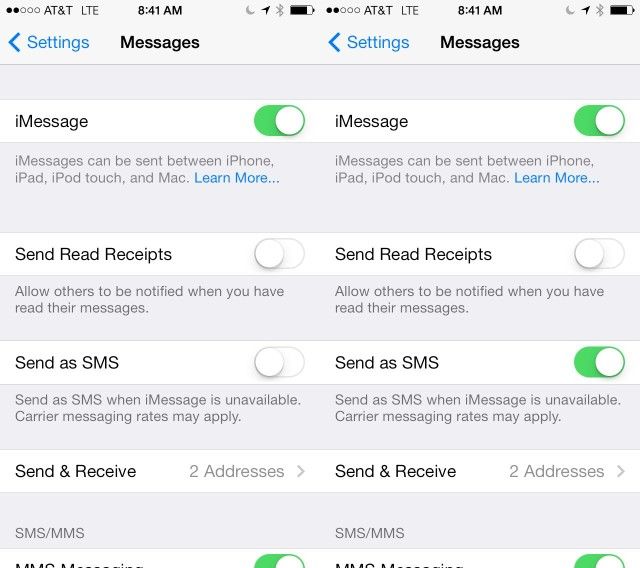
Some users have reported problems with sending text messages to their friends and family after the upgrade to iOS 7. Typically, when iMessage is unavailable, your iPhone should send messages as SMS ones instead, denoted by the green chat bubble as opposed to the regular blue.

If, however, your iPhone won’t send texts automatically, here’s a possible fix.

Tap into the Settings app, and scroll down to tap on Messages. Once there, you’ll see a toggle switch for Send as SMS. Set this to ON with a quick tap and your iPhone will start sending messages as SMS ones without you needing to intervene.

Even with this toggled OFF, you can still send messages when they stall out with iMessage. Simply tap and hold on the message mid-send, and choose Send as Text Message from the popup menu that appears.

Now you can send iMessages to those with an iOS or Mac device, but still communicate with anyone using an Android or feature phone (ugh).


Soothing Sounds Accompany Action-Packed Gameplay In I’m Aquarius [Video Review]

By

post-273774-image-dd2b330f947ce11ab57808f5305e606a-jpg

With busy schedules it can be easy to be consumed by the stress of our everyday lives. Sometimes sitting down and playing a good game can be a great way to escape from it all. The new app I’m Aquarius is an arcade game with intense action gameplay and a relaxing soundtrack. Avoid all obstacles as you tap to keep your ship safe for as long as possible. How long do you think you can last?

Take a look at the video and find out what you think.


Jony’s Way Or The Highway: Key Software Exec Greg Christie Leaving Apple

By

Jony Ive

A key executive within Apple is reportedly leaving the company due to a fallout with design chief Jony Ive. The result is that Ive will directly control even more of how Apple designs its software.

Greg Christie has been getting a lot of attention lately in the Apple vs. Samsung patent trial for his role as an engineer for the original iPhone. And that’s not all he’s known for; the guy has also patented nearly a hundred ideas for Apple, including the iconic “Slide to unlock” patent Apple is using as evidence in the ongoing case with Samsung.

Christie has been heading up Apple’s software design under Craig Federighi. But according to a new report, Ive is basically pushing Christie out because the two haven’t been getting along.

Dropbox Announces Mailbox For Mac To Fix Your Inbox Woes

By

mailbox_for_mac_final

At an event today in San Francisco, Dropbox made several announcements about Mailbox, the popular email app for iOS that it bought a little over a year ago. Things have been busy around Dropbox since then, because Mailbox is coming to not one, but two new platforms.

Mailbox for Mac was unveiled today alongside an Android app, the latter of which is out now in Google Play. But that’s not what we’re really interested in. What’s important is that Mac users can now sign up to get access to the private beta of Mailbox on the desktop. There are some new Mailbox features that should also get you excited.

Weatherproof Braven 710 Is Loud But Lacking [Review]

By

710 byBraven
Category: Speakers
Works With: Anything with Bluetooth
Price: $170

Braven’s 710 Bluetooth candybar speaker has a lot going for it. It’s the same size as my favorite pocket speaker ever, the Braven 650. It’s made of aluminum, it has the same battery-sharing tech as all the other Bravens, and it even fixes some of my complaints about the 650 – it has proper buttons for volume and play pause.

Hell, it’s even waterproof. But there’s one thing that isn’t quite so good. It doesn’t sound as good as the 650. Not by much, but enough that you should still buy the 650 – unless you want to use it in the shower.

Why Heartbleed Shouldn’t Make You Rush To Change Passwords … Yet

By

heartbleed

The discovery of the Heartbleed security bug sent the web into a panic with it’s devastating OpenSSL vulnerability.

On a scale of 1 to 10 of Internet catastrophes this one goes all the way to 11, according to respected security analyst Bruce Schneier, who isn’t prone to manic exaggeration.

A shriek of “CHANGE YOUR PASSWORDS”  has erupted from the throats of sites issuing evasive maneuvers, but you might want to hold off on going password-reset-crazy for just a few days.

Here’s why:

‘Doorsteps Swipe’ Gives You Some Idea Where You’d Like To Live

By

Doorsteps Swipe

House hunting can be stressful and annoying, especially if you’ve never done it before. But the Doorsteps Swipe app wants to help you out by letting you quickly look through a bunch of listings in your desired location, then reject or save them with a single swipe. It also compiles data (average price, number of beds and baths, etc.) on the ones you’ve liked so you can get some idea what you’re looking for.

Unfortunately, I haven’t seen any cloud houses or big shells yet. But I haven’t gotten all the way through the list yet.

Source:Doorsteps Swipe – Free | Move, Inc.

Robots Love Ice Cream Weaponizes Frozen Dairy To Save … Frozen Dairy. Wait.[Review]

By

Robots Love Ice Cream

The robots are coming, you guys. And they want all of our ice cream. What are we going to do?

Robots Love Ice Cream by Dragon Army
Category: iOS Games
Works With: iPhone, iPad
Price: $0.99

We could call in the military, or we could devise some kind of electromagnetic pulse. Or, what the heck, let’s just stand out in the street and throw bricks at them. None of these ideas will work. But here’s a fun new game that knows the correct answer.

Robots Love Ice Cream knows that all free people must be prepared to sacrifice everything to protect that freedom, and the same should be true of tasty desserts. So obviously the best course of action is to convert an ice-cream truck into a rolling tank that fires single-scoop cones with enough velocity to penetrate an invading robot’s cold, unfeeling metal hull.

I mean, duh.

In New Game of Thrones App, You Wait or You Pay [Review]

By

Game of Thrones Ascent

For each noble house in the Seven Kingdoms, the choices that leaders make often lead to tragedy and ruin. In Game of Thrones: Ascent, you play as an up-and-coming noble who, through endless decision-making and item crafting, can move a bit closer to the Iron Throne. However, failure and death aren’t a real option in Ascent; instead, it’s all about waiting and paying.

Game of Thrones: Ascent by Disruptor Beam
Category: iOS Games
Works With: iPad
Price: Free

Game of Thrones: Ascent originally launched on Facebook, and it’s a free to play game, so you can expect two things right off the bat. First, this casual game is so basic that you can’t possibly lose — the only consequence for making poor decisions is that you’ll waste some time. Second, there’s a lot of waiting involved, and even the most basic actions can take hours to complete.

Samsung Stole Apple’s Ideas At Crucial Time, Expert Says

By

Tim Cook, Phil Schiller and others sold Apple stock at a time when it was hitting record highs.

How do you convince a jury you’re owed $2 billion in damages? If you’re Apple you hire an MIT-trained economist to do it for you.

While the patent war between Apple and Samsung continues to rage, Apple on Tuesday called economist Chris Vellturo to spell out exactly why Apple is asking to be paid $2 billion in damages ($2.19B to be exact) from arch-rival Samsung for infringing on five of its utility patents.

Exploring Elder Scrolls Online: Be A People Person

By

Making friends, meeting new people. And queens.

Editor’s Note: Due to the sheer size of Elder Scrolls Online, we’re publishing our hands-on impressions of the game in three chunks. Part one is here. What follows is part two.

Queen Ayrenn is a modern monarch. She’s definitely trying to do the right thing, but I can hear the weariness in her tone when she tells me about the endless rituals she must complete in order to be accepted by her subjects.

I’m not sure what happened to her during her 17-year absence, nor why she returned to the kingdom at age 28 to inherit the throne of Alinor. Honestly, I don’t much care. What I do care about is that she is tired. She knows these rituals and adventures are necessary, but she finds them tedious, if dangerous.

She’s always glad to see me. I always want to help her. I’ve bonded with Queen Ayrenn, and she’s not even real.

That’s one of the real triumphs of impressive new MMO Elder Scrolls Online: It’s a virtual world, but the individuals you meet there somehow can, at times, seem more realistic than the people you might spend your day next to on the subway.

Spotlight Potential: See The Full File Path Of Found Documents [OS X Tips]

By

Image: kensegall.com
Credit: kensegall.com

Spotlight is crazy useful to find stuff on your Mac. Just hit Command-Space on your keyboard and type in the name of files, words from in text files, the kind of document you want, or even the date when you think it might have been created or modified, and you’ll find it in an instant.

I rarely organize stuff into fine-grained folders anymore due to the power of this one simple to use feature in OS X.

Sometimes, though, I want to know where a found document is — here’s a cool trick to do just that, sent to us from Cult of Mac reader Ivan Manzanilla.

Amazon Surges Past Apple In Streaming Video Stats

By

amazon_rank_slide

Amazon’s Prime Instant Video service is on fire in the United States — and that growth happened before Amazon even introduced its $99 Fire TV set-top box.

According to a new report from online-video delivery and caching solutions provider Qwilt, streams on Prime Instant Video have almost tripled over the past year — and in the process have passed both Apple and Hulu in terms of volume of video streaming traffic. The data was gathered from MSO broadband providers that use the Qwilt systems.

PhotoFlip Is An Almost-Excellent Picture Note-Taking App

By

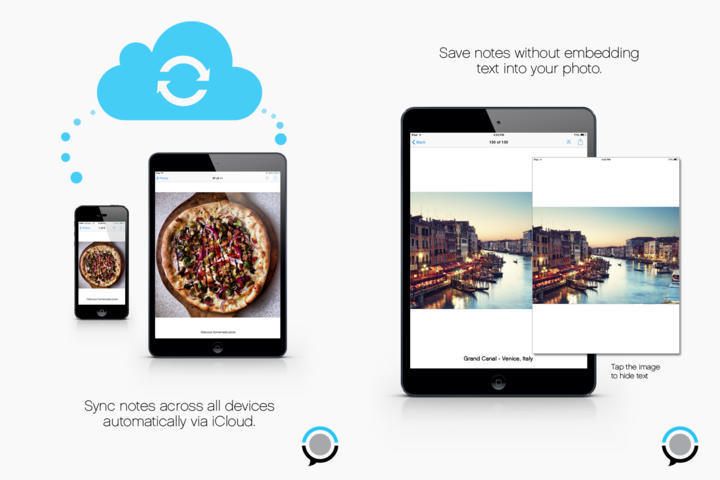
PhotoFlip has the beginnings of a great idea, let down by poor implementation. Here’s the idea: The app lets you add notes to the photos you have in your iPhone camera roll, without copying those images. That is, the pictures stay in your regular photo library, and the app just displays them with your text note added underneath.

It’s a great idea right? It uses almost no storage, and doesn’t double up on picture libraries. You can even snap photos from within the app and they’re saved ion the regular camera roll, and everything is synced via iCloud (if you want anyway).

So what’s wrong?

Forget PowerPoint: Deckset Is A Markdown-Powered Presentation Powerhouse

By

Ever been on a plane and seen some suit squished into his chair, browning his ThinkPad’s screen with his office breath and lining up some pictures and text on a PowerPoint slide? “Jeez,” you think. “Not only is this dork-o inflicting yet more PowerPain on the world, but he thinks it’s important enough to do on a plane.”

Next time you see one of these sad specimens, you might point them in the direction of Deckset, a slideshow maker that works using Markdown.

Luxi, The Little Light Meter For the iPhone

By

The little Luxi turns your iPhone’s front camera into a light meter. A what? A light meter, a device that measures the amount of light falling on a subject so that you can set the exposure correctly on your camera.

But wait, doesn’t you camera already set its own exposure? Doesn’t it have a light meter built in for when i want to kick it old school in manual mode? Yes and yes, but this $30 widget might still be handy.