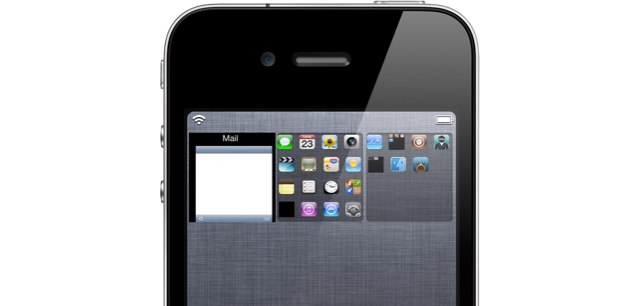
While Apple is yet to open its iOS 5 Notification Center up to third-party widgets, developers have been hard at work creating awesome tweaks that can be installed on jailbroken devices. One of the best is a tweak called WeeSpaces, which makes it easier than ever to multitask on an iOS device.
With WeeSpaces installed on your iPhone, you can access the apps that you have running in the background directly from the Notification Center. The tweak presents you with a new widget that features a scrollable list of open apps and makes it easy to switch between them.
It does have its limitations — you cannot close apps from the widget, or rearrange them — but it seems like a much nicer way of multitasking than constantly double-tapping your home button. The best thing about WeeSpaces, however, is that it’s a completely free download from Cydia.
Check out this video from iDownloadBlog to see WeeSpaces in action:
httpv://www.youtube.com/watch?v=GFH-FOgsurk
What do you think of WeeSpaces?
11 responses to “WeeSpaces Brings iOS Multitasking to Your Notification Center [Jailbreak Only]”
Neat idea, but its pretty ugly looking
All these hacks are the same. They are ugly, clunky, tweaks which just make you realise how great the original design is.
The widget above it to switch radios on and off is even uglier and pretty useless for the average person.
Do you want to make $85 hourly and $7000 per month like me just working on laptop for few hours! Would you like to be your own boss!Opportunities like this don’t come by often. Don’t let this one pass you by! fon.gs/la4r6y
Very nice tweak, of course needs to be shaped a bit. Hope this developer can fix noti-center couse for now it sucks. I already jailbroke my iphone ios 5 (tether) and im happy, i would like they make a tweak to remove noti-center completly, i’ll stay with lockinfo.
You are absolutely wrong, the reason you are using absolutes.
I agree, there are tweaks that are ugly, though some people value function over pretty.
On the other hand, a majority of these tweaks are stunning, and beautiful. And a lot of them have given rise to official features (I’d rather not use iOS products if I have to wait 2 years for a feature I want to maybe come).
To the tweaks you mention, the I/O switches can be teamed, if the dev have not implemented a setting for this, just swap the icon files. Since the device is jailbroken, the file system is at your private fingertips.
For the tweak in this article, yes I agree it needs some visual enhancements, but heck this is the developers first release (yes I actually checked).
Here is a small list of only a handfull of all of the stunningly beautiful homebrew additions that I could not live without.
AdBlocker
AttachmentSaver
Cyntact
EasyFindOnPage
f.lux
FakeClockUp (this is only a visual enhancement, nothing more)
GPower Pro
IconClasm (i just have it set to have the same number icons in the width as in the height, cause else it looks so UGLY when you rotate the homescreen)
Infinidock(i dont have it do slide, i use it to make me able to put as many icons in the dock as is visually pleasing to me)iRetinizeBoot (makes some app icons prettier)
Locktopous (its to easy to pick up an iOS device, recover the password to the mail on the device, get full access, i use this so it asks for password on opening Mail)RemovePictureFrame
Safari Download Manager
Tab+(all the above looks beautiful and id not have an iDevice without it, id rather have a none-smart nokia phone than a iPhone with restrictions)There are loads more useful beautiful tweaks, like Move2Unlock, Maps Enhancer, and the list goes on. But you might think ignorance is bliss since your talking like you have an apple stuck in your ass.

