Leander Kahney is the editor and publisher of Cult of Mac.
Leander is a longtime technology reporter and the author of six acclaimed books about Apple, including two New York Times bestsellers: Jony Ive: The Genius Behind Apple’s Greatest Products and Inside Steve’s Brain, a biography of Steve Jobs.
He’s also written a top-selling biography of Apple CEO Tim Cook and authored Cult of Mac and Cult of iPod, which both won prestigious design awards. Most recently, he was co-author of Cult of Mac, 2nd Edition.
Leander has been reporting about Apple and technology for nearly 30 years.
Before founding Cult of Mac as an independent publication, Leander was news editor at Wired.com, where he was responsible for the day-to-day running of the Wired.com website. He headed up a team of six section editors, a dozen reporters and a large pool of freelancers. Together the team produced a daily digest of stories about the impact of science and technology, and won several awards, including several Webby Awards, 2X Knight-Batten Awards for Innovation in Journalism and the 2010 MIN (Magazine Industry Newsletter) award for best blog, among others.
Before being promoted to news editor, Leander was Wired.com’s senior reporter, primarily covering Apple. During that time, Leander published a ton of scoops, including the first in-depth report about the development of the iPod. Leander attended almost every keynote speech and special product launch presented by Steve Jobs, including the historic launches of the iPhone and iPad. He also reported from almost every Macworld Expo in the late ’90s and early ‘2000s, including, sadly, the last shows in Boston, San Francisco and Tokyo. His reporting for Wired.com formed the basis of the first Cult of Mac book, and subsequently this website.
Before joining Wired, Leander was a senior reporter at the legendary MacWeek, the storied and long-running weekly that documented Apple and its community in the 1980s and ’90s.
Leander has written for Wired magazine (including the Issue 16.04 cover story about Steve Jobs’ leadership at Apple, entitled Evil/Genius), Scientific American, The Guardian, The Observer, The San Francisco Chronicle and many other publications.
Leander has a postgrad diploma in artificial intelligence from the University of Aberdeen, and a BSc (Hons) in experimental psychology from the University of Sussex.
He has a diploma in journalism from the UK’s National Council for the Training of Journalists.
Leander lives in San Francisco, California, and is married with four children. He’s an avid biker and has ridden in many long-distance bike events, including California’s legendary Death Ride.
You can find out more about Leander on LinkedIn and Facebook. You can follow him on X at @lkahney or Instagram.
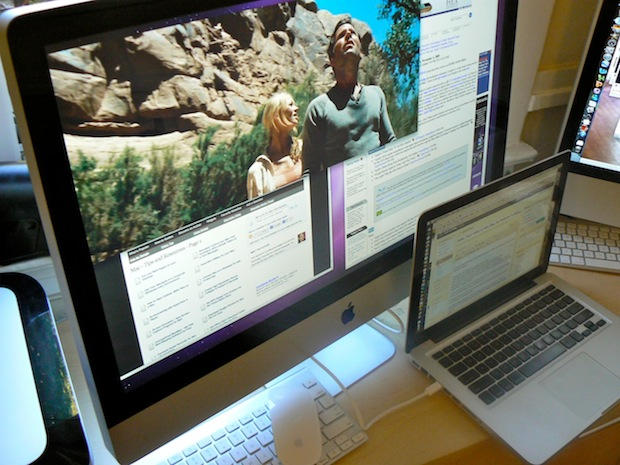
64 responses to “Video: 27-Inch iMac in Action as External Monitor”
whats the diffrence between the 27″ imac and a early 2009 24″ imac ? Is it purely an software update that enables the 27″ to act as a display or is it something elce?
Hey Craig, I know it’s been three weeks since you posted that, but to reply to your comment: The 27″ iMac is the only iMac that has a two-way MiniDisplayPort… port. As a result, this mode will not work on any other iMac.
hi, thanks for the info.. very helpful. But do you perchance know of a good method, or a particular KVM switch/product that will allow me to take my mouse/keyboard/wacom tablet with me between computers?
Also, I assume there is know way to stop the window reformatting/repositioning when I switch the iMac from target mode to normal mode?
thanks so much in advance!
John
Hi
do you have any idea whether this is also working with the new iMacs with a thunderbolt port?
Thanks in advance
Leo
30 dollars for a proprietary cable. Apple hard at work again ;)
Does this work with the new 27″ iMac that was just released?
Posted below as well – but I’d like to know the same thing. Would this work with the new 21″ or 27″?
i believe the new iMacs will only work in target mode if the laptop (or other machine you are using) has a thunderbolt port. the new iMacs no longer have a miniDisplay port input. see here:
http://www.tuaw.com/2011/05/03…
This is totally stupid and hilarious.. WTF APPLE engineers…. hello ??? never heard of VGA or DVI…. ?? It’s cheap and work with any computers. And, ooh, the imac needs to be turned on ??? OH MY GOD… then why not simply open the file direcly on the imac,, no need to waste running 2 computers !!!!.. Apple you deceive me a lot… this reminds me the black days of apple back in the end 90s..
I don’t have time to look it up, but from what I remember, you should check out synergy. Its a program that allows the same keyboard/mouse (and inherently, tablet) across multiple PCs
You sound a bit angry.
Would this work with a 24″ iMac 2.8ghz Intel2 Duo?
Emelia
I have the early 2009 version as well. Is there some update that can be done to allow these older versions to be our monitor for our laptops? I really hate having 2 large monitors on my desk and cannot afford a new MAC. Would love to know if there is an update to the hardware, firmware, anything? Thanks…
The new thunderbolt port is based on displayport technology so I am assuming that to connect another external monitor you would use this port.
Heres the question:Since the new 27″ imac has two of these ports, does that mean you can connect up to two external monitors?Has anyone tried?
I hope this means they’re moving toward making it so that one day you will be able to set your Startup Disk as something like “None (monitor only)” or even just kick a physical switch in the back and then slave it to another Mac. It’s important and helpful for many reasons, but these are mine…
1) It’s a HUGE waste to throw away a top-functioning flat screen monitor just because the computer is obsolete or not functioning as well as you need. You’re not even supposed to put computer parts in landfills, but the iMac begs you to throw fully functional machines away. I still have an eMac in my basement that’s running strong as another hard drive on my home network and a DVD/streaming movie player over my treadmill and a tangerine iBook that I pull out occasionally because I find it fun to write on and because booting OS9 makes me smile. The idea of throwing away a new iMac with this beautiful display gives me cramps.
2) Apple’s no longer pricing computers even close to reality for most home users. I like to have one at home so that I can bring home work files if I want to. It used to be true that the quality of a Mac was so far beyond a PC that the extra price had value, but the separation isn’t that far anymore, and the difference between a high-end Dell laptop at $500 and a bottom of the line MacBook at $1000 is hard to swallow. The difference between desktop computers is even greater. I won’t be able to afford another new Mac for home, even my current MacBook was bought used, but I would consider over extending myself for an iMac if I knew that after it was past its prime I could use the monitor for a Mini, and then another Mini after the first became obsolete. It would be especially cool if the monitor conversion setup just bypassed the motherboard so that you could simultaneously turn the hard drive into an external for the new ‘puter you were plugging in.
I know people think it’s stupid to worry about throwing these away, but when a comparable TV this size costs $300, it’s hard to chuck an iMac knowing it’s about 10 minutes of programming work away from being an awesome bedroom TV or a monitor for a new Mini.
Is it possible to set it up to use the resources of the iMac too… somehow wipe the OS of the iMac and use that as an External drive/Back up drive… Kinda make it so your MacBook is your lightweight main computer and the iMac is an powerhouse extension of that computer.
That way you don’t have to worry about two OS’s with multiple users… and multiple files…
Just a thought
Is there a way to do this if the iMac needs a new logic board??
Thanks!

