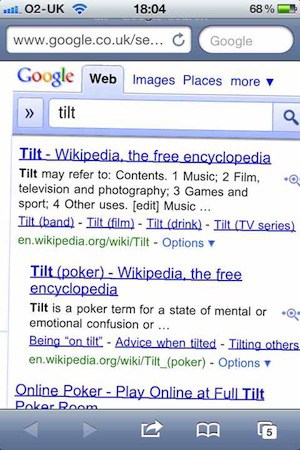
This is all over Twitter today.
Grab your iThing, open Safari, and use the Google search box to search for “tilt”.
Your search results are… tilted.
Is this an easter egg? An April Fools gag that someone forgot to switch off?
This is all over Twitter today.
Grab your iThing, open Safari, and use the Google search box to search for “tilt”.
Your search results are… tilted.
Is this an easter egg? An April Fools gag that someone forgot to switch off?
Our daily roundup of Apple news, reviews and how-tos. Plus the best Apple tweets, fun polls and inspiring Steve Jobs bons mots. Our readers say: "Love what you do" -- Christi Cardenas. "Absolutely love the content!" -- Harshita Arora. "Genuinely one of the highlights of my inbox" -- Lee Barnett.
38 responses to “Try This: Google For “Tilt” On Your iPhone”
wow must need some real work to do over at google.
Nope sorry “iThing” is to broad a term as my iPad 2 does not tilt when looking up tilt in google.
Well just tried with my iPhone 4 and still no tilt… I call BS or maybe this is a UK feature…LOL
Works on my iPhone 4 in the UK
works in southern california
tried on my iMac not working, i think you meant a ios devices
it works on my iPhone 3GS in France
i got it ,, oh and BTW
from now on guess what part of my body i will call ithing
I’m in the US and I just tried this on my Android phone and it worked.
Works with iPhone 4 – Florida, US
No luck with either my iPhone 3GS or my iPad 2 in North Carolina.
this works on my 2nd gen itouch
crooked does the same thing.
You have to turn off Instant (beta), if you have it on, to make this work.
Really?? Who cares. This story is garbage. I hate posting just because it admits I actually ready this pos.
Kind of like googling “elgoog”….
worked with iphone4 in cameroon
Looks like a nifty css trick:
-webkit-transform: rotate(1deg);
I wasn’t aware of it and found it interesting as somebody who tinkers with CSS on a daily basis.

