Mobile menu toggle

Tilt-shift Your Mac

By

post-4979-image-2396949bee59e33b7678072f03fc005f-jpg

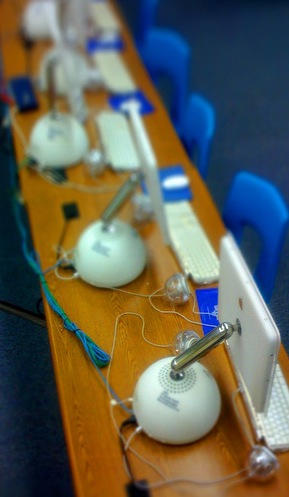
These fabulous tilt-shift G4 iMacs are the work of joelsuplido on Flickr. He’s got a whole set of them, there’s more Mac ones to drool over. It’s not just the tilt-shift effect, it’s the colors; they’re gorgeous.

These images were made using Joe Prytherch’s Auto tilt-shift Photoshop action, which you can grab and use for free.

(Pic used by permission; thanks joelsuplido!)

  • Subscribe to the Newsletter

    Our daily roundup of Apple news, reviews and how-tos. Plus the best Apple tweets, fun polls and inspiring Steve Jobs bons mots. Our readers say: "Love what you do" -- Christi Cardenas. "Absolutely love the content!" -- Harshita Arora. "Genuinely one of the highlights of my inbox" -- Lee Barnett.

6 responses to “Tilt-shift Your Mac”

  1. owen-b says:

    Correct me if I’m wrong, but aren’t they using Gaussian Blur? Looks that way at first glance.

  2. aventw2 says:

    Seriously. Could they not either build custom ethernet cable lengths or hide them under the desk?

  3. Joel says:

    Thanks Giles!

    @owen-b, the Gaussian Blur can be done too with just one layer. However, the Photoshop action, tilts/distorts some parts of the image to produce this effect.

    @Jay, I inherited that wiring layout. It used to be less organized but as we go wireless (and move those iMacs to other rooms) we’ll get rid of the wires. But I think at least, it adds to the beauty of the shot.

