I’m sure you’re like me and get tons of email from people you don’t necessarily want email from. While OS X Mail has the new VIP feature to group important contacts into one mailbox, what about all those emails from contacts you feel are less than important, but might want to keep around, just in case.
There is a way to sort all those emails from non-important contacts, using Smart Groups in the Contacts App as well as a Smart Mailbox in Mail app. Here’s how.
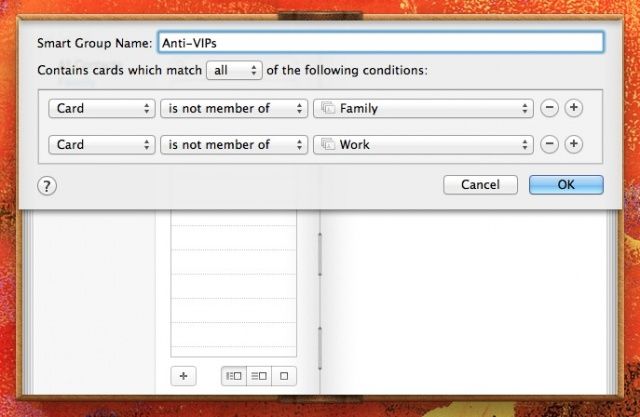
Launch Contacts and click on the File menu at the top of your screen. Choose New Smart Group from the menu there, or just hit Option-Command-N on your keyboard to create a new Smart Group. You’ll get a dialog box to fill in, which will look familiar if you’ve created rules in Mail app before. Make sure you have a couple of groups in Contacts for important folks, like Family, or Work contacts. Then, simply choose “Card” and “is not a member of” and fill in the groups that are, in fact, important contacts. That will make you a Anti-VIP smart group in Contacts app, and it will contain all those contacts you don’t want to deal with right away when they email you.
Then, launch Mail and create a new Smart Mailbox. From the Mailbox menu, choose New Smart Mailbox. Choose “Sender is member of Group” from the popup menu there, and then choose the group you just created. All mail coming from folks in your Contacts who are in that Smart Group will now filter automatically to this new mailbox in Mail.
Via: Addictive Tips

Rob LeFebvre is an Anchorage, Alaska-based writer and editor who has contributed to various tech, gaming and iOS sites, including 148Apps, Creative Screenwriting, Shelf-Awareness, VentureBeat, and Paste Magazine. Feel free to find Rob on Twitter @roblef, and send him a cookie once in a while; he’ll really appreciate it.

