
One of my favorite improvements that shipped with Mac OS X Lion is Mail 5.0 and its new Conversations view. This new view allows you to view message threads by combining messages into a chronological timeline. It has one drawback, since by default, any messages that you sent don’t show up in the timeline. That makes it hard to read and make sense of the thread. Here is a tip on how to fix it.
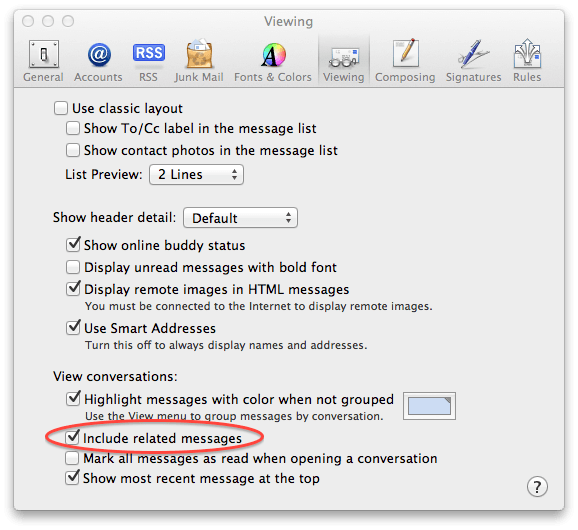
Launch Mail and access its preferences by pressing Command+Comma (CMD+,). Click on the Viewing tab. You will see a section labeled View Conversations. Locate Include Related Messages and check it.

12 responses to “Tweak Your Mail Preferences And See The Whole Conversation Thread In Lion [OS X Tips]”
I also recommend unchecking the last entry. Every forum does timelines this way, so I prefer it with my mail too.
… nice … i was just wondering how to do this ! thx
http://tinyurl.com/23963mg
tinyurl.com/2df4ccp
Yeah, this displays beautifully. It displays both sides of the conversation, sent and received.
But…
The problem is that the related messages, are second class citizens. They do not function like the usual messages in the list.
Try this:
Select the conversation and move it to another folder.
Not all the messages in the conversation move. All the messages *except* for the related messages move. The sent messages in the conversation remain in the Sent box. That means that there is no real way to move an entire conversation, both sent and received to another folder.
I know it might be hard to believe, they look like they move, but they do not. You’ll need to look very carefully after you do the move. To see this problem you will have to turn ON Use Classic Layout and turn OFF Include Related Messages.
You will see that the messages in the conversation have all moved *except* for the related messages which have remained where they were, in the sent folder
This pertains to delete too. There is no way to delete an entire conversation, both sent and received.
Stop your bottom-posting propaganda here. Nobody likes bottom-posting.
I have been SEARCHING for a way to do exactly what you just stated. It is great to be able to file incoming mail into folders but in OSX Mail, it is always difficult to file the sent mail as you have to go into the sent mail folder, find it, and file it. Entourage used to have an option to tell the program to file the mail after you send it, etc…
I thought that this conversation view would have fixed that, by allowing you to file the entire conversation, including the sent mail. But unfortunately it does not :-(

