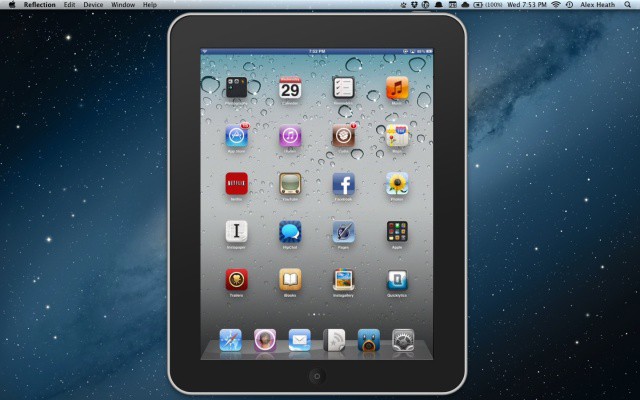
A new Mac app called Reflection allows you to wirelessly mirror your iPhone 4S or iPad 2 screen on your Mac. Using the magic of AirPlay and OS X Lion, Reflection will allow you to view your iOS device’s screen in real time on your Mac display, no setup required. Screen activity can be recorded and saved to your desktop. You can even kick back and play your favorite iOS game on your giant iMac! Now that’s awesome.
The developer of AirParrot (a similar tool that lets you mirror your Mac’s OS X screen to an Apple TV) has been working on Reflection for quite some time, and he’s continuing to work on updates for the 1.0 version that just launched to the public.
We haven’t gotten to really go hands-on with the app yet, but it looks like a sweet tool. iOS device mirroring can be great for lectures, business presentations, demonstrations, etc. It’s also an essential feature for iOS developers. Since you could theoretically play any iPhone or iPad game on your Mac, we’re sure that you guys will be coming up with all sorts of creative ways to use this nifty app.
Designer and Cult of Mac reader Jeff Broderick has a nice video preview of Reflection in action:
Visit the Reflection website to learn more. A single user license costs $15 and a pack of 5 licenses costs $40. A 10-minute free trial is also available. You’ll need to be running OS X Lion on your Mac and iOS 5 with AirPlay Mirroring on the iPhone 4S or iPad 2.
(via TUAW)
23 responses to “Reflection App Uses AirPlay To Mirror Your iPhone 4S And iPad 2 Screen On Your Mac”
bought this app tonight – very very cool – what I’ve hoping for for a while – now I can record my iPad / iPhone screen using @screenflow:twitter
I just downloaded this app on my MBA! Works great! This is exactly what I’ve needed for an upcoming webinar demonstrating a few of my many uses of the iPad in my work! Thanks for posting this… I may not have ever found this app!
Take advantage of the 10 minute free trial and you’ll be sold!
Bought the app but still no confirmation email or license file. Hoping this is resolved as I want to use this ASAP.
Hopefully Apple integrates this soon, so it isn’t so sluggish.
Display recorder does that for $4.99
Its pretty fluid too.
Works in both portrait and landscape
Just wait guys… Recording coming as a feature in an update. :)
Check your spam or send an email to [email protected]
I love DisplayRecorder but I don’t like having to connect an audio cable from my 4S to my Macbook Pro, running more software just to record audio, and then spending a lot of time trying to sync both video & audio.
http://img705.imageshack.us/im…
Now On Sales, iPhone 4s / iPads In Factory Box.
Albert-Techie (UK) Now On Sales Smartphones/Android Phones, we export internationally and Offer Promos to all interested International buyers; We make delivery right to your Doorstep at affordable Rates including Customs Duties Charges.
iPhone 4s:
16GB $480
32GB $575
64GB $675
iPads:
iPad 3G + wifi 64GB $485
iPad2 64GB with Wi-Fi + 3G $600
We offer a buy 3units and get Free Drop-Shipping.
FOR FURTHER DETAILS CONTACT:
Albert Morrison
International Department–Export Manager
E-mail: [email protected]
Tel: +44 703 592 3780
playing game without full screen?
Will i be able to read iBooks now on my Mac?????
Well I got it, it’s stable for about 15 seconds then freezes and crashes. Crashes when you set it tO go full screen in prefs when an active AP session is active. It knows when it has a connection but won’t envoke the window automatically, I had to tell it to go to full screen, then it showed up…and was very impressive…backed it out of full screen mode…the refreshes stopped, back to full screen mode and crash.
I am running mountain lion but according to the sys reqs I’m + what is required.
No help in the help file :(
Good thing I waste a lot of money on apps that say they do things and don’t deliver, because $15 for one that delivers what it said it would (albeit only for a few moments) isn’t really disappointing, and Im a patient guy.
I have 8 i Macs back at My Lab I could transfer my license to one of them to test it…would the developer mind do you suppose?
pretty nice. Lags on games on my work network, hopefully runs better at home
OSX has built in screen recording functionality already, no?
I did a video review of the app here as well. It’s on my must buy list – http://skeetertalkstech.com/20…
Not that I know of. I’m still a newbie to using OSX.
Nice!
http://i.imgur.com/Fyd6A.png
Open Quick Time
FIle–>New Screen Recording (or Command+Control+Escape to start/stop it in QuickTime).
You can do voiceover with a mic too in the drop down menu
Thanks all. Just an update as it was total user error on my part (too many hours in front of the machine and mis-typed my email address).
Now that I got that sorted out, this is simply awesome. I do some demo’s of mobile device management software and there was not a simple way to “mirror” my iOS device onto my Mac so the folks on the other end of the Webex could see what was happening with my device.
This solves that problem hands down. Great job!
Graphics look bad…
I think Air Server is a better alternative.

