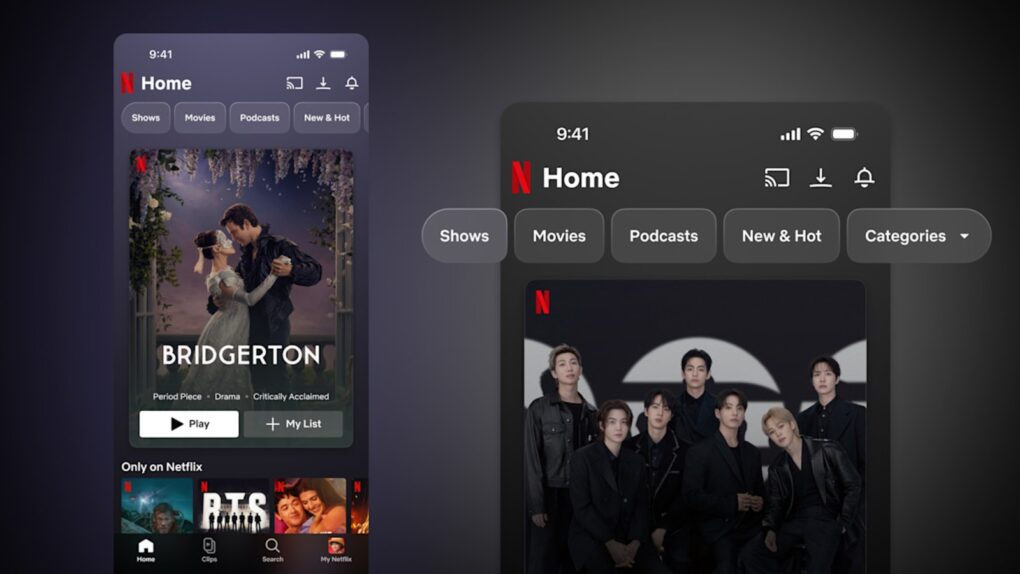
A redesigned Netflix iPhone app brings a cleaner interface, revamped navigation and an entirely new vertical video discovery feature called Clips, the streamer said Thursday.
We’ll see how Apple users receive the update. The recent revamp of Netflix’s app for Apple TV, which switched from a native tvOS player to a custom one that blocked Apple TV features, didn’t go over well.
Redesigned Netflix iPhone app brings new look and functionality
Following last year’s overhaul of its TV experience — and a confusing Netflix “mistake” over Apple TV integration — the streamer said it now applies that same emphasis on simplicity and ease of use to mobile. The updated phone app places frequently used content front and center. A navigation bar at the top of the app offers more options than before. The bottom tab bar has also been revamped, dropping the “New & Hot” tab in favor of dedicated tabs for Search and Clips.
The goal, according to Netflix, is an experience that feels native to the way people actually use their phones — whether that’s during a commute, on a lunch break or killing time before a flight.
“Our goal is to make our mobile experience as entertaining as what you watch, delivering increasingly personalized, immersive experiences for any mood or moment,” said Elizabeth Stone, Netflix’s chief product and technology officer. “This is just the beginning.”
Meet Clips: Netflix’s answer to vertical video
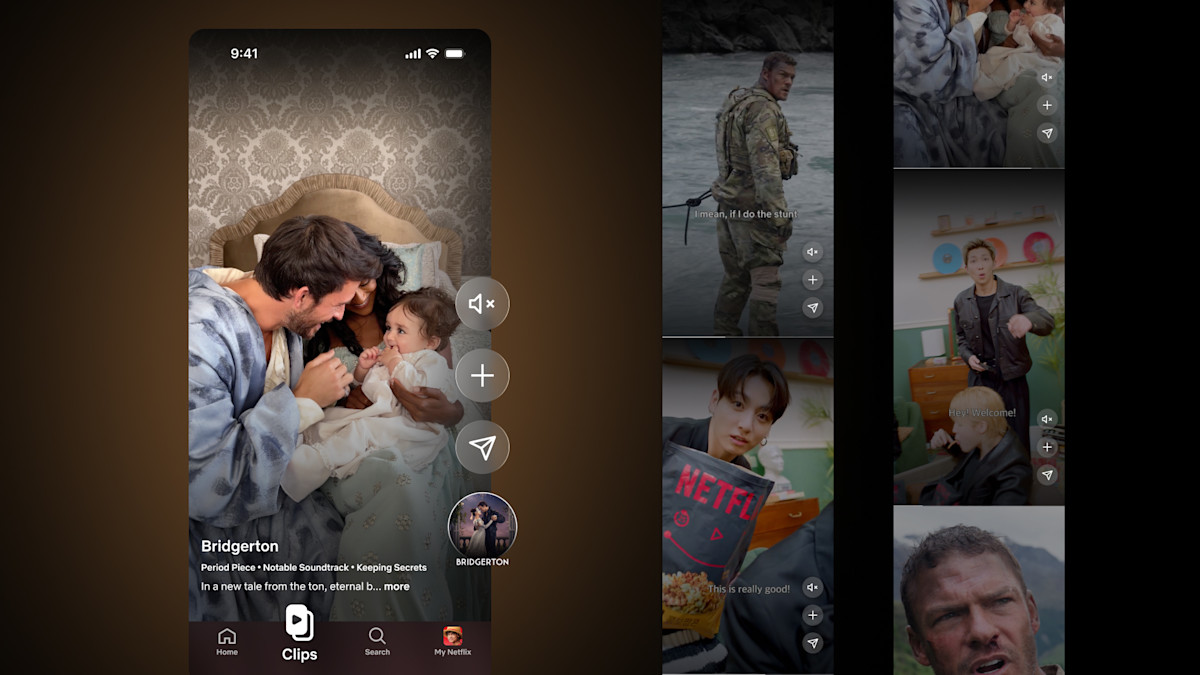
Photo: Netflix
The centerpiece of the redesign is Clips, a new vertical video feed that sits at the heart of the updated app. Netflix describes it as a personalized highlight reel designed to help users decide what to watch or play next, without endless scrolling. The feed surfaces short clips from series, films, and specials tailored to each user’s viewing habits, with an easy path to jump straight into something that catches their eye.
Clips is designed to be more than passive browsing. From within the feed, iPhone users can add titles directly to their My List, share clips with friends and followers via text or social media, and explore content organized around moods and occasions — whether that’s a family movie night or something for a quick laugh.
Netflix says future versions of Clips will expand to include podcasts, live programming, and collections organized around specific genres and interests, making it an increasingly central part of the mobile experience over time.
Redesigned Netflix iPhone app: Where and when to expect it
The redesigned app is rolling out today across a number of launch markets, including the US, the UK, Australia, Canada, India, Malaysia, Pakistan, the Philippines and South Africa. Netflix says it will expand the new experience to the rest of the world in the months ahead.
iPhone users in supported regions can check for the update in the App Store or simply open the Netflix app to see if the new design has arrived. For a streaming service with an enormous library and increasingly diverse content — spanning film, TV, games and now podcasts — a mobile experience that makes discovery faster and more intuitive is long overdue. Clips, in particular, feels like a direct acknowledgment that short-form vertical video has become the default way many people browse entertainment on their phones.

David Snow, an expert on Apple hardware and software, writes on a variety of technological and cultural topics for Cult of Mac. They include Apple news, technology buying guides, and features about computer setups and Apple TV shows and movies.
With 30 years of experience covering technology and other subjects, he has written and edited for numerous print and online publications, including CMP Media, TechTV.com, CNET, Wired News, Red Herring magazine, Law.com, The National Law Journal and Law Technology News magazine. Among other roles, he served as executive editor of the Law.com network of websites and editorial director, technology, for ALM Media.
Snow graduated with a B.A. from Syracuse University with majors in magazine journalism and psychology. While there, he worked as a reporter for The Daily Orange newspaper and associate editor of Equal Time magazine.
Founder of the blog At the Waterline, he can be reached on X (formerly Twitter) via @atthewaterline and on Mastodon via @dsnow.


One response to “Netflix overhauls iPhone app with vertical video feed, redesigned navigation”
I like the cleaner visual style. It seems less cluttered and easier to navigate than before.