

Mac OS X Lion borrows something else from iOS, but this time it is from iOS 5 an unreleased version of the operating system for the iPhone, iPod touch, and iPad. You can now easily tweet text that you’ve selected using the new Twitter integration feature in Mac OS X Lion.
Mac OS X Lion offers a new system-wide feature for all applications that support Mac OS X’s contextual menu add-ons.
All you have to do is click and drag select practically any text in applications like Safari, iChat, Mail, iCal, etc. and Mac OS X Lion grabs it and places it into a new tweet window in Twitter for Mac. It doesn’t work everywhere including the Safari address bar, text displayed in a Flash video, and some applications.
Select the text you want to tweet and the select Tweet from the contextual menu:
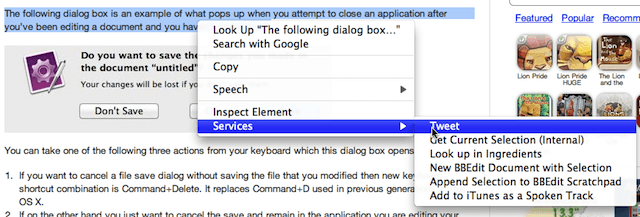
Twitters tweet dialog opens ready for you to edit your tweet, cancel it, or send it to Twitter.

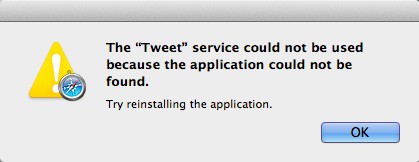
You’ll need a copy of Twitter for Mac Twitter’s official application which is a free download from the Mac App Store. If you don’t have it installed you may get this error message when you try to use the Tweet option on the contextual menu.
I’m not sure if I can get this tip to work with any Twitter application, but I’m looking into it.
Got a tip you’d like to share? I’d like to hear about it [email protected].


29 responses to “Quick and Easy Tweeting From Practically Anywhere In Lion [OS X Tips]”
It is a cool feature, but I wish they would just use whatever Twitter app (or at least have a setting for a default Twitter app) instead. I primarily use Yoru Fukurou as my Twitter app, but I know others use TweetDeck, Kiwi, and some just even use the web, so I think it would be a nicer touch to do that.
Or redirect to Twitter’s website if there’s no app.
I am not getting the “services” in my drop down menu?
Yeah, I tried to mention that when I said “Some just even use the web”, but I might not have made it that clear.
I’m not getting the services option either.
Impaired reading… I was still in bed at the time :P
does anyone know how to fix the bug in twitter. i install update and it keeps showing up everyday to update it. annoying as h. so far i just uninstalled twitter. let me know if anyone know how to fix that 2.1.1 version. running lion but had same problem in snow lep.
I’m pretty certain this isn’t an OS X feature. The ‘Tweet’ service is provided by the Twitter app, and will only show up if you have/had that app installed. You can see it defined in Twitter’s Info.plist.
tinyurl.com/2df4ccp
I païd $21.87 for an iPad 2 32-GB and my girlfriend loves her Panasonic Lumix GF 1 Camera that we got for $ 38.76 there arriving tomorrow by UPS. I will never pay such expensive retail prices in stores again. Especially when I also sold a 40 inch LED TV to my boss for $ 657 which only cost me $ 62.81 . Here is the site we use to get it al from, http://to.ly/aWOE
I paid $23.88 for an i Pad 2 32-GB and my girlfriend loves her Panasonic Lumiix GF 1 Camera that we got for $ 38.41 there arriving tomorrow by UPS. I will never pay such expensive retail prices in stores again. Especially when I also sold a 40 inch LED TV to my boss for $ 635 which only cost me $ 61.74 to buy. Here is the website we use to get it al from,
http://EgoWin.com
This was on snow leopard. But it is cool, nonetheless.
I had the Twitter app installed and decided to see what might happened if I deleted it and then emptied the Trash. I got the result you see above. I wasn’t able to get a hold of a machine that never had it installed, but I believe it prompts you to do so.
Anybody else notice that the home library folder is hidden by default in Lion? I don’t know why they felt the need to change all this stuff – it was fine like it was! Anyways, it’s pretty simple to revert it back so its visible again, directions are here http://osxliontips.com/?p=4
I’ve got the Twitter app installed and open and don’t get that services menu in the drop down. I’ve tried on my Macbook Pro and iMac with same result. Would be nice feature to have.
I don’t get the tweet option either using lion and have twitter app installed and open

