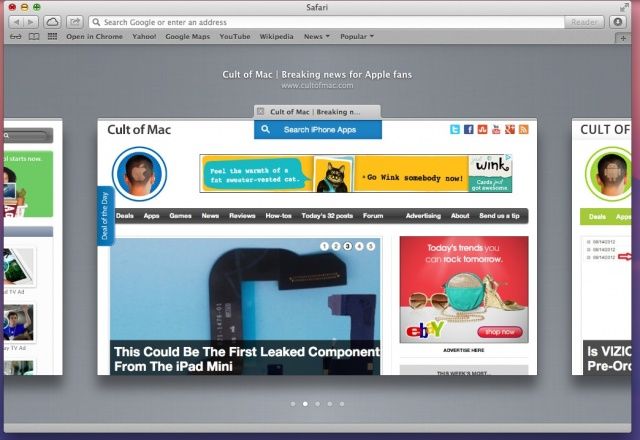
Now here’s a slick new way of interacting with tabs in Safari. When you open a bunch of tabs in Safari, it gets a little hard to figure out which tab is which, right? You can, of course, use Command-Shift-Arrow (right or left) to move between tabs, but that’s only reliable if the site you’re tabbing over to doesn’t auto-focus your cursor to a search field, like YouTube or Google does.
Luckily, it urns out that Apple has again made things a bit more iOS like in its flagship Mac operating system, OS X Mountain Lion. To check this tip out on your own, launch Safari on your Mac (be sure you’re running OS X 10.8 Mountain Lion) and open a few tabs.
Now, while in Safari, browsing one of your open tabbed windows, use a pinching in gesture on your trackpad, either on your Macbook or desktop Mac using the Magic Trackpad. See how all the tabs sort of squish in? You can now swipe left or right to move to the tabs on either side of the currently active one.
To select a tab you just navigated to, simply pinch out and Safari will zoom the tab in front out to fill the entire browser window. Repeat as needed, zooming in and out with joy. You can also just hit the return key on your keyboard, as well, but might as well stay with the pinching gestures, right?
This is a great way to see what’s in your tabs when using Safari, and I hope that Chrome comes out with a similar implementation soon, as well.
Via: Macworld Hints

Rob LeFebvre is an Anchorage, Alaska-based writer and editor who has contributed to various tech, gaming and iOS sites, including 148Apps, Creative Screenwriting, Shelf-Awareness, VentureBeat, and Paste Magazine. Feel free to find Rob on Twitter @roblef, and send him a cookie once in a while; he’ll really appreciate it.

