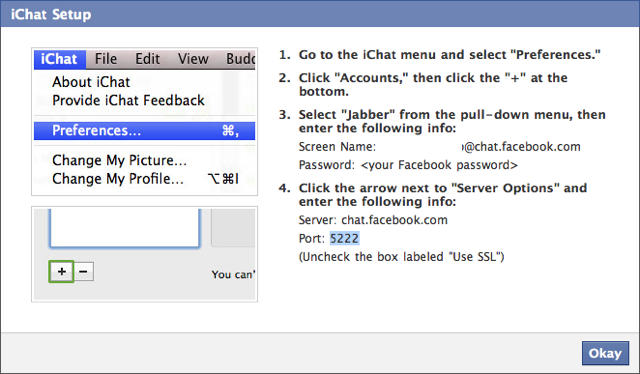
Facebook Chat is a wonderful little service opening you up to the incessant, sub-literate, real-time blatherings of the wide array of superficial acquaintances you’ve coalesced over the many years: the dim-witted teenage cousins, the sociopathic ex-boyfriends, the senile but sweet grannies, the LOLing old high school friends.
Or at least that’s what it is like for me, and if you’re anything like me, you’ve already turned Facebook Chat off. It wouldn’t surprise me, though, to find out you’ve got a more articulate gaggle of Facebook friends. So good news! Facebook has just posted instructions on how to access Facebook Chat through iChat, even when you’re not signed in to Facebook proper.
The set-up is pretty easy. All you do is go to the iChat’s “Preferences”, menu, click “Accounts” add a new account, select “Jabber” from the pull-down menu and then type in your screen name ([email protected]) and password. You then edit your “Server Options” to point to chat.facebook.com at port 5222, unticking SSL as you go. Click OK and you’re all set to harass and be harassed by Facebook friends through iChat at any time. You’ll be being brow-beaten for never responding to their chats in no time.
[via 9to5Mac]

John Brownlee is a writer for Fast Company, and a contributing writer here at CoM. He has also written for Wired, Playboy, Boing Boing, Popular Mechanics, VentureBeat, and Gizmodo. He lives in Boston with his wife and two parakeets. You can follow him here on Twitter.

