UPDATE: You can fix the hole by remapping the “Home” button. In the iPhone’s Settings/General/Home Button, assign double clicking the Home button to “Home” — not “Phone Favorites.”
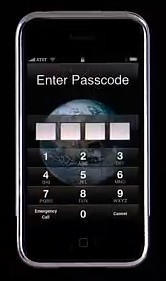
iPhone’s 2.0.2 firmware allows almost full access to your iPhone even when it’s under password protection, according to a report in MacRumors. Access can be gained through the “Emergency Call” keypad that appears on the passcode entry screen, allowing unrestricted use of Safari’s browser as well as access to Mail, SMS, Contacts, Maps and more.
Here’s how it works:
1. On the passcode screen hit “Emergency Call” button at bottom left.
2. In the Emergency Call screen, hit the “Home” button twice. You’ll be taken to the Favorites screen.
3. From there, hit the blue arrow next to a contact’s name.
4. You can now access all the iPhone’s functions by selecting their email address, homepage URL or address.
5. For example — hit the contact’s “Homepage” URL — and you are straight into Safari.
6. Hit the email address, and you enter Mail. Cancel the message, and you have full access to the iPhone’s email.
Via MacRumors

Lonnie Lazar is a writer-musician-web designer-attorney. He writes about Apple for Cult of Mac and Mac|Life, and about VoIP and telecommunications for Voxilla. Follow Lonnie on Twitter @LonnieLazar, join the Cult of Mac on Facebook, and find Lonnie’s photos on Flickr.

