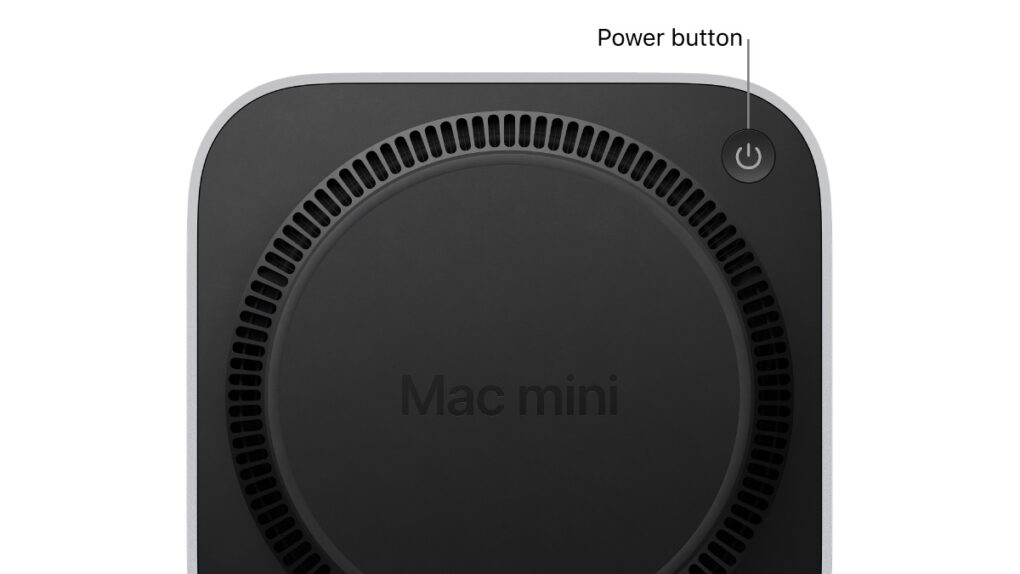
Apple finally found a software fix for one of the most mocked Mac design decisions in years. In macOS 26.5 Tahoe, released Monday, Apple added a new option that allows M4 Mac mini owners to turn on their machines without picking them up.
macOS 26.5 Tahoe fixes Mac mini’s power button problem
Ever since Apple redesigned the M4 Mac mini in 2024, users have criticized the awkward power button placement on the bottom of the tiny desktop computer. Some Mac mini owners even purchased aftermarket accessories that allowed them to turn on the machines without picking them up.
With the latest macOS update, the M4 Mac mini will automatically boot up when power is connected. That means users may never need to fumble around trying to reach the bottoms of their machines. The M4 iMac and the Mac Studio, launched in 2025, also get the new feature.
Apple, on its support page, says the feature “can be helpful when you don’t have easy access to the computer’s power button.”
How to enable the feature
To enable the feature on your compatible Mac, open System Settings and go to Energy. Find the option called Startup when power is connected and set it to Always.
This will cause your Mac mini to boot automatically when power is restored or reconnected.
Apple says that if your Mac was connected to power when you shut down, you should wait about 30 seconds between disconnecting and reconnecting power to turn it on. That gives the Mac’s power supply time to discharge.
The macOS 26.5 update also allows users to manage their Mac’s power state using third-party accessories, such as “switches.” But they are mostly for accessibility purposes. You can find the option to pair external switches under the new Power Control menu in the Energy section.
Apple probably did not expect the Mac mini’s power button placement to become a mockable meme, but the criticism clearly stuck. But with macOS 26.5, most users may never need to touch it again.

Anurag Chawake is a tech-focused writer specializing in smartphones, apps and consumer technology. His interest in computers began during the Windows 98 era, eventually leading him to explore everything from operating systems to mobile devices and PC hardware. Anurag previously contributed to The Indian Express, covering Apple, Android, gaming and the broader technology landscape.


6 responses to “Apple finally found a fix for the M4 Mac mini’s infamous power button”
This is the solution? To unplug it, and plug it back in. Instead of putting a power button where people can reach it.
Yeah, or fumble around with the switch on a power bar under your desk?
Rationale solution would be a combo power button / light on front of device. Apple still suffers from form over function.
This has been in Mac OS for years- you’re just finding out?
Great. Now I’m supposed to get on the floor on my hands & knees under my desk to pull and replug in my Mac Mini to turn it on. And this is supposed to be “easier” how????
If my Mac Mini is always plugged in, this software tweak makes no sense. How about simply having the Mac Mini power on pressing the space bar or with the fingerprint button on the keyboard?
Of course they ignored the obvious. If a miniMaC has power, simply use the power button on the Mac keybord to turn it on. Duh!
Oh I forgot. Under Tim Cook’s management the best and the brightest have alread left Apple, to work elsewhere where their talents are much more likley to be appreciated.