As a Mac user, I’ve always been a fan of Activity Monitor. It keeps track of RAM and hard disk memory, CPU and Disk usage, and Network activity. It’s a handy app to have, on my Mac.
But what about the iPhone? Doesn’t it deserve some sort of activity monitor of it’s own? Well, todays’ tip offers one such app, called Activity Monitor Touch.
This app, by HandyPadSoft, does all the things Activity Monitor does on the Mac, only on your iOS device. When launched, it shows a page of information about your iPhone, from its name to it’s UDID, the OS running on it, the available memory, uptime, and so on.
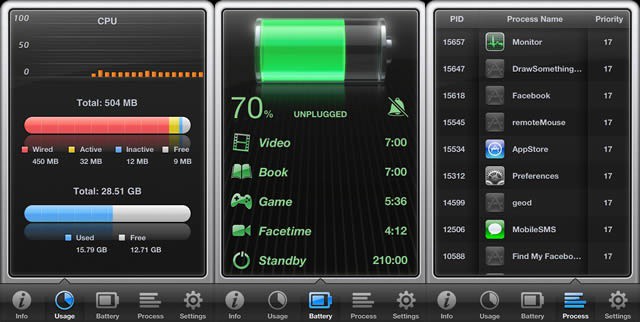
To see more information, tap along the bottom. The usage tab shows a real-time CPU usage bar along with the total available RAM and storage memory. A quick tap on the Battery tab shows, obviously, the amount of battery charge left, and splits it out into categories like Talk time, Wi-Fi and 3G time, and other activities you might be engaging in on your phone. The Process tab shows all the running processes on your iOS device, proving that yes, indeed, many apps DO run in the background. The final tab, Settings, has links to Help pages as well as a bunch of ways to contact the developer.
Again, this isn’t a review, but the app seems fairly useful to those who need this functionality, right? Enjoy!
Got a tip? Need help with an iOS problem? Shoot me an email, or drop a comment below.

Rob LeFebvre is an Anchorage, Alaska-based writer and editor who has contributed to various tech, gaming and iOS sites, including 148Apps, Creative Screenwriting, Shelf-Awareness, VentureBeat, and Paste Magazine. Feel free to find Rob on Twitter @roblef, and send him a cookie once in a while; he’ll really appreciate it.

