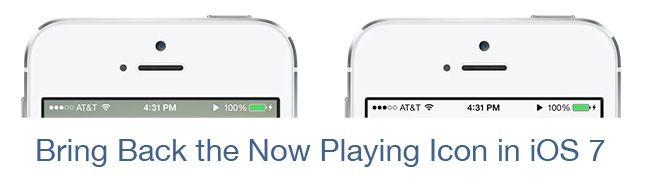
When Jony Ive ousted Scott Forstall as Design King of iOS, he made a lot of changes, most of them for the better. One of the tinier — and for the worse — changes, though, was removing the ‘Now Playing’ icon from the iOS 7 status bar. Now a new jailbreak tweaks brings it back.
In iOS 6 or below, if you were playing music on your iPhone, iPod or iPad, a small little ‘Now Playing’ triangle would appear in the menu bar, to remind you that you were playing music in the background. This was actually useful, as if you had your iPhone on mute, you might forget that you had songs playing, draining the battery.
Unfortunately, when iOS 7 came along, this feature didn’t make the cut. But NowPlayingStatusBar for iOS 7 brings the ‘Now Playing’ triangle back, so that when you are playing any media in the background, you’ll be able to see it next to the battery percentage indicator.
The tweak is free to download, and can be installed on any jailbroken iOS 7 device. You can find it on Cydia’s default BigBoss repo.
Via: ModMyi

John Brownlee is a writer for Fast Company, and a contributing writer here at CoM. He has also written for Wired, Playboy, Boing Boing, Popular Mechanics, VentureBeat, and Gizmodo. He lives in Boston with his wife and two parakeets. You can follow him here on Twitter.

