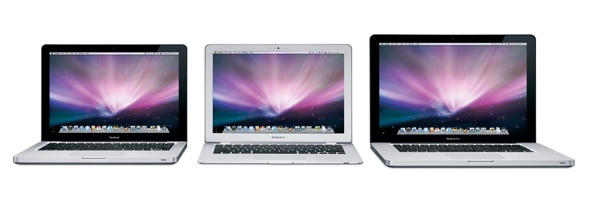
Apple promised that it would finally pull its attention off the cash cow iPhone and iPod product lines to spotlight notebooks at an event this morning, and they weren’t kidding. New MacBook, new Air, new Pro, and a new matching Cinema Display for good measure. The design team absolutely hit it out of the park on these machines, which are all glass, shiny black accents, and subtly tapered corners. Like the iMac whose design they refine and make significantly more appealing, these machines look like they were just made to sync with an iPhone or iPod touch (and, if anything, they make the continued use of white plastic docks for those devices look increasingly incongruous). This is Apple’s best design work, and it’s for a Mac — something we haven’t seen since the 12″ PowerBook G4 that I’m typing on was introduced. Read on for the Pros and the Cons…
Just as importantly, the new MacBook family’s external changes were matched by praiseworthy, significant upgrades under the hood that go far beyond just chucking in a new processor and a bigger hard drive. The biggest change is the use of a system-on-a-chip from NVIDIA that sports the GeForce 9400M graphics processor. Compared to the built-in Intel GMA x3100 of the previous MacBooks, this is a brawny graphics performer, capable of handling Apple’s most demanding pro apps, including Aperture and Final Cut Studio. This is the first credible graphics performer in an Apple consumer line in ages. Much lower on the list for immediate impact but incredibly symbolically important is the extension of an SSD option to all models, not just the Air — and the drive is user-accessible and really easy to change. You can buy today and toss in an SSD when it’s affordable.
Cons: Even when Apple nails it, there are inexplicable decisions to second-guess. Most notable among these is the introduction of Mini DisplayPort, an Apple-only version of an emerging video standard. I really don’t get this choice at all. It’s barely smaller than a full-size DisplayPort, but it’s just enough to be incompatible with all existing DisplayPort monitors. Worse, Apple doesn’t offer an adapter to hook it to full-size DisplayPort or the far-more ubiquitous HDMI for watching HD iTunes rentals on your TV without an extra audio cable. The new standard also requires an incredibly expensive adapter ($100!) to hook it up to any monitor requiring DVI Dual Link, such as Apple’s 30″ Cinema Display. Out of the box, you can connect these machines to Apple’s 24″ LED Cinema Display — AND THAT’S IT. In previous generations, Apple always at least made their computers ready to hook up to a standard video source, whether DVI or VGA. This time, they want $30 just to think about using a non-Apple monitor — or even using a slightly older Apple monitor. It will be inexcusable if Apple doesn’t bring out both a Mini DisplayPort-to-HDMI and Mini DisplayPort-to-DisplayPort in the next year. You see how outrageous this is? Apple has made me type “DisplayPort” three times in just eight words!
There are other puzzlements. The MacBook Air now looks practically retro, since it only got an under-the-hood upgrade instead of the black glass bezel. The MacBook no longer has FireWire of any kind, so wave goodbye to directly hooking up a camcorder for iMovie at the consumer level. The mandatorily glossy screen reduces choice dramatically and makes the line even more inappropriate for professional color graphic design work than the previous generation.
Verdict: Other than the bizarre choice of Mini DisplayPort and the likely controversial choice of glossy screens only, these machines absolutely hit it out of the park. I have held out for five and a half years with my PowerBook G4 12″, and I’m finally ready to take the plunge. Well-done, Apple, and get them in stores as soon as you can!

Pete Mortensen is a design strategist for consulting firm Jump Associates and the co-author of Wired to Care: How Companies Prosper When They Create Widespread Empathy, a book and blog that are significantly more interesting than you might initially think. Pete’s particular Apple avocations are both around design–interface and industrial. Follow him on Twitter!

