
Google is bringing Circle to Search, one of its best search features, from Android to iPhone. Like on Android, you can now circle on your iPhone’s screen to search for the on-screen content.
The feature is coming to Google Chrome and the Google app through Lens integration.
Google app and Chrome on iPhone gain Circle to Search
Google launched Circle to Search on Android in early 2024. You can activate it by long-pressing the navigation bar, then circle or tap the on-screen content to quickly find more information about it.
The same functionality is now coming to two of Google’s most popular iOS apps: Chrome and Google. Starting this week, an update will add a “Search Screen with Google Lens” option to the apps. Once selected, you can circle or tap on content within the Google app or Chrome to instantly access more information.
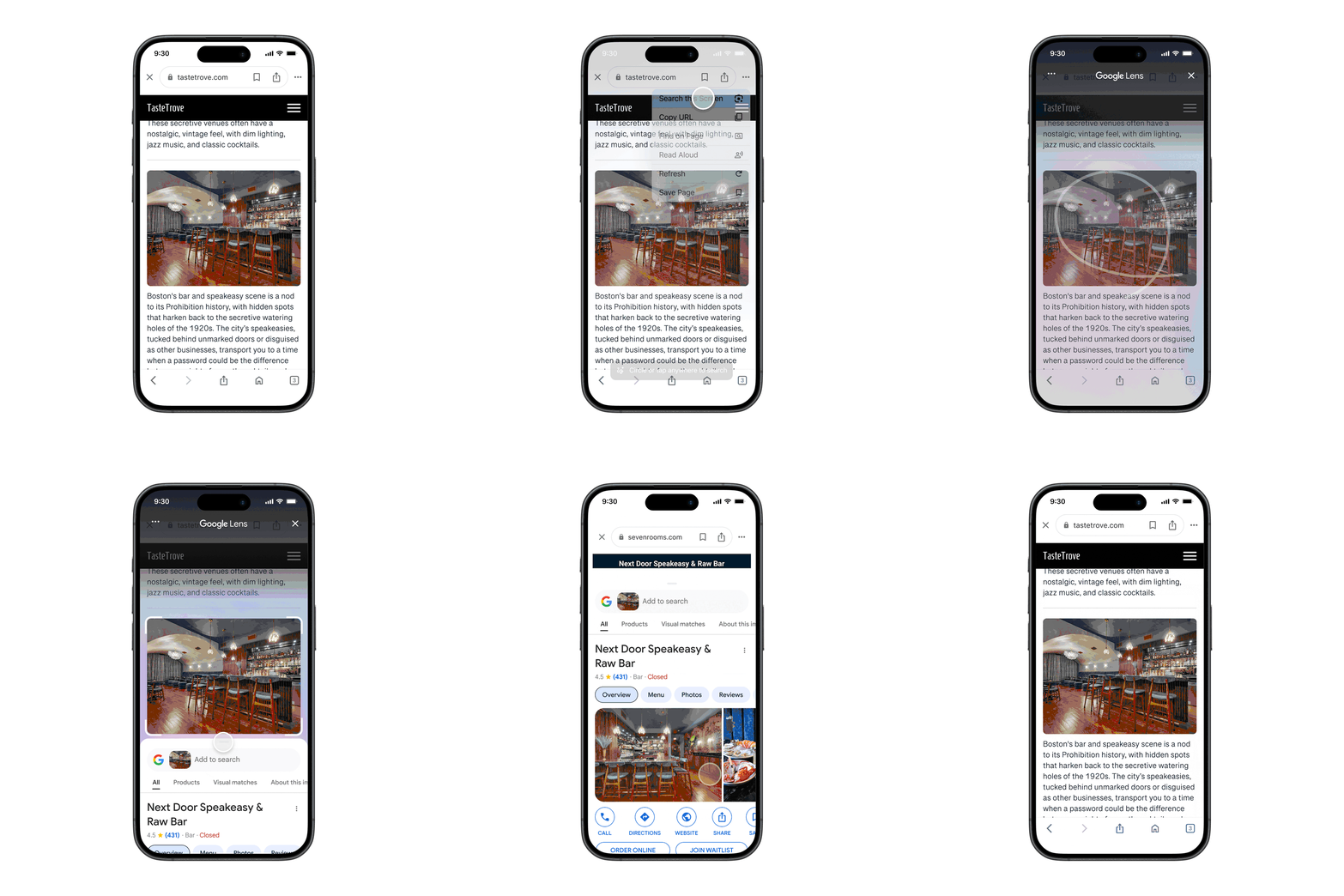
Photo: Google
For now, you can access the Search Screen with Google Lens option from the three-dot menu. Later this year, Google will add a direct Lens icon in the address bar in Chrome to speed up this process further.
Besides this, Google is pulling Gemini access from the Google Search iOS app. Going forward, you can only access Gemini from its standalone app on the iPhone.
AI Overviews comes to Google Lens
Google is also improving Lens by using its advanced AI models. The company says you will now see more AI Overviews in Lens search results. Plus, you can directly point your iPhone’s camera to get more information about the subject without adding a question to the search. This will primarily appear for information available in Google’s AI database. The change will make Lens behave similarly to iPhone 16’s Visual Intelligence feature.
Google is initially rolling out this feature in English, where AI Overviews are available. It will first be available in the Google app on Android and iOS and eventually come to Chrome on desktop.
Download: Google app | Google Chrome

Rajesh has been writing about consumer technology for over a decade, with a strong focus on iPhones, Macs and Apple’s ecosystem. He enjoys digging into Apple software updates, hardware changes, and discovering new Mac apps that make work faster and more enjoyable.
You can reach out to him at mail[at]rajeshpandey.me.

