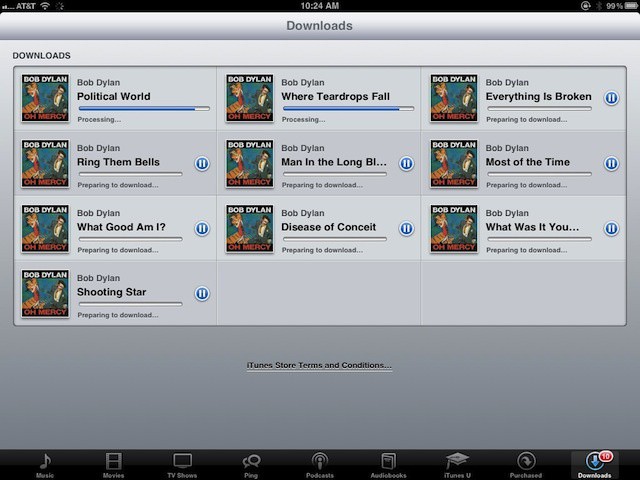
Don’t you hate it when you start to download a song file, or a podcast, or an app and it just sits there, mocking you? When the little progress bar just refuses to move, no matter how you scream at the front of your magical iOS device? Yeah, me, too.
One way to fix this problem with apps is to tap the icon to stop the download, and then tap it again to resume the download. If that doesn’t work (and it won’t with a media download), then you’re not out of luck. There is another way.
While this may seem fairly simple, it’s not that intuitive. We all hate to start from scratch and destroy any progress we’ve made, but that’s basically what we need to do in this case.
Launch iTunes and tap on the Downloads icon in the lower right. You’ll see your stuck download in the list. Swipe to the right on the name of the download and a little Delete button will appear. Tap Delete and the stuck song or video or podcast episode will go away.
Now, simply go to the Search tab of iTunes, type in the name of your podcast, song, or video file, and re-download it. Things should go swimmingly from here.
The stuck download issue happens sometimes when restoring your iPhone, iPad, or iPod touch, so be warned. This is really the best way to fix it.
Via: OS X Daily

Rob LeFebvre is an Anchorage, Alaska-based writer and editor who has contributed to various tech, gaming and iOS sites, including 148Apps, Creative Screenwriting, Shelf-Awareness, VentureBeat, and Paste Magazine. Feel free to find Rob on Twitter @roblef, and send him a cookie once in a while; he’ll really appreciate it.


8 responses to “Get Your Stuck Media Downloads Unstuck On iPhone, iPad, or iPod touch [iOS Tips]”
iTunes Match seems to slow everything that uses the wifi signal, even when you are not listening to your music from the cloud.
When I turned off iTunes Match in settings my wifi speed went up to 8G, before it was stalling and at a test speed of less than 1G.