
Initially after the release of Mac OS X Lion it looked like Apple had removed the tap-to-drag functionality in Mac OS X. Tap-to-drag activates when you tap your trackpad, release, tap again and then hold to drag items around on the screen.
Well Apple didn’t remove it, but they sure did find a good place to hide it and I’ll show you where in today’s tip.
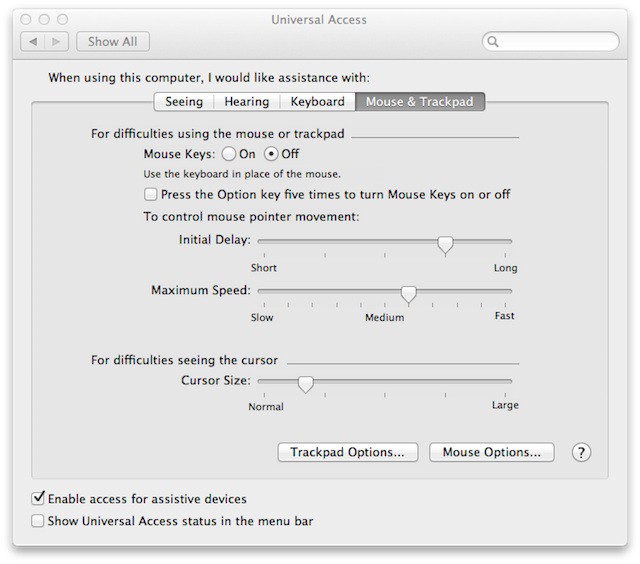
Apple decided to hide the settings you need to get tap-to-drag back inside of Universal Access in System Preferences. So if you miss tap-to-drag and want it back start by opening System Preferences and then open Universal Access.
Now find the Mouse & Trackpad tab and click it at the bottom you’ll see a button labeled Trackpad options which you should click.
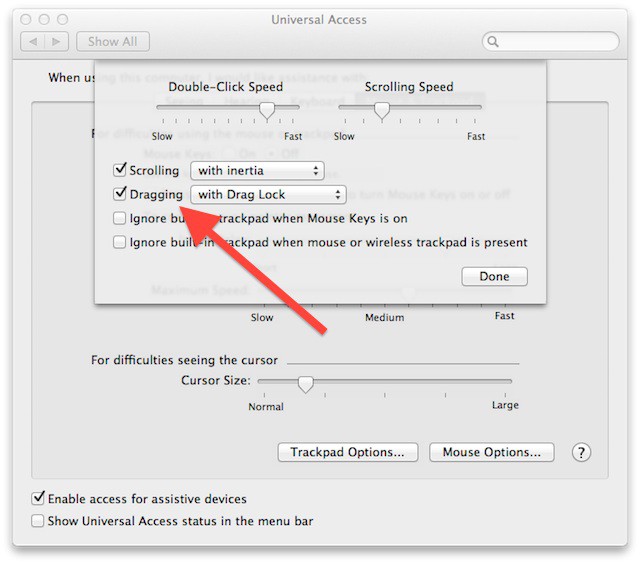
Locate the Dragging option, check it if it isn’t checked already and finally change the drop down next to it to with Drag Lock.
Once you are finished making these changes close System Preferences and enjoy tap-to-drag again on your Mac.

David W. Martin has more than 20 years of experience in the industry as a programmer, systems and business analyst, author, and consultant. David has written for CNET’s iPhoneatlas.com, MacLife.com, CultofMac.com, BYTE.com and recently for aNewDoman.net. He comes to Cult of Mac’s website with deep knowledge and passion for the all things Apple. Follow David on Twitter @david_w_martin or see what he’s up to now at davidwmartin.com.

