I love interactive Notification Center widgets. Widgets that let me use Notification Center like a quick entry form for my best used apps. Stuff like PCalc’s calculator widget that gives functionality to users that Apple seems conflicted about.
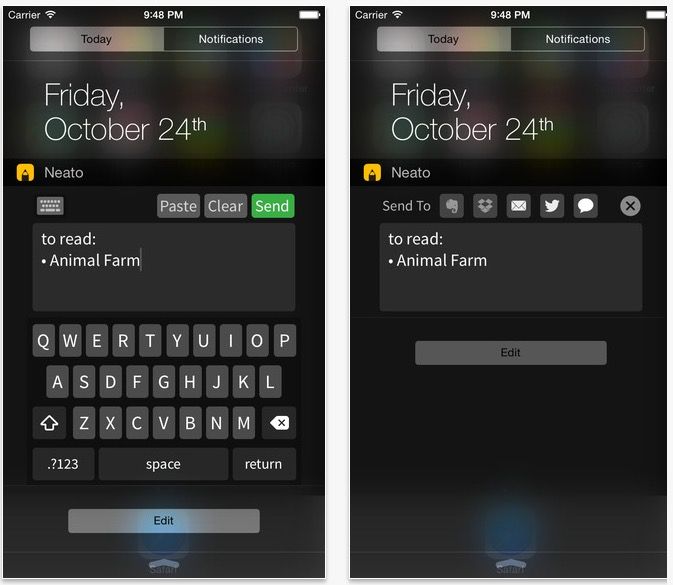
That’s why I love Neato. It’s a quick jot notepad for Notification Center that lets you speedily enter notes no matter where you are in iOS 8.
After installing the app, all you need to do is add the Notification Center extension to get up and running. Neato allows users to type quick notes just by swiping down on Notification Center, or accessing Notification Center from the lock screen. That means it effectively works as a note app no matter where you are in iOS 8.
One strange thing about Neato is it doesn’t rely upon iOS 8’s system keyboard, but rather comes with its own keyboard that sort of hovers in Notification Center, which can be disorienting. Even so, Apple doesn’t allow apps to call up the system keyboard within Notification Center, so this is as good as the interface is going to get if you want to be able to enter notes anywhere in the operating system.
Neato syncs with popular notes services like Evernote or Dropbox, so your notes aren’t stranded in limbo. You can also use it to send tweets, emails, or even text messages.
That’s pretty great funtionality for the price of free, though personally, I’d love to see a Notification Center widget like this come to Drafts 4, my favorite notes app for iOS 8.
Source: iTunes

John Brownlee is a writer for Fast Company, and a contributing writer here at CoM. He has also written for Wired, Playboy, Boing Boing, Popular Mechanics, VentureBeat, and Gizmodo. He lives in Boston with his wife and two parakeets. You can follow him here on Twitter.


15 responses to “This free iOS 8 widget lets you use Notification Center as a notepad”
that is strange… in iOS8 widgets guidelines doesnt allow keyboard inputs…
This is a little clever loophole. The guidelines says it can’t invoke the system keyboard (1st or 3rd party) however a mini keyboard is a part of the widget itself… creative to say the least. It’s an interesting work around since with widgets you are allowed to tap buttons for inputs just not INVOKE the keyboard… so essentially if calculator widgets are allowed then this should be to it’s the exact same thing (and coding on the front end) except the pad has letters instead of numbers…
Exactly.
The keyboard is incredibly unresponsive unfortunately. The main reason I would use this is to input quick info especially if I was on a phone call, and missing letters and numbers of something I’d consider important proves unusable to me.
can you tell me where it saves the notes
To Evernote or Dropbox.
Also you can mail, text or tweet it.
In the next update you can do even more.
No real support for iPad. The app if really cool but not universal. Can install it on iPad, but the code is written for iPhone only. Also, you must run Neato in Portrait mode.. :(
We are sorry for that. Our team is small. But we promise to prepare iPad version ASAP.
Thank you for using Neato :)
Awesome app, love it to death :)
Is there going to be a way to select which services are visible for sharing? Because I don’t really use evernote or dropbox, and when sending notes those 2 buttons just take up space for me
We think so. In the next update you have more control over widget and you can customize it easily.
I’ve been hoping to find a widget that allows direct posting to Twitter without opening an app to post. Is this something that could come to Neato?
Yes. But not very soon.
So how do I use Neato with 6 languages keyboards on my iPhone 6 ?
It’s not free in India store