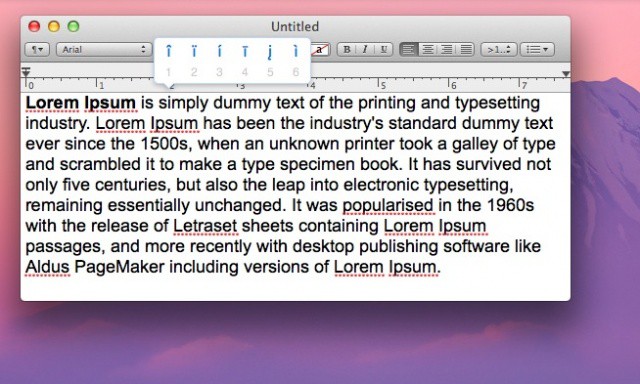
Every so often, you might want to type an accented character on your Mac. There are many keyboard shortcuts, most involving the Option key, to achieve this. For example, to type an “enye,” the letter in the Spanish alphabet, you need to press Option-n, then release and type n again. In Mac OS Lion, however, there’s an even easier way to find these diacritical characters.
It’s really very simple to make this happen. Press and hold on the letter key you want to add an accent or special symbol to, and Lion will cause a little bubble to pop up with all the special ways that letter can be displayed. Pressing and holding n, for example, brings up the “enye” character as well as the n with an accent above it. This looks just like the little pop up in iOS, showing yet another convergence feature in the Apple operating systems.
This does, however, mean that repeating a letter by holding a key down is now disabled by default. If you want the key repeat feature more than the special character feature, hop into the Terminal app. Open the Applications folder, then the Utilities folder there. Launch Terminal, and then paste or type the following code into the resulting window:
defaults write -g ApplePressAndHoldEnabled -bool NO
You’ll then need to restart any applications you were using to get the effects to show up. If you want to go back to the default special character feature, simply replace the word NO above with the word YES.
[Via Mac OS X Tips]
Got an OS X tip? Need help troubleshooting OS X? Drop me a line or leave a comment below.

Rob LeFebvre is an Anchorage, Alaska-based writer and editor who has contributed to various tech, gaming and iOS sites, including 148Apps, Creative Screenwriting, Shelf-Awareness, VentureBeat, and Paste Magazine. Feel free to find Rob on Twitter @roblef, and send him a cookie once in a while; he’ll really appreciate it.

