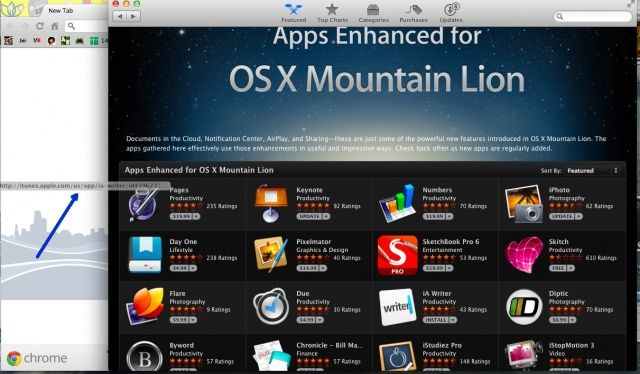
Let’s face it: the Mac App Store, and the iTunes App Store that it’s modeled on, just isn’t made for comparing apps. Let’s say you want to find the best note taking app for your Mac. You can launch the Mac App Store, search for note taking apps, and see one at a time. If you want to look at more than one, you end up clicking the back button endlessly.
Sometimes it’s just better to be able to flip through a bunch of apps at once. If only the App Stores had tabbed browsing. Luckily, you can browse more than one app at once with a bit of a workaround and your web browser.
Launch the Mac App Store and do a search for the type of app you’re interested in, or click through to one of Apple’s curated list, like the one in the screenshot above, for Mountain Lion optimized apps.
Now, simply move the App Store window to the side, making sure your web browser is visible in the background, and click, drag, and drop an app icon into the web browser window. Bring the web browser to the front with a click, and then hit Command-T to create another tab. Bring the App Store window to the front with another click, and repeat the process with the next app. Repeat as many times as you need, opening a new tab for each app you want to look at. Now you can flip back and forth without having to work around the App Store’s poor interface.
Source: Finer Things In Tech
Via: Macworld Hints

Rob LeFebvre is an Anchorage, Alaska-based writer and editor who has contributed to various tech, gaming and iOS sites, including 148Apps, Creative Screenwriting, Shelf-Awareness, VentureBeat, and Paste Magazine. Feel free to find Rob on Twitter @roblef, and send him a cookie once in a while; he’ll really appreciate it.

